




public

Rpg Maker Developers Group

Simple enough for a child, powerful enough for a developer

2 Followers

Yanfly Party System - Window_PartyList

BMM Archive · July 15, 2026

Preserved forum archive. This topic stores the original first post and locally mirrored RPG Maker Web attachments when available. It is posted by the BMMPlay archive account, not by the original creator.

Original Source

  • Original title: Yanfly Party System - Window_PartyList
  • Original author: Roninator2
  • Original date: May 20, 2020
  • Source thread: https://forums.rpgmakerweb.com/threads/yanfly-party-system-window_partylist.121831/
  • Source forum path: Game Development Engines > Ruby Game System (RGSS) Scripts > RGSSx Script Support

Summary

Good day everyone, Looking for advice on a specific graphical issue. Yanfly Party system In the Subject script, The Window_PartyList shows all members in the party and has them stacked on top of each other. What it does it show the actor sprite image in the window, But it cuts off the bottom of the image.

Archived First Post

Good day everyone,

Looking for advice on a specific graphical issue. Yanfly Party system
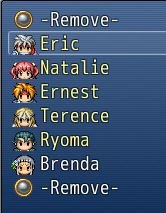
In the Subject script, The Window_PartyList shows all members in the party and has them stacked on top of each other.
What it does it show the actor sprite image in the window, But it cuts off the bottom of the image.
Protected download
In trying to adjust this I have not been able to find a way to get the select cursor to align with the positions.
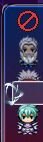
Protected downloadLast actor selected. The cursor is above the image for that actor.

I added in a simple position adjust for rect.y = rect.y + (10 * index)
This has the images lined up good. but the cursor is not aligning properly to the graphic position, but instead to the line position.

I've tried line_height adjustment
Fitting_height adjustment
Standard_padding adjustment

But I haven't been able to make the selection cursor move properly or just to be larger for that window.

What can be done for this?

Thanks

Features Mentioned

  • "lightbox_close": "Close",
  • "lightbox_next": "Next",
  • "lightbox_previous": "Previous",
  • "lightbox_error": "The requested content cannot be loaded. Please try again later.",
  • "lightbox_start_slideshow": "Start slideshow",
  • "lightbox_stop_slideshow": "Stop slideshow",
  • "lightbox_full_screen": "Full screen",
  • "lightbox_thumbnails": "Thumbnails",
  • "lightbox_download": "Download",
  • "lightbox_share": "Share",
  • "lightbox_zoom": "Zoom",
  • "lightbox_new_window": "New window",
  • "lightbox_toggle_sidebar": "Toggle sidebar"
  • In trying to adjust this I have not been able to find a way to get the select cursor to align with the positions.
  • Last actor selected. The cursor is above the image for that actor.
  • I added in a simple position adjust for rect.y = rect.y + (10 * index)
  • This has the images lined up good. but the cursor is not aligning properly to the graphic position, but instead to the line position.
  • I've tried line_height adjustment

Downloads / Referenced Files

Log in to download

Log in, then follow the RPG Maker Developers Group to see these download links.

Log in to download
Referenced Images / Attachments

line 1.JPG
line 1.JPG
line 3.JPG
line 3.JPG
Creator Claims / Removal

If you are the original creator and want this listing reassigned, edited, or removed, join BMMPlay and contact the moderators with proof that matches the original RPG Maker Web profile, linked GitHub, itch.io page, or another public creator identity.

#039#rpg-maker-archive#rgss-support

Replies (0)

No replies yet.

0 replies 1 view

Log in to reply.

User Avatar

