Looking for some help with a compatibility issues between
Hime's Scene Interpreter and
Mr. Trivel Crafting Simple.
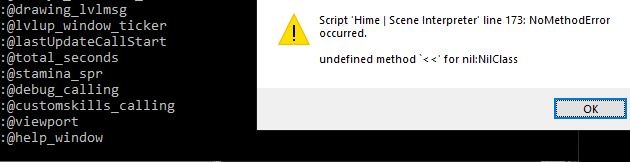
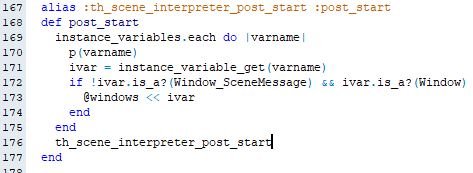
I get this error
Protected download
Protected download
The crafting script work perfectly without the scene interpreter script.
My other portions of my game work fine with scene interpreter script.
I tested this in a blank project. They are not compatible for some reason.
This is beyond my coding knowledge currently.
If I was to add in a condition to ignore the craft_help window then it stops on the next window created in the crafting script.
create_help_window
create_main_command_window
create_discipline_info_window
create_item_list_window
create_requirements_window
create_disciplines_command_window
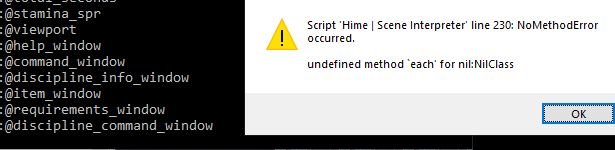
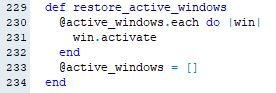
If I add conditions for all of them, then the crafting window starts to load, but then I get an error on line 230 for scene interpreter.
Protected downloadProtected download
Any help appreciated.
*Edit *Update
I seemed to have gotten it to work.
Not sure what problems this will cause in the future, but...
Ruby:
  def post_start
    instance_variables.each do |varname|
      ivar = instance_variable_get(varname)
      if !ivar.is_a?(Window_SceneMessage) && ivar.is_a?(Window) && !SceneManager.scene_is?(MrTS_Scene_Crafting)
        @windows << ivar
      end
    end
    th_scene_interpreter_post_start
  end
Ruby:
  def store_active_windows
#~     restore_active_windows
#~     @windows.each do |win|
#~       if win.active
#~         @active_windows.push(win)
#~         win.deactivate
#~       end
#~     end
  end

  def restore_active_windows
#~     @active_windows.each do |win|
#~       win.activate
#~     end
#~     @active_windows = []
  end




 Playstation DualSense Charging Station
Dock-style charging station for keeping two DualSense controllers ready between sessions.
View on Amazon
Playstation DualSense Charging Station
Dock-style charging station for keeping two DualSense controllers ready between sessions.
View on Amazon

