


[VXAce] The "Continue" button is not showing up when there's no saves.
BMM_Archive · July 15, 2026

Original Source
- Original title: [VXAce] The "Continue" button is not showing up when there's no saves.
- Original author: CarlosDavilla
- Original date: April 27, 2020
- Source thread: https://forums.rpgmakerweb.com/threads/vxace-the-continue-button-is-not-showing-up-when-theres-no-saves.120730/
- Source forum path: Game Development Engines > Ruby Game System (RGSS) Scripts > RGSSx Script Support
Summary
Hello there. So, I got sort of a problem with the title screen commands again. There are 6 commands on my game. The "Begin" (which is New Game), the "Your Notes" (which is the Continue), the "GameJolt" (which makes you log in to GameJolt), "Settings" (where you can tweak the sound, window color, and other stuff) and "Extras" (where you can access extra content on the game). The "GameJolt" and "Extras" commands were added with the Shadowmaster's Extra Start Options and the "Settings" one, with Sixth's Global Setting Addon for...
Archived First Post
So, I got sort of a problem with the title screen commands again.
There are 6 commands on my game. The "Begin" (which is New Game), the "Your Notes" (which is the Continue), the "GameJolt" (which makes you log in to GameJolt), "Settings" (where you can tweak the sound, window color, and other stuff) and "Extras" (where you can access extra content on the game).
The "GameJolt" and "Extras" commands were added with the Shadowmaster's Extra Start Options and the "Settings" one, with Sixth's Global Setting Addon for Yanfly's System Options.
For some reason, the Continue command disappears when there are no saves made. This messes up with all the other commands present on the title screen since the Shutdown goes to the second line in the command instead of staying on the sixth line.
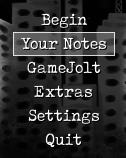
When there's a save, the menu looks like this
Protected download
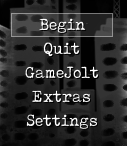
And when there isn't, it looks like this
Protected download
Those are the modifications I made on the Extra Start Options script
And these on the Global Setting Addon script (if I put it on 5 it crashes the game, but for some reason, there can be two "4"s)
I know that the Continue command doesn't disappear like this when there's no save ready. It should be unavailable, showing in gray font.
So, is there a reason that the command disappears like this? I just want it to show normally and make a buzzer sound like it's supposed to do.
If it can't be done, how can I make the Shutdown option stay on the sixth line, instead of it jumping to the second one?
Thanks in advance. This is bugging me for a while now, and I wished I could fix this.
Edit: I'm sorry, looks like I posted this in the wrong place. Could the mods move the thread for me, please?
Downloads / Referenced Files
Log in, then follow the RPG Maker Developers Group to see these download links.
Log in to downloadReferenced Images / Attachments
Creator Claims / Removal
If you are the original creator and want this listing reassigned, edited, or removed, join BMMPlay and contact the moderators with proof that matches the original RPG Maker Web profile, linked GitHub, itch.io page, or another public creator identity.
Replies (0)
No replies yet.
Topic Summary
Loading summary...

