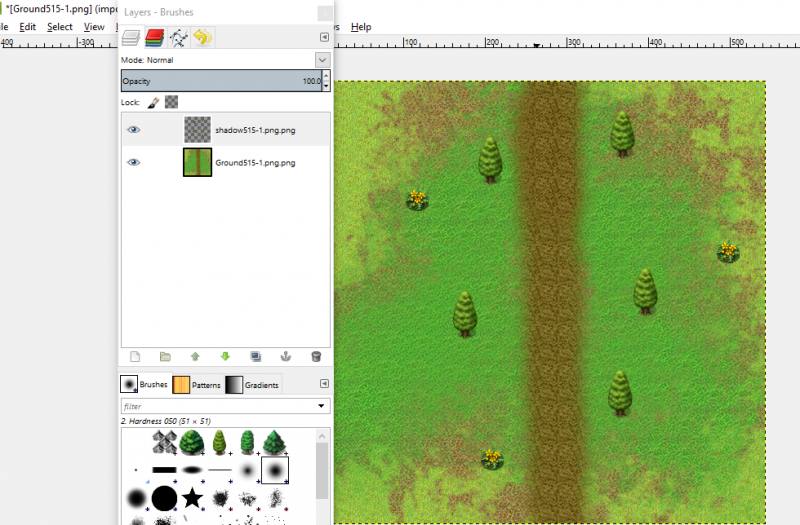
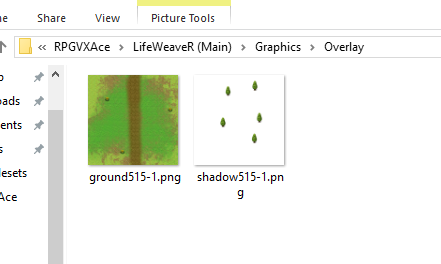
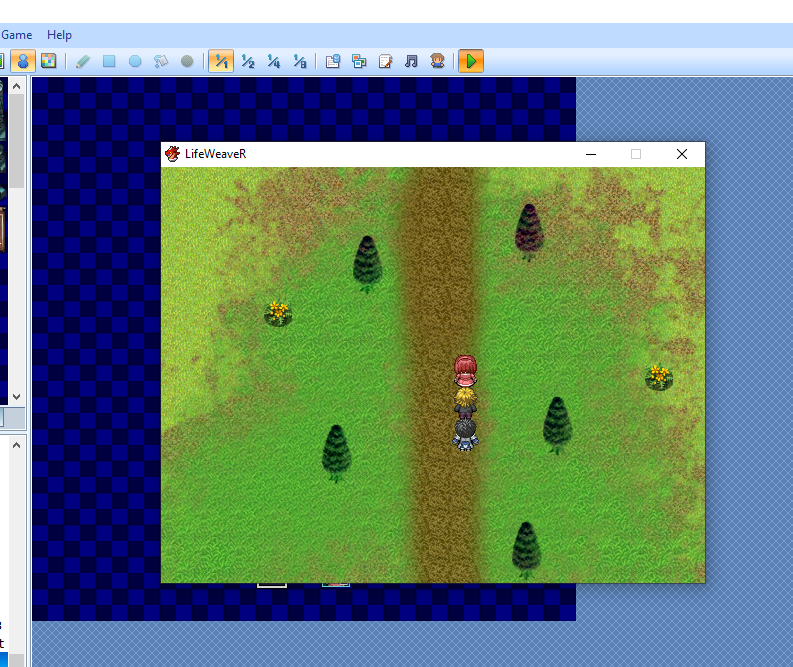
For reference, I was following the parallax mapping tutorial located here: https://forums.rpgmakerweb.com/index.php?threads/cvincents-parallax-mapping-guide.43583/ The guide was followed as closely as possible, and both scripts were installed. Everything else in the map worked perfectly (passibility, events, ground layers, etc...) but the overlay (trees in this example, as this was a test map) is giving me issues. For a second I thought somehow the blending had gone AWOL on me but after rechecking the layers, I still can't figure it out. { "lightbox_close": "Close",
For reference, I was following the parallax mapping tutorial located here:
https://forums.rpgmakerweb.com/index.php?threads/cvincents-parallax-mapping-guide.43583/
The guide was followed as closely as possible, and both scripts were installed. Everything else in the map worked perfectly (passibility, events, ground layers, etc...) but the overlay (trees in this example, as this was a test map) is giving me issues. For a second I thought somehow the blending had gone AWOL on me but after rechecking the layers, I still can't figure it out.
Protected download
Protected download
Protected download
Any ideas?






 ZSCMALLS 18.5-Inch Portable Monitor
Portable 1080p screen for laptop expansion, travel desks, and compact workstations.
View on Amazon
ZSCMALLS 18.5-Inch Portable Monitor
Portable 1080p screen for laptop expansion, travel desks, and compact workstations.
View on Amazon