





Original Source
- Original title: Change size of skill window in battle
- Original author: RoseofElandil
- Original date: April 12, 2019
- Source thread: https://forums.rpgmakerweb.com/threads/change-size-of-skill-window-in-battle.107871/
- Source forum path: Game Development Engines > Ruby Game System (RGSS) Scripts > RGSSx Script Support
Summary
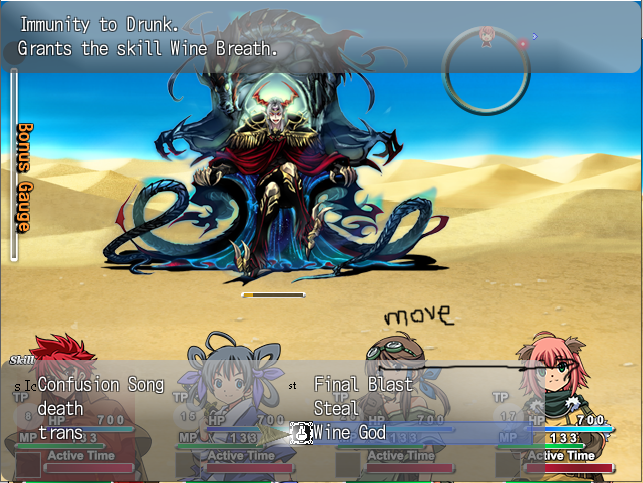
Hi guys, hopefully this is not in the wrong forum... I've enlarged the window for my VX Ace game, but unfortunately the skill window have not resized with the enlargement. I was wondering if there's a code I have to edit to make it resize so that the 2 columns of all skill lists in battle are spaced symmetrically? Right now it looks like this and I just want to make the columns space out evenly (image is attached) {
Archived First Post
I've enlarged the window for my VX Ace game, but unfortunately the skill window have not resized with the enlargement. I was wondering if there's a code I have to edit to make it resize so that the 2 columns of all skill lists in battle are spaced symmetrically?
Right now it looks like this and I just want to make the columns space out evenly (image is attached)
Protected download
The demo containing the code can be found on Moghunter's website, or I can post it if someone can't find it, as it's too big to put in one post with the image. Great if someone could point me in the right direction as to where the resizing code can be found. Thanks a lot!
Downloads / Referenced Files
Log in, then follow the RPG Maker Developers Group to see these download links.
Log in to downloadReferenced Images / Attachments
Creator Claims / Removal
If you are the original creator and want this listing reassigned, edited, or removed, join BMMPlay and contact the moderators with proof that matches the original RPG Maker Web profile, linked GitHub, itch.io page, or another public creator identity.
Replies (0)
No replies yet.
Topic Summary
Loading summary...
