public

Rpg Maker Developers Group

Simple enough for a child, powerful enough for a developer

2 Followers

[Ace] Status menu problem

BMM Archive · July 15, 2026

Preserved forum archive. This topic stores the original first post and locally mirrored RPG Maker Web attachments when available. It is posted by the BMMPlay archive account, not by the original creator.

Original Source

  • Original title: [Ace] Status menu problem
  • Original author: AoSapphire
  • Original date: November 6, 2018
  • Source thread: https://forums.rpgmakerweb.com/threads/ace-status-menu-problem.101847/
  • Source forum path: Game Development Engines > Ruby Game System (RGSS) Scripts > RGSSx Script Support

Summary

Okay! I'm going to ask help again! I was able to fix some errors earlier that appeared as I test the game but there are still some things that are not right about it... I've been going at it for hours now and I'm really tired since it's already night here... Anyways, I created a new project to see what was the scripts that is making this all trouble and whatnot and found out that it was Yea's Ace status menu...

Archived First Post

Okay! I'm going to ask help again!

I was able to fix some errors earlier that appeared as I test the game but there are still some things that are not right about it...
I've been going at it for hours now and I'm really tired since it's already night here...

Anyways, I created a new project to see what was the scripts that is making this all trouble and whatnot and found out that it was Yea's Ace status menu...
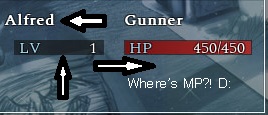
bandicam-2018-11-06-23-30-41-797.jpg

The MP suddenly disappeared after I put the script in the script editor
Though, I'm not sure about the other two... The character's name isn't on the line with "LV" I actually edited the position of the level as it was too close to the face of the character...
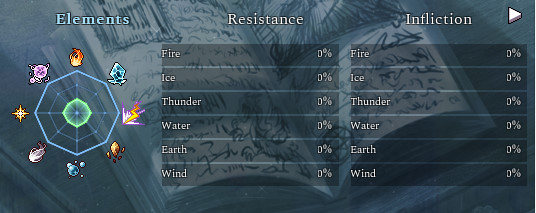
Not only that. This gauge suddenly appeared even though there wasn't supposed to be a gauge there.
bandicam-2018-11-06-23-31-07-715.jpg
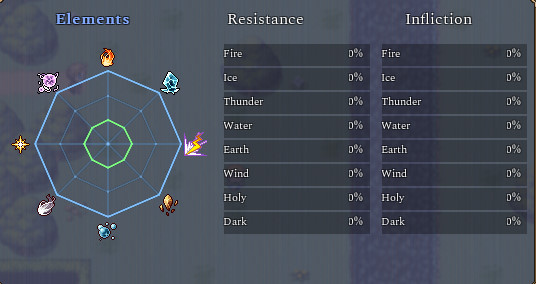
bandicam-2018-11-06-23-31-33-635.jpg

The names are not in the line!!!
Hmmm... But thinking about it, I had Ace status menu for quite a long while and this kind of problem didn't happened before so I'm guessing it had to do with galv's theme menu script too...

I'm not really sure anymore as I has gone to a lot of scripts just so I can try to fix this problem...
Here are the scripts I've gone through, looking, searching and trying to fix so it will make my game work.
Yea:
Ace core engine: https://github.com/Archeia/YEARepo/blob/master/Core/Ace_Core_Engine.rb
Adjust limit: https://github.com/Archeia/YEARepo/blob/master/Core/Adjust_Limits.rb
Ace menu engine: https://github.com/Archeia/YEARepo/blob/master/Menu/Ace_Menu_Engine.rb
Ace status menu: https://github.com/Archeia/YEARepo/blob/master/Menu/Ace_Status_Menu.rb

Blackmorning:
Yea status menu addon:
Basic module:

KGC:
Bitmap extension:

Galv:
Menu theme engine: https://galvs-scripts.com/galvs-menu-themes-engine/

It must be from one of these scripts... Maybe I'm really tired now but I can't seem to find it.. Granted I was able to fix hp, its text and its gauge, as well as "LV" and the menu screen. But this guys seems to like to make me suffer

I've been going at it for hours now and it got me really tired.
I'll just leave a thread here. I hope someone can help me

Thank you in advance and good night, everyone!

Downloads / Referenced Files

Log in to download

Log in, then follow the RPG Maker Developers Group to see these download links.

Log in to download

Referenced Images / Attachments

bandicam-2018-11-06-23-30-41-797.jpg
bandicam-2018-11-06-23-31-07-715.jpg
bandicam-2018-11-06-23-31-33-635.jpg
Creator Claims / Removal

If you are the original creator and want this listing reassigned, edited, or removed, join BMMPlay and contact the moderators with proof that matches the original RPG Maker Web profile, linked GitHub, itch.io page, or another public creator identity.

#039#rpg-maker-archive#rgss-support

Replies (0)

No replies yet.

0 replies 1 view

Log in to reply.

User Avatar