


Custom background for Scene_Shop
BMM_Archive · July 15, 2026

Original Source
- Original title: Custom background for Scene_Shop
- Original author: Mawichan
- Original date: September 12, 2018
- Source thread: https://forums.rpgmakerweb.com/threads/custom-background-for-scene_shop.100015/
- Source forum path: Game Development Engines > Ruby Game System (RGSS) Scripts > RGSSx Script Support
Summary
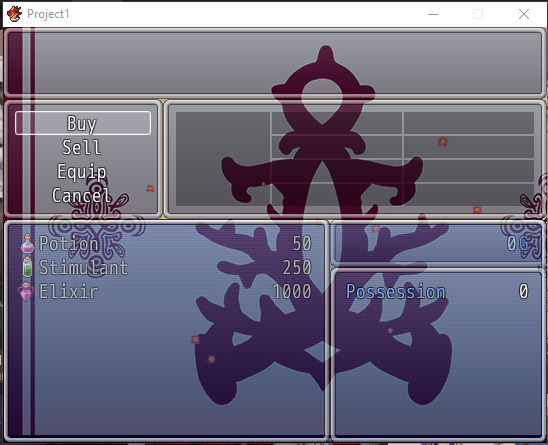
I'm using eugene222's Custom Menu Backgrounds and Yanfly's Ace Shop Options. I noticed that there's an empty unecessary window that pops up layered in the middle between the items window and the status window. This window appears when I open the shop scene, but disappears once I select between the buy/sell/cancel commands. This is what it looks like when I open the shop { "lightbox_close": "Close",
Archived First Post
This is what it looks like when I open the shop
This is what it looks like after the window disappears (what it should look like from the start).
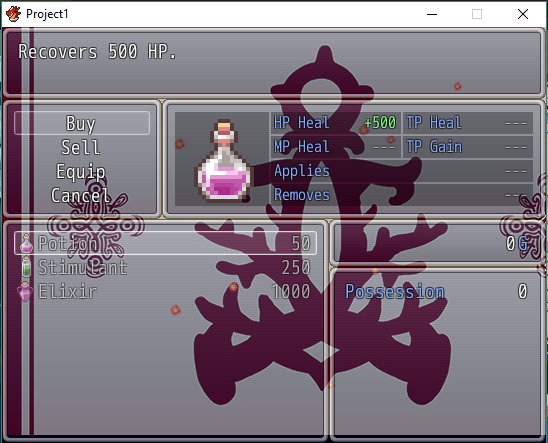
The extra window only appears when these two scripts are used at the same time (provided the shop scene is added to the background image script's list of scenes to add bgs to).Deleting the shop scene from it prevents the extra window from appearing again on the shop, but of course it leaves it without a background.
On the other hand, deleting the Ace script allows the shop to have a background without mysterious empty windows popping up, but of course the shop is left with the default interface.
I reproduced the problem in a clean project to make these images, so I know one of those two scripts must be the one creating the window. The problem is I don't know which one or what script line/s are creating that window or for what reason it's appearing.
Any kind of help or suggestion would be greatly appreciated. These scripts work fine together otherwise, but the look of that window really bugs me off.
Thanks in advance!
Downloads / Referenced Files
Log in, then follow the RPG Maker Developers Group to see these download links.
Log in to downloadReferenced Images / Attachments
Creator Claims / Removal
If you are the original creator and want this listing reassigned, edited, or removed, join BMMPlay and contact the moderators with proof that matches the original RPG Maker Web profile, linked GitHub, itch.io page, or another public creator identity.
Replies (0)
No replies yet.
Topic Summary
Loading summary...

