Hello! I need help with this script: Spoiler #============================================================================== class Window_TitleCommand < Window_Command
Hello! I need help with this script:
#==============================================================================
class Window_TitleCommand < Window_Command
IMG_NEWGAME = ["newgame","newgame_active"]
IMG_NEWGAME_X = 20
IMG_NEWGAME_Y = 240
IMG_CONTINUE = ["continue","continue_active"]
IMG_CONTINUE_X = 20
IMG_CONTINUE_Y = 280
IMG_SHUTDOWN = ["shutdown","shutdown_active"]
IMG_SHUTDOWN_X = 20
IMG_SHUTDOWN_Y = 320
def create_command_sprite
sprite1 = Sprite.new
sprite1.x = IMG_NEWGAME_X
sprite1.y = IMG_NEWGAME_Y
sprite2 = Sprite.new
sprite2.x = IMG_CONTINUE_X
sprite2.y = IMG_CONTINUE_Y
sprite3 = Sprite.new
sprite3.x = IMG_SHUTDOWN_X
sprite3.y = IMG_SHUTDOWN_Y
@command_sprites = [sprite1, sprite2, sprite3]
@command_bitmaps = [IMG_NEWGAME, IMG_CONTINUE, IMG_SHUTDOWN]
end
def select_command_sprite(index)
@command_sprites[0].bitmap = Cache.title1(@command_bitmaps[0][0])
@command_sprites[1].bitmap = Cache.title1(@command_bitmaps[1][0])
@command_sprites[2].bitmap = Cache.title1(@command_bitmaps[2][0])
@command_sprites[index].bitmap = Cache.title1(@command_bitmaps[index][1])
end
def set_enabled_command_sprite(index, enabled)
if enabled
@command_sprites[index].opacity = 255
else
@command_sprites[index].opacity = 160
end
end
def dispose_command_sprite
if @command_sprites != nil
@command_sprites[0].dispose
@command_sprites[1].dispose
@command_sprites[2].dispose
end
end
def refresh
create_command_sprite
self.visible = false
super
end
def index=(index)
super
select_command_sprite(index)
end
def draw_item(index)
super
set_enabled_command_sprite(index, command_enabled?(index))
end
def dispose
dispose_command_sprite
super
end
end
This script does the following:
-Allows you to move the option's window in the title.
-Using images (that should be in the folder "Tiles1") to change the color option when it's pressed or not.
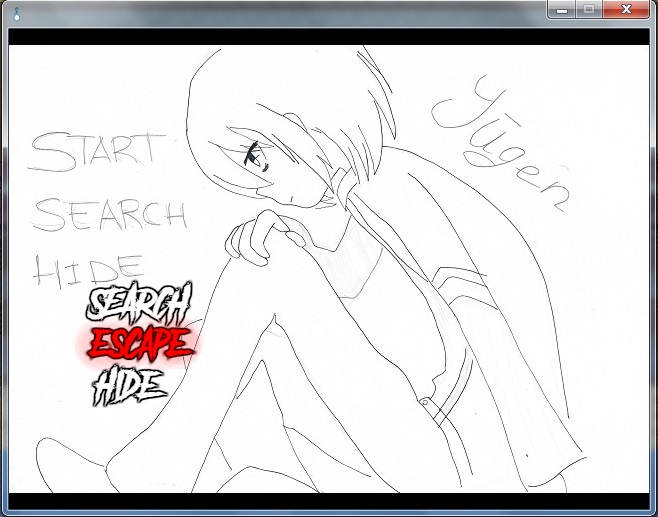
My problem is that when I want to move the window to the upper left part, the images just dissapear. What can I do to fix this?
Protected download
This is the max that the script leaves me until it dissappear, and I want them to go where the others go.
This script was made by パラ犬




 WD_BLACK 2TB SN750 NVMe Internal Gaming SSD
High-capacity NVMe storage pick for expanding a gaming PC or performance setup.
View on Amazon
WD_BLACK 2TB SN750 NVMe Internal Gaming SSD
High-capacity NVMe storage pick for expanding a gaming PC or performance setup.
View on Amazon