


(Ace) MOG_Chain_Commands Cursor Position Error
BMM_Archive · July 15, 2026

Preserved forum archive. This topic stores the original first post and locally mirrored RPG Maker Web attachments when available. It is posted by the BMMPlay archive account, not by the original creator.
Original Source
- Original title: (Ace) MOG_Chain_Commands Cursor Position Error
- Original author: Yappy Monoxide
- Original date: April 4, 2017
- Source thread: https://forums.rpgmakerweb.com/threads/ace-mog_chain_commands-cursor-position-error.76869/
- Source forum path: Game Development Engines > Ruby Game System (RGSS) Scripts > RGSSx Script Support
Summary
Hi Everyone, I've been plagued with another script error. This involves MOG_Chain_Commands by Moghunter. This is the script (There's no copy of this online without downloading the master demo which can take awhile, so this just for pure convience.): Spoiler: Original #===============================================================================
Archived First Post
Hi Everyone, I've been plagued with another script error.
This involves MOG_Chain_Commands by Moghunter. This is the script (There's no copy of this online without downloading the master demo which can take awhile, so this just for pure convience.):
The problem I'm having is the following:
Protected download Protected download
As you can see, the cursor in the second picture is working properly as it's right below the start of the chain, while in the first picture, the cursor is far to left. I have no idea this is happening. I've tried fixing it myself but I still can't figure out the problem. The only things I can think of as to why this could be happening. Perhaps it's because I have Yanfly's core in the main game. Or the map that I'm using has the default height, the switch I'm calling on is 124 which I added. I doubt this is the problem because picture 2 uses number 122. I honestly have no idea. Any help is appreciated.
New project recreating the error: ERROR
This involves MOG_Chain_Commands by Moghunter. This is the script (There's no copy of this online without downloading the master demo which can take awhile, so this just for pure convience.):
#===============================================================================
# +++ MOG - Chain Commands (v1.4) +++
#===============================================================================
# By Moghunter
# https://atelierrgss.wordpress.com/
#===============================================================================
# Sistema de sequência de botões para ativar switchs.
#
# Serão necessárias as seguintes imagens. (Graphics/System)
#
# Chain_Cursor.png
# Chain_Command.png
# Chain_Layout.png
# Chain_Timer_Layout.png
# Chain_Timer_Meter.png
#
#===============================================================================
#
# Para ativar o script use o comando abaixo. (*Call Script)
#
# chain_commands(ID)
#
# ID - Id da switch.
#
#===============================================================================
#==============================================================================
# ● Histórico (Version History)
#==============================================================================
# v 1.4 - Correção do crash aleatório.
# v 1.3 - Melhoria no sistema de dispose
# v 1.2 - Melhoria na codificação e correção de alguns glitches.
# v 1.1 - Animação de fade ao sair da cena de chain.
# - Opção de definir a prioridade da hud na tela.
#==============================================================================
module MOG_CHAIN_COMMANDS
#==============================================================================
# CHAIN_COMMAND = { SWITCH_ID => [COMMAND] }
#
# SWITCH_ID = ID da switch
# COMMANDS = Defina aqui a sequência de botões.
# (Para fazer a sequência use os comandos abaixo)
#
# "Down" ,"Up" ,"Left" ,"Right" ,"Shift" ,"D" ,"S" ,"A" ,"Z" ,"X" ,"Q" ,"W"
#
# Exemplo de utilização
#
# CHAIN_SWITCH_COMMAND = {
# 25=>["Down","D","S","Right"],
# 59=>["Down","Up","Left","Right","Shift","D","S","A","Z","X","Q","W"],
# 80=>["Shift","D"]
# }
#==============================================================================
CHAIN_SWITCH_COMMAND = {
5=>["X","Right","Left","Z","Z"],
6=>["Left","Right","Left","Right","Left","Right","Q","Z","Up","A","S",
"Down","D","Z","Right","Up","Up","Z","W","Left","Down","D","A","W"],
8=>["Up","Down","Left","Right","Z"]
}
#Duração para colocar os comandos. (A duração é multiplicado pela quantidade
#de comandos) *60 = 1 sec
CHAIN_INPUT_DURATION = 30
#Som ao acertar.
CHAIN_RIGHT_SE = "Chime1"
#Som ao errar.
CHAIN_WRONG_SE = "Buzzer1"
#Switch que ativa o modo automático.
CHAIN_AUTOMATIC_MODE_SWITCH_ID = 20
#Definição da prioridade da hud na tela
CHAIN_HUD_Z = 300
end
#===============================================================================
# ■ Chain Commands
#===============================================================================
class Chain_Commands
include MOG_CHAIN_COMMANDS
#--------------------------------------------------------------------------
# ● Initialize
#--------------------------------------------------------------------------
def initialize
@action_id = $game_temp.chain_switch_id
@chain_command = CHAIN_SWITCH_COMMAND[@action_id]
@chain_command = ["?"] if @chain_command == nil
duration = [[CHAIN_INPUT_DURATION, 1].max, 9999].min
@timer_max = duration * @chain_command.size
@timer = @timer_max
@slide_time = [[60 / duration, 10].max, 60].min
@change_time = 0
if $game_switches[CHAIN_AUTOMATIC_MODE_SWITCH_ID]
@auto = true
else
@auto = false
end
@com = 0
end
#--------------------------------------------------------------------------
# ● Main
#--------------------------------------------------------------------------
def main
dispose
@background_sprite = Sprite.new
@background_sprite.bitmap = SceneManager.background_bitmap2
create_chain_command
create_cusrsor
create_layout
create_meter
create_text
create_number
Graphics.transition
loop do
Graphics.update
Input.update
update
break if SceneManager.scene != self
end
dispose
end
#--------------------------------------------------------------------------
# ● Create Cursor
#--------------------------------------------------------------------------
def create_cusrsor
@fy_time = 0
@Fy = 0
@com_index = 0
@cursor = Sprite.new
@cursor.bitmap = Cache.system("Chain_Cursor")
@cursor.z = 4 + CHAIN_HUD_Z
@cursor_space = ((@bitmap_cw + 5) * @chain_command.size) / 2
if @chain_command.size <= 20
@cursor.x = (544 / 2) - @cursor_space + @cursor_space * @com_index
else
@cursor.x = (544 / 2)
end
@cursor.y = (416 / 2) + 30
end
#--------------------------------------------------------------------------
# ● Create Chain Command
#--------------------------------------------------------------------------
def create_chain_command
@image = Cache.system("Chain_Command")
width_max = ((@image.width / 13) + 5) * @chain_command.size
@bitmap = Bitmap.new(width_max,@image.height * 2)
@bitmap_cw = @image.width / 13
@bitmap_ch = @image.height
index = 0
for i in @chain_command
command_list_check(i)
bitmap_src_rect = Rect.new(@com * @bitmap_cw, 0, @bitmap_cw, @bitmap_ch)
if index == 0
@bitmap.blt(index * (@bitmap_cw + 5) , 0, @image, bitmap_src_rect)
else
@bitmap.blt(index * (@bitmap_cw + 5) , @bitmap_ch, @image, bitmap_src_rect)
end
index += 1
end
@sprite = Sprite.new
@sprite.bitmap = @bitmap
if @chain_command.size <= 15
@sprite.x = (544 / 2) - ((@bitmap_cw + 5) * @chain_command.size) / 2
@new_x = 0
else
@sprite.x = (544 / 2)
@new_x = @sprite.x
end
@sprite.y = (416 / 2) + 30 - @bitmap_ch - 15
@sprite.z = 3 + CHAIN_HUD_Z
@sprite.zoom_x = 1.5
@sprite.zoom_y = 1.5
end
#--------------------------------------------------------------------------
# * create_layout
#--------------------------------------------------------------------------
def create_layout
@back = Plane.new
@back.bitmap = Cache.system("Chain_Layout")
@back.z = 0
@layout = Sprite.new
@layout.bitmap = Cache.system("Chain_Timer_Layout")
@layout.z = 1 + CHAIN_HUD_Z
@layout.x = 160
@layout.y = 150
end
#--------------------------------------------------------------------------
# * create_meter
#--------------------------------------------------------------------------
def create_meter
@meter_flow = 0
@meter_image = Cache.system("Chain_Timer_Meter")
@meter_bitmap = Bitmap.new(@meter_image.width,@meter_image.height)
@meter_range = @meter_image.width / 3
@meter_width = @meter_range * @timer / @timer_max
@meter_height = @meter_image.height
@meter_src_rect = Rect.new(@meter_range, 0, @meter_width, @meter_height)
@meter_bitmap.blt(0,0, @meter_image, @meter_src_rect)
@meter_sprite = Sprite.new
@meter_sprite.bitmap = @meter_bitmap
@meter_sprite.z = 2 + CHAIN_HUD_Z
@meter_sprite.x = 220
@meter_sprite.y = 159
update_flow
end
#--------------------------------------------------------------------------
# ● Create Text
#--------------------------------------------------------------------------
def create_text
@text = Sprite.new
@text.bitmap = Bitmap.new(200,32)
@text.z = 2 + CHAIN_HUD_Z
@text.bitmap.font.name = "Georgia"
@text.bitmap.font.size = 25
@text.bitmap.font.bold = true
@text.bitmap.font.italic = true
@text.bitmap.font.color.set(255, 255, 255,220)
@text.x = 230
@text.y = 100
end
#--------------------------------------------------------------------------
# ● Create Number
#--------------------------------------------------------------------------
def create_number
@combo = 0
@Number = Sprite.new
@number.bitmap = Bitmap.new(200,64)
@number.z = 2 + CHAIN_HUD_Z
@number.bitmap.font.name = "Arial"
@number.bitmap.font.size = 24
@number.bitmap.font.bold = true
@number.bitmap.font.color.set(0, 255, 255,200)
@number.bitmap.draw_text(0, 0, 200, 32, "Ready",1)
@number.x = 30
@number.y = 100
end
#--------------------------------------------------------------------------
# ● Pre Dispose
#--------------------------------------------------------------------------
def exit
loop do
Graphics.update
@sprite.x += 5
@layout.x -= 5
@meter_sprite.x -= 5
@text.x -= 2
@text.opacity -= 5
@sprite.opacity -= 5
@layout.opacity -= 5
@meter_sprite.opacity -= 5
@number.opacity -= 5
@back.opacity -= 5
@cursor.visible = false
break if @sprite.opacity == 0
end
SceneManager.call(Scene_Map)
end
#--------------------------------------------------------------------------
# ● Dispose
#--------------------------------------------------------------------------
def dispose
return if @layout == nil
Graphics.freeze
@background_sprite.bitmap.dispose
@background_sprite.dispose
@bitmap.dispose
@sprite.bitmap.dispose
@sprite.dispose
@cursor.bitmap.dispose
@cursor.dispose
@meter_image.dispose
@meter_bitmap.dispose
@meter_sprite.bitmap.dispose
@meter_sprite.dispose
@layout.bitmap.dispose
@layout.dispose
@layout = nil
@back.bitmap.dispose
@back.dispose
@text.bitmap.dispose
@text.dispose
@number.bitmap.dispose
@number.dispose
@image.dispose
end
#--------------------------------------------------------------------------
# ● Update
#--------------------------------------------------------------------------
def update
update_command
update_cursor_slide
update_flow
update_change_time
end
#--------------------------------------------------------------------------
# ● Change_Time
#--------------------------------------------------------------------------
def update_change_time
return unless @auto
@change_time += 1
check_command(-1) if @change_time >= CHAIN_INPUT_DURATION - 1
end
#--------------------------------------------------------------------------
# ● Update Flow
#--------------------------------------------------------------------------
def update_flow
@timer -= 1
@meter_sprite.bitmap.clear
@meter_width = @meter_range * @timer / @timer_max
@meter_src_rect = Rect.new(@meter_flow, 0, @meter_width, @meter_height)
@meter_bitmap.blt(0,0, @meter_image, @meter_src_rect)
@meter_flow += 20
@meter_flow = 0 if @meter_flow >= @meter_image.width - @meter_range
wrong_command if @timer == 0 and @auto == false
end
#--------------------------------------------------------------------------
# ● Update Command
#--------------------------------------------------------------------------
def update_command
return if @auto
if Input.trigger?(Input::X)
check_command(0)
elsif Input.trigger?(Input::Z)
check_command(1)
elsif Input.trigger?(Input::Y)
check_command(2)
elsif Input.trigger?(Input::A)
check_command(3)
elsif Input.trigger?(Input::C)
check_command(4)
elsif Input.trigger?(Input::
check_command(5)
elsif Input.trigger?(Input::L)
check_command(6)
elsif Input.trigger?(Input::R)
check_command(7)
elsif Input.trigger?(Input::RIGHT)
check_command(8)
elsif Input.trigger?(Input::LEFT)
check_command(9)
elsif Input.trigger?(Input:OWN)
check_command(10)
elsif Input.trigger?(Input::UP)
check_command(11)
end
end
#--------------------------------------------------------------------------
# ● command_list_check
#--------------------------------------------------------------------------
def command_list_check(command)
case command
when "A"
@com = 0
when "D"
@com = 1
when "S"
@com = 2
when "Shift"
@com = 3
when "Z"
@com = 4
when "X"
@com = 5
when "Q"
@com = 6
when "W"
@com = 7
when "Right"
@com = 8
when "Left"
@com = 9
when "Down"
@com = 10
when "Up"
@com = 11
else
@com = 12
end
end
#--------------------------------------------------------------------------
# ● check_command
#--------------------------------------------------------------------------
def check_command(com)
index = 0
if com != -1
right_input = false
for i in @chain_command
if index == @com_index
command_list_check(i)
right_input = true if @com == com
end
index += 1
end
else
command_list_check(@com_index)
@change_time = 0
right_input = true
end
if right_input
refresh_number
next_command
else
wrong_command
end
end
#--------------------------------------------------------------------------
# ● Next Command
#--------------------------------------------------------------------------
def next_command
@com_index += 1
Audio.se_play("Audio/SE/" + CHAIN_RIGHT_SE, 100, 100)
if @com_index == @chain_command.size
$game_switches[@action_id] = true
exit
$game_map.need_refresh = true
end
refresh_command
refresh_text(0)
end
#--------------------------------------------------------------------------
# ● wrong_command
#--------------------------------------------------------------------------
def wrong_command
Audio.se_play("Audio/SE/" + CHAIN_WRONG_SE, 100, 100)
refresh_text(1)
exit
$game_player.jump(0,0)
end
#--------------------------------------------------------------------------
# ● Refresh Command
#--------------------------------------------------------------------------
def refresh_command
@sprite.bitmap.clear
index = 0
for i in @chain_command
command_list_check(i)
bitmap_src_rect = Rect.new(@com * @bitmap_cw, 0, @bitmap_cw, @bitmap_ch)
if @com_index == index
@bitmap.blt(index * (@bitmap_cw + 5) , 0, @image, bitmap_src_rect)
else
@bitmap.blt(index * (@bitmap_cw + 5) , @bitmap_ch, @image, bitmap_src_rect)
end
index += 1
end
if @chain_command.size > 15
@new_x = (544 / 2) - ((@bitmap_cw + 5) * @com_index)
else
@cursor.x = (544 / 2) - @cursor_space + ((@bitmap_cw + 5) * @com_index)
end
end
#--------------------------------------------------------------------------
# ● Refresh Text
#--------------------------------------------------------------------------
def refresh_text(type)
@text.bitmap.clear
if type == 0
if @com_index == @chain_command.size
@text.bitmap.font.color.set(55, 255, 55,220)
@text.bitmap.draw_text(0, 0, 200, 32, "Perfect!",1)
else
@text.bitmap.font.color.set(55, 155, 255,220)
@text.bitmap.draw_text(0, 0, 200, 32, "Success!",1)
end
else
@text.bitmap.font.color.set(255, 155, 55,220)
if @timer == 0
@text.bitmap.draw_text(0, 0, 200, 32, "Time Limit!",1)
else
@text.bitmap.draw_text(0, 0, 200, 32, "Fail!",1)
end
end
@text.x = 230
@text.opacity = 255
end
#--------------------------------------------------------------------------
# ● Refresh Number
#--------------------------------------------------------------------------
def refresh_number
@combo += 1
@number.bitmap.clear
@number.bitmap.font.size = 34
@number.bitmap.draw_text(0, 0, 200, 32, @combo.to_s,1)
@number.opacity = 255
@number.zoom_x = 2
@number.zoom_y = 2
end
#--------------------------------------------------------------------------
# ● Update Cursor Slide
#--------------------------------------------------------------------------
def update_cursor_slide
@sprite.zoom_x -= 0.1 if @sprite.zoom_x > 1
@sprite.zoom_y -= 0.1 if @sprite.zoom_y > 1
@text.x -= 2 if @text.x > 210
@text.opacity -= 5 if @text.opacity > 0
@sprite.x -= @slide_time if @sprite.x > @new_x and @chain_command.size > 15
if @number.zoom_x > 1
@number.zoom_x -= 0.1
@number.zoom_y -= 0.1
end
if @fy_time > 15
@Fy += 1
elsif @fy_time > 0
@Fy -= 1
else
@Fy = 0
@fy_time = 30
end
@fy_time -= 1
@cursor.oy = @Fy
end
end
#==============================================================================
# ■ Game Temp
#==============================================================================
class Game_Temp
attr_accessor :chain_switch_id
#--------------------------------------------------------------------------
# ● Initialize
#--------------------------------------------------------------------------
alias mog_chain_commands_initialize initialize
def initialize
@chain_switch_id = 0
mog_chain_commands_initialize
end
end
#==============================================================================
# ■ Game_Interpreter
#==============================================================================
class Game_Interpreter
#--------------------------------------------------------------------------
# ● Chain Commands
#--------------------------------------------------------------------------
def chain_commands(switch_id = 0)
return if switch_id <= 0
$game_temp.chain_switch_id = switch_id
SceneManager.call(Chain_Commands)
wait(1)
end
end
#===============================================================================
# ■ SceneManager
#===============================================================================
class << SceneManager
@background_bitmap2 = nil
#--------------------------------------------------------------------------
# ● Snapshot For Background2
#--------------------------------------------------------------------------
def snapshot_for_background2
@background_bitmap2.dispose if @background_bitmap2
@background_bitmap2 = Graphics.snap_to_bitmap
end
#--------------------------------------------------------------------------
# ● Background Bitmap2
#--------------------------------------------------------------------------
def background_bitmap2
@background_bitmap2
end
end
#===============================================================================
# ■ Scene Map
#===============================================================================
class Scene_Map < Scene_Base
#--------------------------------------------------------------------------
# ● Terminate
#--------------------------------------------------------------------------
alias mog_chain_commands_terminate terminate
def terminate
SceneManager.snapshot_for_background2
mog_chain_commands_terminate
end
end
$mog_rgss3_chain_commands = true
# +++ MOG - Chain Commands (v1.4) +++
#===============================================================================
# By Moghunter
# https://atelierrgss.wordpress.com/
#===============================================================================
# Sistema de sequência de botões para ativar switchs.
#
# Serão necessárias as seguintes imagens. (Graphics/System)
#
# Chain_Cursor.png
# Chain_Command.png
# Chain_Layout.png
# Chain_Timer_Layout.png
# Chain_Timer_Meter.png
#
#===============================================================================
#
# Para ativar o script use o comando abaixo. (*Call Script)
#
# chain_commands(ID)
#
# ID - Id da switch.
#
#===============================================================================
#==============================================================================
# ● Histórico (Version History)
#==============================================================================
# v 1.4 - Correção do crash aleatório.
# v 1.3 - Melhoria no sistema de dispose
# v 1.2 - Melhoria na codificação e correção de alguns glitches.
# v 1.1 - Animação de fade ao sair da cena de chain.
# - Opção de definir a prioridade da hud na tela.
#==============================================================================
module MOG_CHAIN_COMMANDS
#==============================================================================
# CHAIN_COMMAND = { SWITCH_ID => [COMMAND] }
#
# SWITCH_ID = ID da switch
# COMMANDS = Defina aqui a sequência de botões.
# (Para fazer a sequência use os comandos abaixo)
#
# "Down" ,"Up" ,"Left" ,"Right" ,"Shift" ,"D" ,"S" ,"A" ,"Z" ,"X" ,"Q" ,"W"
#
# Exemplo de utilização
#
# CHAIN_SWITCH_COMMAND = {
# 25=>["Down","D","S","Right"],
# 59=>["Down","Up","Left","Right","Shift","D","S","A","Z","X","Q","W"],
# 80=>["Shift","D"]
# }
#==============================================================================
CHAIN_SWITCH_COMMAND = {
5=>["X","Right","Left","Z","Z"],
6=>["Left","Right","Left","Right","Left","Right","Q","Z","Up","A","S",
"Down","D","Z","Right","Up","Up","Z","W","Left","Down","D","A","W"],
8=>["Up","Down","Left","Right","Z"]
}
#Duração para colocar os comandos. (A duração é multiplicado pela quantidade
#de comandos) *60 = 1 sec
CHAIN_INPUT_DURATION = 30
#Som ao acertar.
CHAIN_RIGHT_SE = "Chime1"
#Som ao errar.
CHAIN_WRONG_SE = "Buzzer1"
#Switch que ativa o modo automático.
CHAIN_AUTOMATIC_MODE_SWITCH_ID = 20
#Definição da prioridade da hud na tela
CHAIN_HUD_Z = 300
end
#===============================================================================
# ■ Chain Commands
#===============================================================================
class Chain_Commands
include MOG_CHAIN_COMMANDS
#--------------------------------------------------------------------------
# ● Initialize
#--------------------------------------------------------------------------
def initialize
@action_id = $game_temp.chain_switch_id
@chain_command = CHAIN_SWITCH_COMMAND[@action_id]
@chain_command = ["?"] if @chain_command == nil
duration = [[CHAIN_INPUT_DURATION, 1].max, 9999].min
@timer_max = duration * @chain_command.size
@timer = @timer_max
@slide_time = [[60 / duration, 10].max, 60].min
@change_time = 0
if $game_switches[CHAIN_AUTOMATIC_MODE_SWITCH_ID]
@auto = true
else
@auto = false
end
@com = 0
end
#--------------------------------------------------------------------------
# ● Main
#--------------------------------------------------------------------------
def main
dispose
@background_sprite = Sprite.new
@background_sprite.bitmap = SceneManager.background_bitmap2
create_chain_command
create_cusrsor
create_layout
create_meter
create_text
create_number
Graphics.transition
loop do
Graphics.update
Input.update
update
break if SceneManager.scene != self
end
dispose
end
#--------------------------------------------------------------------------
# ● Create Cursor
#--------------------------------------------------------------------------
def create_cusrsor
@fy_time = 0
@Fy = 0
@com_index = 0
@cursor = Sprite.new
@cursor.bitmap = Cache.system("Chain_Cursor")
@cursor.z = 4 + CHAIN_HUD_Z
@cursor_space = ((@bitmap_cw + 5) * @chain_command.size) / 2
if @chain_command.size <= 20
@cursor.x = (544 / 2) - @cursor_space + @cursor_space * @com_index
else
@cursor.x = (544 / 2)
end
@cursor.y = (416 / 2) + 30
end
#--------------------------------------------------------------------------
# ● Create Chain Command
#--------------------------------------------------------------------------
def create_chain_command
@image = Cache.system("Chain_Command")
width_max = ((@image.width / 13) + 5) * @chain_command.size
@bitmap = Bitmap.new(width_max,@image.height * 2)
@bitmap_cw = @image.width / 13
@bitmap_ch = @image.height
index = 0
for i in @chain_command
command_list_check(i)
bitmap_src_rect = Rect.new(@com * @bitmap_cw, 0, @bitmap_cw, @bitmap_ch)
if index == 0
@bitmap.blt(index * (@bitmap_cw + 5) , 0, @image, bitmap_src_rect)
else
@bitmap.blt(index * (@bitmap_cw + 5) , @bitmap_ch, @image, bitmap_src_rect)
end
index += 1
end
@sprite = Sprite.new
@sprite.bitmap = @bitmap
if @chain_command.size <= 15
@sprite.x = (544 / 2) - ((@bitmap_cw + 5) * @chain_command.size) / 2
@new_x = 0
else
@sprite.x = (544 / 2)
@new_x = @sprite.x
end
@sprite.y = (416 / 2) + 30 - @bitmap_ch - 15
@sprite.z = 3 + CHAIN_HUD_Z
@sprite.zoom_x = 1.5
@sprite.zoom_y = 1.5
end
#--------------------------------------------------------------------------
# * create_layout
#--------------------------------------------------------------------------
def create_layout
@back = Plane.new
@back.bitmap = Cache.system("Chain_Layout")
@back.z = 0
@layout = Sprite.new
@layout.bitmap = Cache.system("Chain_Timer_Layout")
@layout.z = 1 + CHAIN_HUD_Z
@layout.x = 160
@layout.y = 150
end
#--------------------------------------------------------------------------
# * create_meter
#--------------------------------------------------------------------------
def create_meter
@meter_flow = 0
@meter_image = Cache.system("Chain_Timer_Meter")
@meter_bitmap = Bitmap.new(@meter_image.width,@meter_image.height)
@meter_range = @meter_image.width / 3
@meter_width = @meter_range * @timer / @timer_max
@meter_height = @meter_image.height
@meter_src_rect = Rect.new(@meter_range, 0, @meter_width, @meter_height)
@meter_bitmap.blt(0,0, @meter_image, @meter_src_rect)
@meter_sprite = Sprite.new
@meter_sprite.bitmap = @meter_bitmap
@meter_sprite.z = 2 + CHAIN_HUD_Z
@meter_sprite.x = 220
@meter_sprite.y = 159
update_flow
end
#--------------------------------------------------------------------------
# ● Create Text
#--------------------------------------------------------------------------
def create_text
@text = Sprite.new
@text.bitmap = Bitmap.new(200,32)
@text.z = 2 + CHAIN_HUD_Z
@text.bitmap.font.name = "Georgia"
@text.bitmap.font.size = 25
@text.bitmap.font.bold = true
@text.bitmap.font.italic = true
@text.bitmap.font.color.set(255, 255, 255,220)
@text.x = 230
@text.y = 100
end
#--------------------------------------------------------------------------
# ● Create Number
#--------------------------------------------------------------------------
def create_number
@combo = 0
@Number = Sprite.new
@number.bitmap = Bitmap.new(200,64)
@number.z = 2 + CHAIN_HUD_Z
@number.bitmap.font.name = "Arial"
@number.bitmap.font.size = 24
@number.bitmap.font.bold = true
@number.bitmap.font.color.set(0, 255, 255,200)
@number.bitmap.draw_text(0, 0, 200, 32, "Ready",1)
@number.x = 30
@number.y = 100
end
#--------------------------------------------------------------------------
# ● Pre Dispose
#--------------------------------------------------------------------------
def exit
loop do
Graphics.update
@sprite.x += 5
@layout.x -= 5
@meter_sprite.x -= 5
@text.x -= 2
@text.opacity -= 5
@sprite.opacity -= 5
@layout.opacity -= 5
@meter_sprite.opacity -= 5
@number.opacity -= 5
@back.opacity -= 5
@cursor.visible = false
break if @sprite.opacity == 0
end
SceneManager.call(Scene_Map)
end
#--------------------------------------------------------------------------
# ● Dispose
#--------------------------------------------------------------------------
def dispose
return if @layout == nil
Graphics.freeze
@background_sprite.bitmap.dispose
@background_sprite.dispose
@bitmap.dispose
@sprite.bitmap.dispose
@sprite.dispose
@cursor.bitmap.dispose
@cursor.dispose
@meter_image.dispose
@meter_bitmap.dispose
@meter_sprite.bitmap.dispose
@meter_sprite.dispose
@layout.bitmap.dispose
@layout.dispose
@layout = nil
@back.bitmap.dispose
@back.dispose
@text.bitmap.dispose
@text.dispose
@number.bitmap.dispose
@number.dispose
@image.dispose
end
#--------------------------------------------------------------------------
# ● Update
#--------------------------------------------------------------------------
def update
update_command
update_cursor_slide
update_flow
update_change_time
end
#--------------------------------------------------------------------------
# ● Change_Time
#--------------------------------------------------------------------------
def update_change_time
return unless @auto
@change_time += 1
check_command(-1) if @change_time >= CHAIN_INPUT_DURATION - 1
end
#--------------------------------------------------------------------------
# ● Update Flow
#--------------------------------------------------------------------------
def update_flow
@timer -= 1
@meter_sprite.bitmap.clear
@meter_width = @meter_range * @timer / @timer_max
@meter_src_rect = Rect.new(@meter_flow, 0, @meter_width, @meter_height)
@meter_bitmap.blt(0,0, @meter_image, @meter_src_rect)
@meter_flow += 20
@meter_flow = 0 if @meter_flow >= @meter_image.width - @meter_range
wrong_command if @timer == 0 and @auto == false
end
#--------------------------------------------------------------------------
# ● Update Command
#--------------------------------------------------------------------------
def update_command
return if @auto
if Input.trigger?(Input::X)
check_command(0)
elsif Input.trigger?(Input::Z)
check_command(1)
elsif Input.trigger?(Input::Y)
check_command(2)
elsif Input.trigger?(Input::A)
check_command(3)
elsif Input.trigger?(Input::C)
check_command(4)
elsif Input.trigger?(Input::
check_command(5)
elsif Input.trigger?(Input::L)
check_command(6)
elsif Input.trigger?(Input::R)
check_command(7)
elsif Input.trigger?(Input::RIGHT)
check_command(8)
elsif Input.trigger?(Input::LEFT)
check_command(9)
elsif Input.trigger?(Input:OWN)
check_command(10)
elsif Input.trigger?(Input::UP)
check_command(11)
end
end
#--------------------------------------------------------------------------
# ● command_list_check
#--------------------------------------------------------------------------
def command_list_check(command)
case command
when "A"
@com = 0
when "D"
@com = 1
when "S"
@com = 2
when "Shift"
@com = 3
when "Z"
@com = 4
when "X"
@com = 5
when "Q"
@com = 6
when "W"
@com = 7
when "Right"
@com = 8
when "Left"
@com = 9
when "Down"
@com = 10
when "Up"
@com = 11
else
@com = 12
end
end
#--------------------------------------------------------------------------
# ● check_command
#--------------------------------------------------------------------------
def check_command(com)
index = 0
if com != -1
right_input = false
for i in @chain_command
if index == @com_index
command_list_check(i)
right_input = true if @com == com
end
index += 1
end
else
command_list_check(@com_index)
@change_time = 0
right_input = true
end
if right_input
refresh_number
next_command
else
wrong_command
end
end
#--------------------------------------------------------------------------
# ● Next Command
#--------------------------------------------------------------------------
def next_command
@com_index += 1
Audio.se_play("Audio/SE/" + CHAIN_RIGHT_SE, 100, 100)
if @com_index == @chain_command.size
$game_switches[@action_id] = true
exit
$game_map.need_refresh = true
end
refresh_command
refresh_text(0)
end
#--------------------------------------------------------------------------
# ● wrong_command
#--------------------------------------------------------------------------
def wrong_command
Audio.se_play("Audio/SE/" + CHAIN_WRONG_SE, 100, 100)
refresh_text(1)
exit
$game_player.jump(0,0)
end
#--------------------------------------------------------------------------
# ● Refresh Command
#--------------------------------------------------------------------------
def refresh_command
@sprite.bitmap.clear
index = 0
for i in @chain_command
command_list_check(i)
bitmap_src_rect = Rect.new(@com * @bitmap_cw, 0, @bitmap_cw, @bitmap_ch)
if @com_index == index
@bitmap.blt(index * (@bitmap_cw + 5) , 0, @image, bitmap_src_rect)
else
@bitmap.blt(index * (@bitmap_cw + 5) , @bitmap_ch, @image, bitmap_src_rect)
end
index += 1
end
if @chain_command.size > 15
@new_x = (544 / 2) - ((@bitmap_cw + 5) * @com_index)
else
@cursor.x = (544 / 2) - @cursor_space + ((@bitmap_cw + 5) * @com_index)
end
end
#--------------------------------------------------------------------------
# ● Refresh Text
#--------------------------------------------------------------------------
def refresh_text(type)
@text.bitmap.clear
if type == 0
if @com_index == @chain_command.size
@text.bitmap.font.color.set(55, 255, 55,220)
@text.bitmap.draw_text(0, 0, 200, 32, "Perfect!",1)
else
@text.bitmap.font.color.set(55, 155, 255,220)
@text.bitmap.draw_text(0, 0, 200, 32, "Success!",1)
end
else
@text.bitmap.font.color.set(255, 155, 55,220)
if @timer == 0
@text.bitmap.draw_text(0, 0, 200, 32, "Time Limit!",1)
else
@text.bitmap.draw_text(0, 0, 200, 32, "Fail!",1)
end
end
@text.x = 230
@text.opacity = 255
end
#--------------------------------------------------------------------------
# ● Refresh Number
#--------------------------------------------------------------------------
def refresh_number
@combo += 1
@number.bitmap.clear
@number.bitmap.font.size = 34
@number.bitmap.draw_text(0, 0, 200, 32, @combo.to_s,1)
@number.opacity = 255
@number.zoom_x = 2
@number.zoom_y = 2
end
#--------------------------------------------------------------------------
# ● Update Cursor Slide
#--------------------------------------------------------------------------
def update_cursor_slide
@sprite.zoom_x -= 0.1 if @sprite.zoom_x > 1
@sprite.zoom_y -= 0.1 if @sprite.zoom_y > 1
@text.x -= 2 if @text.x > 210
@text.opacity -= 5 if @text.opacity > 0
@sprite.x -= @slide_time if @sprite.x > @new_x and @chain_command.size > 15
if @number.zoom_x > 1
@number.zoom_x -= 0.1
@number.zoom_y -= 0.1
end
if @fy_time > 15
@Fy += 1
elsif @fy_time > 0
@Fy -= 1
else
@Fy = 0
@fy_time = 30
end
@fy_time -= 1
@cursor.oy = @Fy
end
end
#==============================================================================
# ■ Game Temp
#==============================================================================
class Game_Temp
attr_accessor :chain_switch_id
#--------------------------------------------------------------------------
# ● Initialize
#--------------------------------------------------------------------------
alias mog_chain_commands_initialize initialize
def initialize
@chain_switch_id = 0
mog_chain_commands_initialize
end
end
#==============================================================================
# ■ Game_Interpreter
#==============================================================================
class Game_Interpreter
#--------------------------------------------------------------------------
# ● Chain Commands
#--------------------------------------------------------------------------
def chain_commands(switch_id = 0)
return if switch_id <= 0
$game_temp.chain_switch_id = switch_id
SceneManager.call(Chain_Commands)
wait(1)
end
end
#===============================================================================
# ■ SceneManager
#===============================================================================
class << SceneManager
@background_bitmap2 = nil
#--------------------------------------------------------------------------
# ● Snapshot For Background2
#--------------------------------------------------------------------------
def snapshot_for_background2
@background_bitmap2.dispose if @background_bitmap2
@background_bitmap2 = Graphics.snap_to_bitmap
end
#--------------------------------------------------------------------------
# ● Background Bitmap2
#--------------------------------------------------------------------------
def background_bitmap2
@background_bitmap2
end
end
#===============================================================================
# ■ Scene Map
#===============================================================================
class Scene_Map < Scene_Base
#--------------------------------------------------------------------------
# ● Terminate
#--------------------------------------------------------------------------
alias mog_chain_commands_terminate terminate
def terminate
SceneManager.snapshot_for_background2
mog_chain_commands_terminate
end
end
$mog_rgss3_chain_commands = true
#===============================================================================
# +++ MOG - Chain Commands (v1.4) +++
#===============================================================================
# By Moghunter
# https://atelierrgss.wordpress.com/
#===============================================================================
# Sistema de sequência de botões para ativar switchs.
#
# Serão necessárias as seguintes imagens. (Graphics/System)
#
# Chain_Cursor.png
# Chain_Command.png
# Chain_Layout.png
# Chain_Timer_Layout.png
# Chain_Timer_Meter.png
#
#===============================================================================
#
# Para ativar o script use o comando abaixo. (*Call Script)
#
# chain_commands(ID)
#
# ID - Id da switch.
#
#===============================================================================
#==============================================================================
# ● Histórico (Version History)
#==============================================================================
# v 1.4 - Correção do crash aleatório.
# v 1.3 - Melhoria no sistema de dispose
# v 1.2 - Melhoria na codificação e correção de alguns glitches.
# v 1.1 - Animação de fade ao sair da cena de chain.
# - Opção de definir a prioridade da hud na tela.
#==============================================================================
module MOG_CHAIN_COMMANDS
#==============================================================================
# CHAIN_COMMAND = { SWITCH_ID => [COMMAND] }
#
# SWITCH_ID = ID da switch
# COMMANDS = Defina aqui a sequência de botões.
# (Para fazer a sequência use os comandos abaixo)
#
# "Down" ,"Up" ,"Left" ,"Right" ,"Shift" ,"D" ,"S" ,"A" ,"Z" ,"X" ,"Q" ,"W"
#
# Exemplo de utilização
#
# CHAIN_SWITCH_COMMAND = {
# 25=>["Down","D","S","Right"],
# 59=>["Down","Up","Left","Right","Shift","D","S","A","Z","X","Q","W"],
# 80=>["Shift","D"]
# }
#==============================================================================
CHAIN_SWITCH_COMMAND = {
5=>["X","Right","Left","Z","Z"],
123=>["Left","Right","Left","Right","Left","Right","Q","Z","Up","A","S",
"Down","Shift","Z","Right","Up","Up","Z","W","Left","Down","D","A","W"],
122=>["Up","Down","Left","Right","Z","Shift","Up","Up","Right"],
124=>["Left", "Q", "W", "A", "S", "Shift", "Right", "Up", "Left", "Down", "D",
"Z", "Up", "Up", "W", "Shift", "A", "D"],
9=>["Down","Left","X"]
}
#Duração para colocar os comandos. (A duração é multiplicado pela quantidade
#de comandos) *60 = 1 sec
CHAIN_INPUT_DURATION = 30
#Som ao acertar.
CHAIN_RIGHT_SE = "Powerup"
#Som ao errar.
CHAIN_WRONG_SE = "Buzzer1"
#Switch que ativa o modo automático.
CHAIN_AUTOMATIC_MODE_SWITCH_ID = 20
#Definição da prioridade da hud na tela
CHAIN_HUD_Z = 300
end
#===============================================================================
# ■ Chain Commands
#===============================================================================
class Chain_Commands
include MOG_CHAIN_COMMANDS
#--------------------------------------------------------------------------
# ● Initialize
#--------------------------------------------------------------------------
def initialize
@action_id = $game_temp.chain_switch_id
@chain_command = CHAIN_SWITCH_COMMAND[@action_id]
@chain_command = ["?"] if @chain_command == nil
duration = [[CHAIN_INPUT_DURATION, 1].max, 9999].min
@timer_max = duration * @chain_command.size
@timer = @timer_max
@slide_time = [[60 / duration, 10].max, 60].min
@change_time = 0
if $game_switches[CHAIN_AUTOMATIC_MODE_SWITCH_ID]
@auto = true
else
@auto = false
end
@com = 0
end
#--------------------------------------------------------------------------
# ● Main
#--------------------------------------------------------------------------
def main
dispose
@background_sprite = Sprite.new
@background_sprite.bitmap = SceneManager.background_bitmap2
create_chain_command
create_cusrsor
create_layout
create_meter
create_text
create_number
Graphics.transition
loop do
Graphics.update
Input.update
update
break if SceneManager.scene != self
end
dispose
end
#--------------------------------------------------------------------------
# ● Create Cursor
#--------------------------------------------------------------------------
def create_cusrsor
@fy_time = 0
@Fy = 0
@com_index = 0
@cursor = Sprite.new
@cursor.bitmap = Cache.system("Chain_Cursor")
@cursor.z = 4 + CHAIN_HUD_Z
@cursor_space = ((@bitmap_cw + 5) * @chain_command.size) / 2
if @chain_command.size <= 20
@cursor.x = (544 / 2) - @cursor_space + @cursor_space * @com_index
else
@cursor.x = (544 / 2)
end
@cursor.y = (416 / 2) + 30
end
#--------------------------------------------------------------------------
# ● Create Chain Command
#--------------------------------------------------------------------------
def create_chain_command
@image = Cache.system("Chain_Command")
width_max = ((@image.width / 13) + 5) * @chain_command.size
@bitmap = Bitmap.new(width_max,@image.height * 2)
@bitmap_cw = @image.width / 13
@bitmap_ch = @image.height
index = 0
for i in @chain_command
command_list_check(i)
bitmap_src_rect = Rect.new(@com * @bitmap_cw, 0, @bitmap_cw, @bitmap_ch)
if index == 0
@bitmap.blt(index * (@bitmap_cw + 5) , 0, @image, bitmap_src_rect)
else
@bitmap.blt(index * (@bitmap_cw + 5) , @bitmap_ch, @image, bitmap_src_rect)
end
index += 1
end
@sprite = Sprite.new
@sprite.bitmap = @bitmap
if @chain_command.size <= 15
@sprite.x = (544 / 2) - ((@bitmap_cw + 5) * @chain_command.size) / 2
@new_x = 0
else
@sprite.x = (544 / 2)
@new_x = @sprite.x
end
@sprite.y = (416 / 2) + 30 - @bitmap_ch - 15
@sprite.z = 3 + CHAIN_HUD_Z
@sprite.zoom_x = 1.5
@sprite.zoom_y = 1.5
end
#--------------------------------------------------------------------------
# * create_layout
#--------------------------------------------------------------------------
def create_layout
@back = Plane.new
@back.bitmap = Cache.system("Chain_Layout")
@back.z = 0
@layout = Sprite.new
@layout.bitmap = Cache.system("Chain_Timer_Layout")
@layout.z = 1 + CHAIN_HUD_Z
@layout.x = 160
@layout.y = 150
end
#--------------------------------------------------------------------------
# * create_meter
#--------------------------------------------------------------------------
def create_meter
@meter_flow = 0
@meter_image = Cache.system("Chain_Timer_Meter")
@meter_bitmap = Bitmap.new(@meter_image.width,@meter_image.height)
@meter_range = @meter_image.width / 3
@meter_width = @meter_range * @timer / @timer_max
@meter_height = @meter_image.height
@meter_src_rect = Rect.new(@meter_range, 0, @meter_width, @meter_height)
@meter_bitmap.blt(0,0, @meter_image, @meter_src_rect)
@meter_sprite = Sprite.new
@meter_sprite.bitmap = @meter_bitmap
@meter_sprite.z = 2 + CHAIN_HUD_Z
@meter_sprite.x = 220
@meter_sprite.y = 159
update_flow
end
#--------------------------------------------------------------------------
# ● Create Text
#--------------------------------------------------------------------------
def create_text
@text = Sprite.new
@text.bitmap = Bitmap.new(200,32)
@text.z = 2 + CHAIN_HUD_Z
@text.bitmap.font.name = "Georgia"
@text.bitmap.font.size = 25
@text.bitmap.font.bold = true
@text.bitmap.font.italic = true
@text.bitmap.font.color.set(255, 255, 255,220)
@text.x = 230
@text.y = 100
end
#--------------------------------------------------------------------------
# ● Create Number
#--------------------------------------------------------------------------
def create_number
@combo = 0
@Number = Sprite.new
@number.bitmap = Bitmap.new(200,64)
@number.z = 2 + CHAIN_HUD_Z
@number.bitmap.font.name = "Arial"
@number.bitmap.font.size = 24
@number.bitmap.font.bold = true
@number.bitmap.font.color.set(0, 255, 255,200)
@number.bitmap.draw_text(0, 0, 200, 32, "Ready",1)
@number.x = 30
@number.y = 100
end
#--------------------------------------------------------------------------
# ● Pre Dispose
#--------------------------------------------------------------------------
def exit
loop do
Graphics.update
@sprite.x += 5
@layout.x -= 5
@meter_sprite.x -= 5
@text.x -= 2
@text.opacity -= 5
@sprite.opacity -= 5
@layout.opacity -= 5
@meter_sprite.opacity -= 5
@number.opacity -= 5
@back.opacity -= 5
@cursor.visible = false
break if @sprite.opacity == 0
end
SceneManager.call(Scene_Map)
end
#--------------------------------------------------------------------------
# ● Dispose
#--------------------------------------------------------------------------
def dispose
return if @layout == nil
Graphics.freeze
@background_sprite.bitmap.dispose
@background_sprite.dispose
@bitmap.dispose
@sprite.bitmap.dispose
@sprite.dispose
@cursor.bitmap.dispose
@cursor.dispose
@meter_image.dispose
@meter_bitmap.dispose
@meter_sprite.bitmap.dispose
@meter_sprite.dispose
@layout.bitmap.dispose
@layout.dispose
@layout = nil
@back.bitmap.dispose
@back.dispose
@text.bitmap.dispose
@text.dispose
@number.bitmap.dispose
@number.dispose
@image.dispose
end
#--------------------------------------------------------------------------
# ● Update
#--------------------------------------------------------------------------
def update
update_command
update_cursor_slide
update_flow
update_change_time
end
#--------------------------------------------------------------------------
# ● Change_Time
#--------------------------------------------------------------------------
def update_change_time
return unless @auto
@change_time += 1
check_command(-1) if @change_time >= CHAIN_INPUT_DURATION - 1
end
#--------------------------------------------------------------------------
# ● Update Flow
#--------------------------------------------------------------------------
def update_flow
@timer -= 1
@meter_sprite.bitmap.clear
@meter_width = @meter_range * @timer / @timer_max
@meter_src_rect = Rect.new(@meter_flow, 0, @meter_width, @meter_height)
@meter_bitmap.blt(0,0, @meter_image, @meter_src_rect)
@meter_flow += 20
@meter_flow = 0 if @meter_flow >= @meter_image.width - @meter_range
wrong_command if @timer == 0 and @auto == false
end
#--------------------------------------------------------------------------
# ● Update Command
#--------------------------------------------------------------------------
def update_command
return if @auto
if Input.trigger?(Input::X)
check_command(0)
elsif Input.trigger?(Input::Z)
check_command(1)
elsif Input.trigger?(Input::Y)
check_command(2)
elsif Input.trigger?(Input::A)
check_command(3)
elsif Input.trigger?(Input::C)
check_command(4)
elsif Input.trigger?(Input::
check_command(5)
elsif Input.trigger?(Input::L)
check_command(6)
elsif Input.trigger?(Input::R)
check_command(7)
elsif Input.trigger?(Input::RIGHT)
check_command(8)
elsif Input.trigger?(Input::LEFT)
check_command(9)
elsif Input.trigger?(Input:OWN)
check_command(10)
elsif Input.trigger?(Input::UP)
check_command(11)
end
end
#--------------------------------------------------------------------------
# ● command_list_check
#--------------------------------------------------------------------------
def command_list_check(command)
case command
when "A"
@com = 0
when "D"
@com = 1
when "S"
@com = 2
when "Shift"
@com = 3
when "Z"
@com = 4
when "X"
@com = 5
when "Q"
@com = 6
when "W"
@com = 7
when "Right"
@com = 8
when "Left"
@com = 9
when "Down"
@com = 10
when "Up"
@com = 11
else
@com = 12
end
end
#--------------------------------------------------------------------------
# ● check_command
#--------------------------------------------------------------------------
def check_command(com)
index = 0
if com != -1
right_input = false
for i in @chain_command
if index == @com_index
command_list_check(i)
right_input = true if @com == com
end
index += 1
end
else
command_list_check(@com_index)
@change_time = 0
right_input = true
end
if right_input
refresh_number
next_command
else
wrong_command
end
end
#--------------------------------------------------------------------------
# ● Next Command
#--------------------------------------------------------------------------
def next_command
@com_index += 1
Audio.se_play("Audio/SE/" + CHAIN_RIGHT_SE, 65, 100)
if @com_index == @chain_command.size
$game_switches[@action_id] = true
exit
$game_map.need_refresh = true
end
refresh_command
refresh_text(0)
end
#--------------------------------------------------------------------------
# ● wrong_command
#--------------------------------------------------------------------------
def wrong_command
refresh_text(1)
exit
end
#--------------------------------------------------------------------------
# ● Refresh Command
#--------------------------------------------------------------------------
def refresh_command
@sprite.bitmap.clear
index = 0
for i in @chain_command
command_list_check(i)
bitmap_src_rect = Rect.new(@com * @bitmap_cw, 0, @bitmap_cw, @bitmap_ch)
if @com_index == index
@bitmap.blt(index * (@bitmap_cw + 5) , 0, @image, bitmap_src_rect)
else
@bitmap.blt(index * (@bitmap_cw + 5) , @bitmap_ch, @image, bitmap_src_rect)
end
index += 1
end
if @chain_command.size > 15
@new_x = (544 / 2) - ((@bitmap_cw + 5) * @com_index)
else
@cursor.x = (544 / 2) - @cursor_space + ((@bitmap_cw + 5) * @com_index)
end
end
#--------------------------------------------------------------------------
# ● Refresh Text
#--------------------------------------------------------------------------
def refresh_text(type)
@text.bitmap.clear
if type == 0
if @com_index == @chain_command.size
@text.bitmap.font.color.set(55, 255, 55,220)
@text.bitmap.draw_text(0, 0, 200, 32, "Perfect!",1)
else
@text.bitmap.font.color.set(55, 155, 255,220)
@text.bitmap.draw_text(0, 0, 200, 32, "Success!",1)
end
else
@text.bitmap.font.color.set(255, 155, 55,220)
if @timer == 0
@text.bitmap.draw_text(0, 0, 200, 32, "Time Limit!",1)
else
@text.bitmap.draw_text(0, 0, 200, 32, "Fail!",1)
end
end
@text.x = 230
@text.opacity = 255
end
#--------------------------------------------------------------------------
# ● Refresh Number
#--------------------------------------------------------------------------
def refresh_number
@combo += 1
@number.bitmap.clear
@number.bitmap.font.size = 34
@number.bitmap.draw_text(0, 0, 200, 32, @combo.to_s,1)
@number.opacity = 255
@number.zoom_x = 2
@number.zoom_y = 2
end
#--------------------------------------------------------------------------
# ● Update Cursor Slide
#--------------------------------------------------------------------------
def update_cursor_slide
@sprite.zoom_x -= 0.1 if @sprite.zoom_x > 1
@sprite.zoom_y -= 0.1 if @sprite.zoom_y > 1
@text.x -= 2 if @text.x > 210
@text.opacity -= 5 if @text.opacity > 0
@sprite.x -= @slide_time if @sprite.x > @new_x and @chain_command.size > 15
if @number.zoom_x > 1
@number.zoom_x -= 0.1
@number.zoom_y -= 0.1
end
if @fy_time > 15
@Fy += 1
elsif @fy_time > 0
@Fy -= 1
else
@Fy = 0
@fy_time = 30
end
@fy_time -= 1
@cursor.oy = @Fy
end
end
#==============================================================================
# ■ Game Temp
#==============================================================================
class Game_Temp
attr_accessor :chain_switch_id
#--------------------------------------------------------------------------
# ● Initialize
#--------------------------------------------------------------------------
alias mog_chain_commands_initialize initialize
def initialize
@chain_switch_id = 0
mog_chain_commands_initialize
end
end
#==============================================================================
# ■ Game_Interpreter
#==============================================================================
class Game_Interpreter
#--------------------------------------------------------------------------
# ● Chain Commands
#--------------------------------------------------------------------------
def chain_commands(switch_id = 0)
return if switch_id <= 0
$game_temp.chain_switch_id = switch_id
SceneManager.call(Chain_Commands)
wait(1)
end
end
#===============================================================================
# ■ SceneManager
#===============================================================================
class << SceneManager
@background_bitmap2 = nil
#--------------------------------------------------------------------------
# ● Snapshot For Background2
#--------------------------------------------------------------------------
def snapshot_for_background2
@background_bitmap2.dispose if @background_bitmap2
@background_bitmap2 = Graphics.snap_to_bitmap
end
#--------------------------------------------------------------------------
# ● Background Bitmap2
#--------------------------------------------------------------------------
def background_bitmap2
@background_bitmap2
end
end
#===============================================================================
# ■ Scene Map
#===============================================================================
class Scene_Map < Scene_Base
#--------------------------------------------------------------------------
# ● Terminate
#--------------------------------------------------------------------------
alias mog_chain_commands_terminate terminate
def terminate
SceneManager.snapshot_for_background2
mog_chain_commands_terminate
end
end
$mog_rgss3_chain_commands = true
# +++ MOG - Chain Commands (v1.4) +++
#===============================================================================
# By Moghunter
# https://atelierrgss.wordpress.com/
#===============================================================================
# Sistema de sequência de botões para ativar switchs.
#
# Serão necessárias as seguintes imagens. (Graphics/System)
#
# Chain_Cursor.png
# Chain_Command.png
# Chain_Layout.png
# Chain_Timer_Layout.png
# Chain_Timer_Meter.png
#
#===============================================================================
#
# Para ativar o script use o comando abaixo. (*Call Script)
#
# chain_commands(ID)
#
# ID - Id da switch.
#
#===============================================================================
#==============================================================================
# ● Histórico (Version History)
#==============================================================================
# v 1.4 - Correção do crash aleatório.
# v 1.3 - Melhoria no sistema de dispose
# v 1.2 - Melhoria na codificação e correção de alguns glitches.
# v 1.1 - Animação de fade ao sair da cena de chain.
# - Opção de definir a prioridade da hud na tela.
#==============================================================================
module MOG_CHAIN_COMMANDS
#==============================================================================
# CHAIN_COMMAND = { SWITCH_ID => [COMMAND] }
#
# SWITCH_ID = ID da switch
# COMMANDS = Defina aqui a sequência de botões.
# (Para fazer a sequência use os comandos abaixo)
#
# "Down" ,"Up" ,"Left" ,"Right" ,"Shift" ,"D" ,"S" ,"A" ,"Z" ,"X" ,"Q" ,"W"
#
# Exemplo de utilização
#
# CHAIN_SWITCH_COMMAND = {
# 25=>["Down","D","S","Right"],
# 59=>["Down","Up","Left","Right","Shift","D","S","A","Z","X","Q","W"],
# 80=>["Shift","D"]
# }
#==============================================================================
CHAIN_SWITCH_COMMAND = {
5=>["X","Right","Left","Z","Z"],
123=>["Left","Right","Left","Right","Left","Right","Q","Z","Up","A","S",
"Down","Shift","Z","Right","Up","Up","Z","W","Left","Down","D","A","W"],
122=>["Up","Down","Left","Right","Z","Shift","Up","Up","Right"],
124=>["Left", "Q", "W", "A", "S", "Shift", "Right", "Up", "Left", "Down", "D",
"Z", "Up", "Up", "W", "Shift", "A", "D"],
9=>["Down","Left","X"]
}
#Duração para colocar os comandos. (A duração é multiplicado pela quantidade
#de comandos) *60 = 1 sec
CHAIN_INPUT_DURATION = 30
#Som ao acertar.
CHAIN_RIGHT_SE = "Powerup"
#Som ao errar.
CHAIN_WRONG_SE = "Buzzer1"
#Switch que ativa o modo automático.
CHAIN_AUTOMATIC_MODE_SWITCH_ID = 20
#Definição da prioridade da hud na tela
CHAIN_HUD_Z = 300
end
#===============================================================================
# ■ Chain Commands
#===============================================================================
class Chain_Commands
include MOG_CHAIN_COMMANDS
#--------------------------------------------------------------------------
# ● Initialize
#--------------------------------------------------------------------------
def initialize
@action_id = $game_temp.chain_switch_id
@chain_command = CHAIN_SWITCH_COMMAND[@action_id]
@chain_command = ["?"] if @chain_command == nil
duration = [[CHAIN_INPUT_DURATION, 1].max, 9999].min
@timer_max = duration * @chain_command.size
@timer = @timer_max
@slide_time = [[60 / duration, 10].max, 60].min
@change_time = 0
if $game_switches[CHAIN_AUTOMATIC_MODE_SWITCH_ID]
@auto = true
else
@auto = false
end
@com = 0
end
#--------------------------------------------------------------------------
# ● Main
#--------------------------------------------------------------------------
def main
dispose
@background_sprite = Sprite.new
@background_sprite.bitmap = SceneManager.background_bitmap2
create_chain_command
create_cusrsor
create_layout
create_meter
create_text
create_number
Graphics.transition
loop do
Graphics.update
Input.update
update
break if SceneManager.scene != self
end
dispose
end
#--------------------------------------------------------------------------
# ● Create Cursor
#--------------------------------------------------------------------------
def create_cusrsor
@fy_time = 0
@Fy = 0
@com_index = 0
@cursor = Sprite.new
@cursor.bitmap = Cache.system("Chain_Cursor")
@cursor.z = 4 + CHAIN_HUD_Z
@cursor_space = ((@bitmap_cw + 5) * @chain_command.size) / 2
if @chain_command.size <= 20
@cursor.x = (544 / 2) - @cursor_space + @cursor_space * @com_index
else
@cursor.x = (544 / 2)
end
@cursor.y = (416 / 2) + 30
end
#--------------------------------------------------------------------------
# ● Create Chain Command
#--------------------------------------------------------------------------
def create_chain_command
@image = Cache.system("Chain_Command")
width_max = ((@image.width / 13) + 5) * @chain_command.size
@bitmap = Bitmap.new(width_max,@image.height * 2)
@bitmap_cw = @image.width / 13
@bitmap_ch = @image.height
index = 0
for i in @chain_command
command_list_check(i)
bitmap_src_rect = Rect.new(@com * @bitmap_cw, 0, @bitmap_cw, @bitmap_ch)
if index == 0
@bitmap.blt(index * (@bitmap_cw + 5) , 0, @image, bitmap_src_rect)
else
@bitmap.blt(index * (@bitmap_cw + 5) , @bitmap_ch, @image, bitmap_src_rect)
end
index += 1
end
@sprite = Sprite.new
@sprite.bitmap = @bitmap
if @chain_command.size <= 15
@sprite.x = (544 / 2) - ((@bitmap_cw + 5) * @chain_command.size) / 2
@new_x = 0
else
@sprite.x = (544 / 2)
@new_x = @sprite.x
end
@sprite.y = (416 / 2) + 30 - @bitmap_ch - 15
@sprite.z = 3 + CHAIN_HUD_Z
@sprite.zoom_x = 1.5
@sprite.zoom_y = 1.5
end
#--------------------------------------------------------------------------
# * create_layout
#--------------------------------------------------------------------------
def create_layout
@back = Plane.new
@back.bitmap = Cache.system("Chain_Layout")
@back.z = 0
@layout = Sprite.new
@layout.bitmap = Cache.system("Chain_Timer_Layout")
@layout.z = 1 + CHAIN_HUD_Z
@layout.x = 160
@layout.y = 150
end
#--------------------------------------------------------------------------
# * create_meter
#--------------------------------------------------------------------------
def create_meter
@meter_flow = 0
@meter_image = Cache.system("Chain_Timer_Meter")
@meter_bitmap = Bitmap.new(@meter_image.width,@meter_image.height)
@meter_range = @meter_image.width / 3
@meter_width = @meter_range * @timer / @timer_max
@meter_height = @meter_image.height
@meter_src_rect = Rect.new(@meter_range, 0, @meter_width, @meter_height)
@meter_bitmap.blt(0,0, @meter_image, @meter_src_rect)
@meter_sprite = Sprite.new
@meter_sprite.bitmap = @meter_bitmap
@meter_sprite.z = 2 + CHAIN_HUD_Z
@meter_sprite.x = 220
@meter_sprite.y = 159
update_flow
end
#--------------------------------------------------------------------------
# ● Create Text
#--------------------------------------------------------------------------
def create_text
@text = Sprite.new
@text.bitmap = Bitmap.new(200,32)
@text.z = 2 + CHAIN_HUD_Z
@text.bitmap.font.name = "Georgia"
@text.bitmap.font.size = 25
@text.bitmap.font.bold = true
@text.bitmap.font.italic = true
@text.bitmap.font.color.set(255, 255, 255,220)
@text.x = 230
@text.y = 100
end
#--------------------------------------------------------------------------
# ● Create Number
#--------------------------------------------------------------------------
def create_number
@combo = 0
@Number = Sprite.new
@number.bitmap = Bitmap.new(200,64)
@number.z = 2 + CHAIN_HUD_Z
@number.bitmap.font.name = "Arial"
@number.bitmap.font.size = 24
@number.bitmap.font.bold = true
@number.bitmap.font.color.set(0, 255, 255,200)
@number.bitmap.draw_text(0, 0, 200, 32, "Ready",1)
@number.x = 30
@number.y = 100
end
#--------------------------------------------------------------------------
# ● Pre Dispose
#--------------------------------------------------------------------------
def exit
loop do
Graphics.update
@sprite.x += 5
@layout.x -= 5
@meter_sprite.x -= 5
@text.x -= 2
@text.opacity -= 5
@sprite.opacity -= 5
@layout.opacity -= 5
@meter_sprite.opacity -= 5
@number.opacity -= 5
@back.opacity -= 5
@cursor.visible = false
break if @sprite.opacity == 0
end
SceneManager.call(Scene_Map)
end
#--------------------------------------------------------------------------
# ● Dispose
#--------------------------------------------------------------------------
def dispose
return if @layout == nil
Graphics.freeze
@background_sprite.bitmap.dispose
@background_sprite.dispose
@bitmap.dispose
@sprite.bitmap.dispose
@sprite.dispose
@cursor.bitmap.dispose
@cursor.dispose
@meter_image.dispose
@meter_bitmap.dispose
@meter_sprite.bitmap.dispose
@meter_sprite.dispose
@layout.bitmap.dispose
@layout.dispose
@layout = nil
@back.bitmap.dispose
@back.dispose
@text.bitmap.dispose
@text.dispose
@number.bitmap.dispose
@number.dispose
@image.dispose
end
#--------------------------------------------------------------------------
# ● Update
#--------------------------------------------------------------------------
def update
update_command
update_cursor_slide
update_flow
update_change_time
end
#--------------------------------------------------------------------------
# ● Change_Time
#--------------------------------------------------------------------------
def update_change_time
return unless @auto
@change_time += 1
check_command(-1) if @change_time >= CHAIN_INPUT_DURATION - 1
end
#--------------------------------------------------------------------------
# ● Update Flow
#--------------------------------------------------------------------------
def update_flow
@timer -= 1
@meter_sprite.bitmap.clear
@meter_width = @meter_range * @timer / @timer_max
@meter_src_rect = Rect.new(@meter_flow, 0, @meter_width, @meter_height)
@meter_bitmap.blt(0,0, @meter_image, @meter_src_rect)
@meter_flow += 20
@meter_flow = 0 if @meter_flow >= @meter_image.width - @meter_range
wrong_command if @timer == 0 and @auto == false
end
#--------------------------------------------------------------------------
# ● Update Command
#--------------------------------------------------------------------------
def update_command
return if @auto
if Input.trigger?(Input::X)
check_command(0)
elsif Input.trigger?(Input::Z)
check_command(1)
elsif Input.trigger?(Input::Y)
check_command(2)
elsif Input.trigger?(Input::A)
check_command(3)
elsif Input.trigger?(Input::C)
check_command(4)
elsif Input.trigger?(Input::
check_command(5)
elsif Input.trigger?(Input::L)
check_command(6)
elsif Input.trigger?(Input::R)
check_command(7)
elsif Input.trigger?(Input::RIGHT)
check_command(8)
elsif Input.trigger?(Input::LEFT)
check_command(9)
elsif Input.trigger?(Input:OWN)
check_command(10)
elsif Input.trigger?(Input::UP)
check_command(11)
end
end
#--------------------------------------------------------------------------
# ● command_list_check
#--------------------------------------------------------------------------
def command_list_check(command)
case command
when "A"
@com = 0
when "D"
@com = 1
when "S"
@com = 2
when "Shift"
@com = 3
when "Z"
@com = 4
when "X"
@com = 5
when "Q"
@com = 6
when "W"
@com = 7
when "Right"
@com = 8
when "Left"
@com = 9
when "Down"
@com = 10
when "Up"
@com = 11
else
@com = 12
end
end
#--------------------------------------------------------------------------
# ● check_command
#--------------------------------------------------------------------------
def check_command(com)
index = 0
if com != -1
right_input = false
for i in @chain_command
if index == @com_index
command_list_check(i)
right_input = true if @com == com
end
index += 1
end
else
command_list_check(@com_index)
@change_time = 0
right_input = true
end
if right_input
refresh_number
next_command
else
wrong_command
end
end
#--------------------------------------------------------------------------
# ● Next Command
#--------------------------------------------------------------------------
def next_command
@com_index += 1
Audio.se_play("Audio/SE/" + CHAIN_RIGHT_SE, 65, 100)
if @com_index == @chain_command.size
$game_switches[@action_id] = true
exit
$game_map.need_refresh = true
end
refresh_command
refresh_text(0)
end
#--------------------------------------------------------------------------
# ● wrong_command
#--------------------------------------------------------------------------
def wrong_command
refresh_text(1)
exit
end
#--------------------------------------------------------------------------
# ● Refresh Command
#--------------------------------------------------------------------------
def refresh_command
@sprite.bitmap.clear
index = 0
for i in @chain_command
command_list_check(i)
bitmap_src_rect = Rect.new(@com * @bitmap_cw, 0, @bitmap_cw, @bitmap_ch)
if @com_index == index
@bitmap.blt(index * (@bitmap_cw + 5) , 0, @image, bitmap_src_rect)
else
@bitmap.blt(index * (@bitmap_cw + 5) , @bitmap_ch, @image, bitmap_src_rect)
end
index += 1
end
if @chain_command.size > 15
@new_x = (544 / 2) - ((@bitmap_cw + 5) * @com_index)
else
@cursor.x = (544 / 2) - @cursor_space + ((@bitmap_cw + 5) * @com_index)
end
end
#--------------------------------------------------------------------------
# ● Refresh Text
#--------------------------------------------------------------------------
def refresh_text(type)
@text.bitmap.clear
if type == 0
if @com_index == @chain_command.size
@text.bitmap.font.color.set(55, 255, 55,220)
@text.bitmap.draw_text(0, 0, 200, 32, "Perfect!",1)
else
@text.bitmap.font.color.set(55, 155, 255,220)
@text.bitmap.draw_text(0, 0, 200, 32, "Success!",1)
end
else
@text.bitmap.font.color.set(255, 155, 55,220)
if @timer == 0
@text.bitmap.draw_text(0, 0, 200, 32, "Time Limit!",1)
else
@text.bitmap.draw_text(0, 0, 200, 32, "Fail!",1)
end
end
@text.x = 230
@text.opacity = 255
end
#--------------------------------------------------------------------------
# ● Refresh Number
#--------------------------------------------------------------------------
def refresh_number
@combo += 1
@number.bitmap.clear
@number.bitmap.font.size = 34
@number.bitmap.draw_text(0, 0, 200, 32, @combo.to_s,1)
@number.opacity = 255
@number.zoom_x = 2
@number.zoom_y = 2
end
#--------------------------------------------------------------------------
# ● Update Cursor Slide
#--------------------------------------------------------------------------
def update_cursor_slide
@sprite.zoom_x -= 0.1 if @sprite.zoom_x > 1
@sprite.zoom_y -= 0.1 if @sprite.zoom_y > 1
@text.x -= 2 if @text.x > 210
@text.opacity -= 5 if @text.opacity > 0
@sprite.x -= @slide_time if @sprite.x > @new_x and @chain_command.size > 15
if @number.zoom_x > 1
@number.zoom_x -= 0.1
@number.zoom_y -= 0.1
end
if @fy_time > 15
@Fy += 1
elsif @fy_time > 0
@Fy -= 1
else
@Fy = 0
@fy_time = 30
end
@fy_time -= 1
@cursor.oy = @Fy
end
end
#==============================================================================
# ■ Game Temp
#==============================================================================
class Game_Temp
attr_accessor :chain_switch_id
#--------------------------------------------------------------------------
# ● Initialize
#--------------------------------------------------------------------------
alias mog_chain_commands_initialize initialize
def initialize
@chain_switch_id = 0
mog_chain_commands_initialize
end
end
#==============================================================================
# ■ Game_Interpreter
#==============================================================================
class Game_Interpreter
#--------------------------------------------------------------------------
# ● Chain Commands
#--------------------------------------------------------------------------
def chain_commands(switch_id = 0)
return if switch_id <= 0
$game_temp.chain_switch_id = switch_id
SceneManager.call(Chain_Commands)
wait(1)
end
end
#===============================================================================
# ■ SceneManager
#===============================================================================
class << SceneManager
@background_bitmap2 = nil
#--------------------------------------------------------------------------
# ● Snapshot For Background2
#--------------------------------------------------------------------------
def snapshot_for_background2
@background_bitmap2.dispose if @background_bitmap2
@background_bitmap2 = Graphics.snap_to_bitmap
end
#--------------------------------------------------------------------------
# ● Background Bitmap2
#--------------------------------------------------------------------------
def background_bitmap2
@background_bitmap2
end
end
#===============================================================================
# ■ Scene Map
#===============================================================================
class Scene_Map < Scene_Base
#--------------------------------------------------------------------------
# ● Terminate
#--------------------------------------------------------------------------
alias mog_chain_commands_terminate terminate
def terminate
SceneManager.snapshot_for_background2
mog_chain_commands_terminate
end
end
$mog_rgss3_chain_commands = true
The problem I'm having is the following:
Protected download Protected download
As you can see, the cursor in the second picture is working properly as it's right below the start of the chain, while in the first picture, the cursor is far to left. I have no idea this is happening. I've tried fixing it myself but I still can't figure out the problem. The only things I can think of as to why this could be happening. Perhaps it's because I have Yanfly's core in the main game. Or the map that I'm using has the default height, the switch I'm calling on is 124 which I added. I doubt this is the problem because picture 2 uses number 122. I honestly have no idea. Any help is appreciated.
New project recreating the error: ERROR
Downloads / Referenced Files
Log in to download
Log in, then follow the RPG Maker Developers Group to see these download links.
Log in to downloadReferenced Images / Attachments
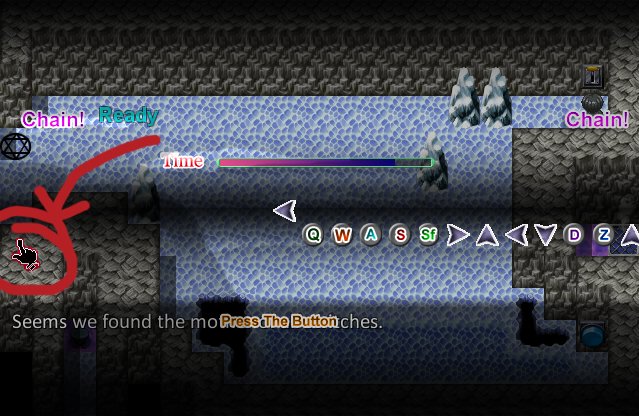
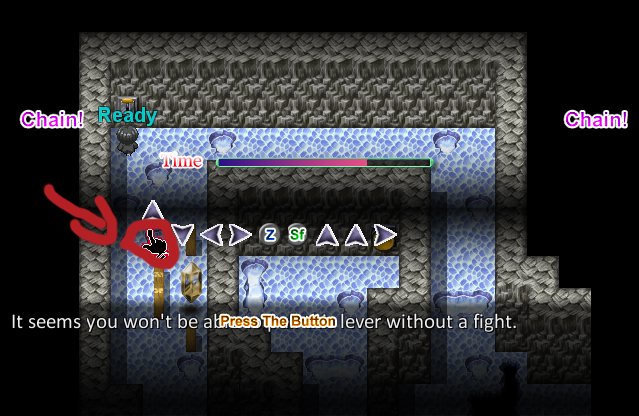
Creator Claims / Removal
If you are the original creator and want this listing reassigned, edited, or removed, join BMMPlay and contact the moderators with proof that matches the original RPG Maker Web profile, linked GitHub, itch.io page, or another public creator identity.
Replies (0)
No replies yet.
0
replies
6
views
Topic Summary
Loading summary...

