

How are MZ tilesets compressed?
BMM_Archive · July 15, 2026

Original Source
- Original title: How are MZ tilesets compressed?
- Original author: Canned_Dinosaur
- Original date: July 6, 2023
- Source thread: https://forums.rpgmakerweb.com/threads/how-are-mz-tilesets-compressed.159011/
- Source forum path: Game Development Engines > RPG Maker MZ Support
Summary
Hi, Not feeling comfortable with there being space between wall and furniture, I decided to GIMP a tile sheet to make the interior look a little more natural (mainly by moving furniture up by 20 or 24px). The results are nice, but when looking at the file size it was three times larger than the original. I managed to shave off some by checking off various settings when exporting ( at 8 bit RGBA), but it's still 352 kb versus 147kb of the original. This, despite the fact that there's...
Archived First Post
Not feeling comfortable with there being space between wall and furniture, I decided to GIMP a tile sheet to make the interior look a little more natural (mainly by moving furniture up by 20 or 24px). The results are nice, but when looking at the file size it was three times larger than the original. I managed to shave off some by checking off various settings when exporting ( at 8 bit RGBA), but it's still 352 kb versus 147kb of the original. This, despite the fact that there's much less pixels than the original.
I'm not sure if this is something I need to worry about, but are there any recommendations for compressing this "properly"?
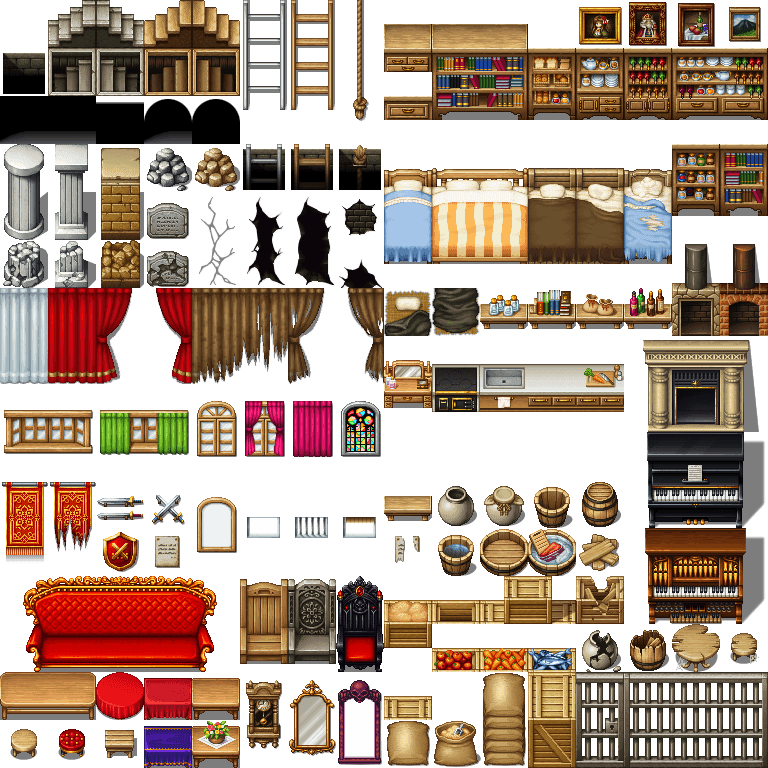
Downloads / Referenced Files
RPG Maker Web attachments are mirrored locally when available. Other external links remain hosted by their original creator or third-party service.
- Local mirror: 247432-87fecdc782da9b85ecec26d2ba43d5ad.png
SHA-256:d2c8f66ffab4bae0b9803b6fa5c93ec7477160dc48804d23b3cda8fc630c75b4
Original attachment URL: https://forums.rpgmakerweb.com/attachments/inside_b_mod-png.268352/
Referenced Images / Attachments
Creator Claims / Removal
If you are the original creator and want this listing reassigned, edited, or removed, join BMMPlay and contact the moderators with proof that matches the original RPG Maker Web profile, linked GitHub, itch.io page, or another public creator identity.
Replies (0)
No replies yet.
Topic Summary
Loading summary...