


How to set specific resolutions for window size?
BMM_Archive · July 15, 2026

Original Source
- Original title: How to set specific resolutions for window size?
- Original author: jjbones123
- Original date: October 21, 2016
- Source thread: https://forums.rpgmakerweb.com/threads/how-to-set-specific-resolutions-for-window-size.69957/
- Source forum path: Game Development Engines > Ruby Game System (RGSS) Scripts > RGSSx Script Support
Summary
Okay so, i'm not entirely sure how to word this, but i'm try: I'm using the Fullscreen++ script. It allows you to fullscreen games made in RPG Maker by pressing F5 and you're able to choose from 3 different resolutions using F6. For the game I am currently making, I have a very specific request for the script and because I know next to nothing about writing scripts in RPG maker, I don't know what to do and was wondering if anyone could please help me? How do I describe it...I...
Archived First Post
I'm using the Fullscreen++ script. It allows you to fullscreen games made in RPG Maker by pressing F5 and you're able to choose from 3 different resolutions using F6. For the game I am currently making, I have a very specific request for the script and because I know next to nothing about writing scripts in RPG maker, I don't know what to do and was wondering if anyone could please help me?
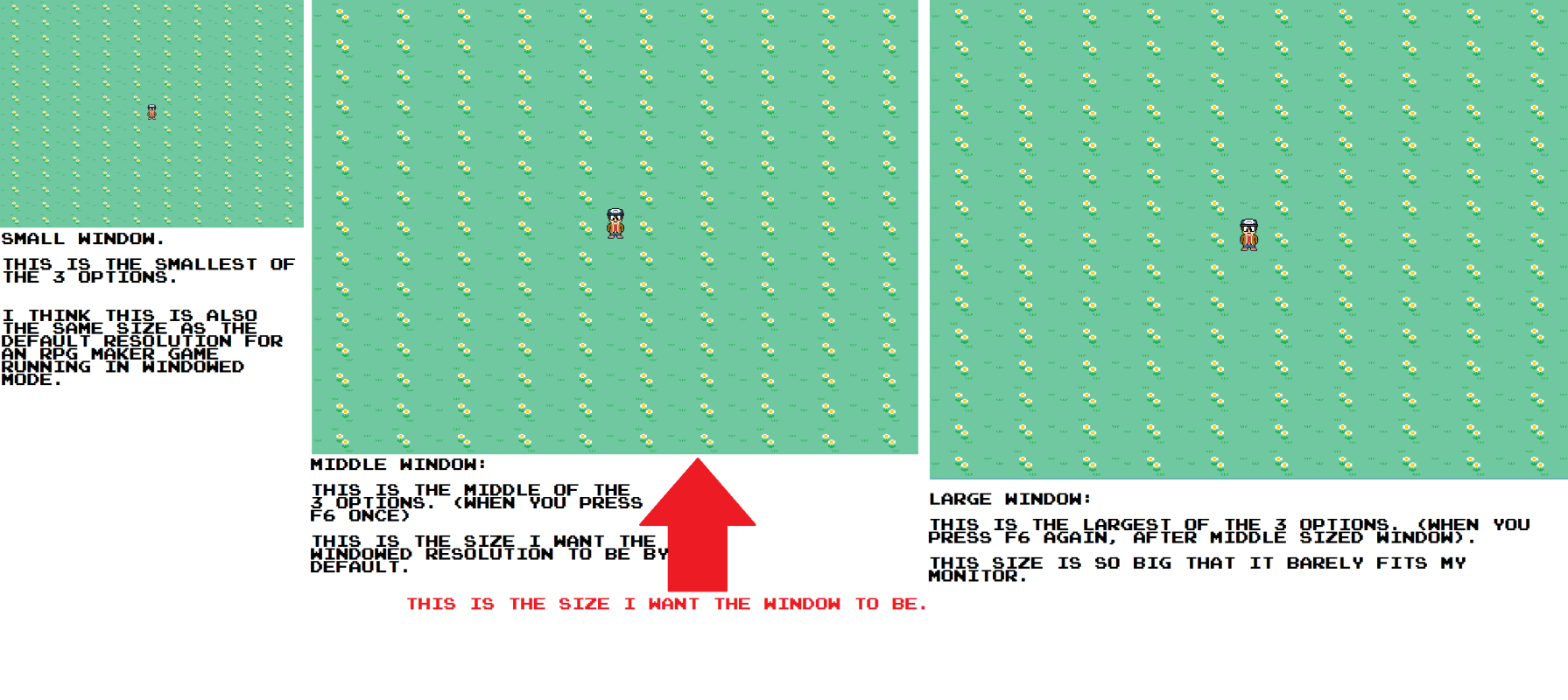
How do I describe it...I want the middle resolution (the second of the 3 resolutions you can choose from when you press F6) to be the default size for when the game is playing in windowed mode. The smallest is similar to the default size of a windowed RPG maker game and it too small to see any details. The largest setting is too big and barely fits on my monitor. I also want to keep it locked at the middle resolution, meaning the resolution can no longer be changed by pressing F6.
TLDR: I want to make the window the game plays in bigger using the Fullscreen++ Script.
I know how to disable the F6 command; just need to type a #before the line of script. (i've already done it for the F5 command since alt+Enter allows fullscreen just fine) but how do I change the resolution/size of the windowed mode to the size I want? To further help convey what I mean, here is a picture diagram of the 3 resolutions and I point out the size window I want below:
Protected download
Downloads / Referenced Files
Log in, then follow the RPG Maker Developers Group to see these download links.
Log in to downloadReferenced Images / Attachments
Creator Claims / Removal
If you are the original creator and want this listing reassigned, edited, or removed, join BMMPlay and contact the moderators with proof that matches the original RPG Maker Web profile, linked GitHub, itch.io page, or another public creator identity.
Replies (0)
No replies yet.
Topic Summary
Loading summary...

