public

Rpg Maker Developers Group

Simple enough for a child, powerful enough for a developer

2 Followers

Yanfly Steal Item Message Window

BMM Archive · July 15, 2026

Preserved forum archive. This topic stores the original first post and locally mirrored RPG Maker Web attachments when available. It is posted by the BMMPlay archive account, not by the original creator.

Original Source

  • Original title: Yanfly Steal Item Message Window
  • Original author: SaburoX
  • Original date: October 19, 2016
  • Source thread: https://forums.rpgmakerweb.com/threads/yanfly-steal-item-message-window.69871/
  • Source forum path: Game Development Engines > Ruby Game System (RGSS) Scripts > RGSSx Script Support

Summary

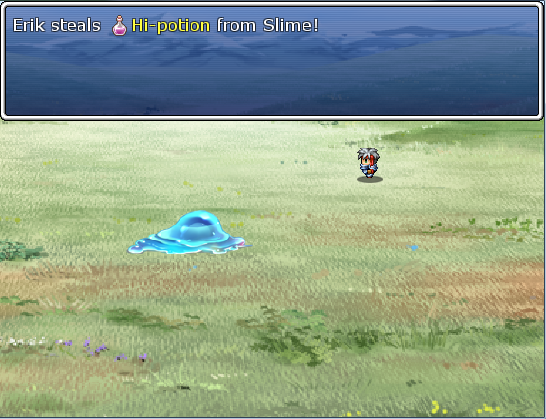
Hi all! I'm in the process of adapting Yanfly Steal Item to work with my SBS of choice (Enu's Tankentai). The skills work properly (or at least seem to so far) but the message window that displays when the player successfully steals isn't quite as I'd like it. I've managed to fix most of the issues by using the advice I found here but I'd also like to move and resize the window to the top of the screen.

Archived First Post

Hi all!
I'm in the process of adapting Yanfly Steal Item to work with my SBS of choice (Enu's Tankentai).
The skills work properly (or at least seem to so far) but the message window that displays when the player successfully steals isn't quite as I'd like it.
I've managed to fix most of the issues by using the advice I found here but I'd also like to move and resize the window to the top of the screen.
Positioning it seems to be as simple as adding the line


$game_message.position = 0


above the message display stuff that starts at line 1015. Doing so gets me to here:


Protected download


So my question now is, how do I resize the message window so that it's only one line high? I experimented with calling and changing the line number variable feature in Yanfly's Ace Message System and resetting it after the message displays. While that works, but it's not very elegant and I'm sure there must be a way to crop the window without calling up another script in the process. So, can anyone provide guidance as to how to do this?.


Thanks in advance!

Downloads / Referenced Files

Log in to download

Log in, then follow the RPG Maker Developers Group to see these download links.

Log in to download

Referenced Images / Attachments

stealmessagesize.png
Creator Claims / Removal

If you are the original creator and want this listing reassigned, edited, or removed, join BMMPlay and contact the moderators with proof that matches the original RPG Maker Web profile, linked GitHub, itch.io page, or another public creator identity.

#039#rpg-maker-archive#rgss-support

Replies (0)

No replies yet.

0 replies 1 view

Log in to reply.

User Avatar