public

Rpg Maker Developers Group

Simple enough for a child, powerful enough for a developer

2 Followers

Title screen overlaps load screen

BMM Archive · July 15, 2026

Preserved forum archive. This topic stores the original first post and locally mirrored RPG Maker Web attachments when available. It is posted by the BMMPlay archive account, not by the original creator.

Original Source

  • Original title: Title screen overlaps load screen
  • Original author: RebirthBlaze
  • Original date: August 7, 2016
  • Source thread: https://forums.rpgmakerweb.com/threads/title-screen-overlaps-load-screen.66462/
  • Source forum path: Game Development Engines > Ruby Game System (RGSS) Scripts > RGSSx Script Support

Summary

Hi, Nice to meet you all! I'm fairly new to this forum and rpg maker VXA, this will be my very first Inquiry post hahah so I'm excited!  I myself am a beginner scriptor and I was watching this tutorial vid on how to create somewhat of a custom background (video will be at end), using the parallax png images and some png images I downloaded via the lesson in which he was teaching for an example. So I end up completing the tutorial and even spent time on allowing...

Archived First Post

Hi, Nice to meet you all! I'm fairly new to this forum and rpg maker VXA, this will be my very first Inquiry post hahah so I'm excited!  I myself am a beginner scriptor and I was watching this tutorial vid on how to create somewhat of a custom background (video will be at end), using the parallax png images and some png images I downloaded via the lesson in which he was teaching for an example. So I end up completing the tutorial and even spent time on allowing myself to fail to get alittle more understand what I doing and it turned out like this.


[IMG]/monthly_2016_08/57a7255a9f6ea_Screenshot(16).png.45628a7d061985cb8cc890790815c4fd.png[/IMG]


Which was what I was aimming for! (still practicing to get the spinny *located top left hand corner* in the middle of the screen)


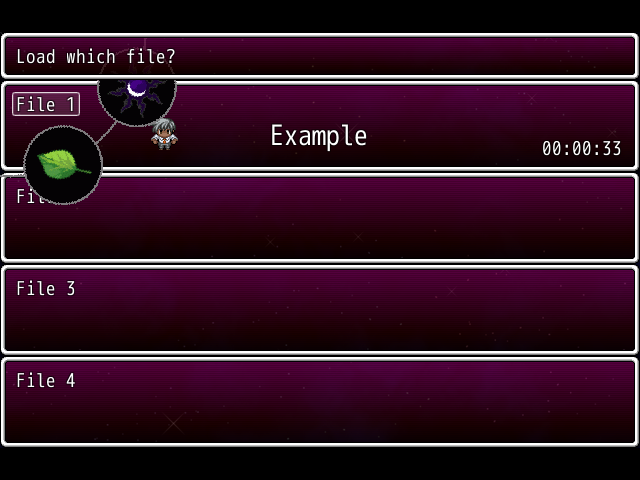
But heres lays the problem. As I didn't notice, I tried to load a game that I have saved recently before I did the tutorial vid and noticed that the title name which is "Example" and the spinny which is the png image top left hand corner is inside of the load menu.


Protected download


I tried to look at a default game script that I created just incase things went wrong when scripting my game in development, so I could look back at the scripts to find an solution to the problem. No luck in finding an solution, but my ambitions to get better made me come here humbly to find answers. Sorry for my inexperiences. Here are the script that I've typed out after the vid.


class Scene_Title < Scene_MenuBase
    def start
      super
      make_graphics
      make_command_window
      play_title_music
    end
    
    def make_graphics
      @background=Plane.new
      @background.bitmap=Cache.parallax("StarlitSky")
      @scroller=Plane.new
      @scroller.bitmap=Cache.picture("StarlitSky")
      @spinny=Sprite.new
      @spinny.bitmap=Cache.picture("finalcircles")
      @spinny.ox=@spinny.width/2
      @spinny.oy=@spinny.height/2
      @spinny.x=5
      @spinny.y=5
      
      
      @foreground_sprite = Sprite.new
      @foreground_sprite.bitmap = Bitmap.new(Graphics.width, Graphics.height)
      @foreground_sprite.z = 100
      draw_game_title if $data_system.opt_draw_title
    end
    
    def draw_game_title
      @foreground_sprite.bitmap.font.size = 35
      rect = Rect.new(0, 0, Graphics.width, Graphics.height / 2)
      @foreground_sprite.bitmap.draw_text(rect, $data_system.game_title, 1)
    end
    
    def update
      super
      @background.oy+=1
      @scroller.ox+=3
      @spinny.angle-=1
    end
    
  def make_command_window
    @command_window = Window_TitleCommand.new
    @command_window.set_handlernew_game, methodcommand_new_game))
    @command_window.set_handlercontinue, methodcommand_continue))
    @command_window.set_handlershutdown, methodcommand_shutdown))
  end
  def close_command_window
    @command_window.close
    update until @command_window.close?
  end
  def command_new_game
    DataManager.setup_new_game
    close_command_window
    fadeout_all
    $game_map.autoplay
    SceneManager.goto(Scene_Map)
  end
  def command_continue
    close_command_window
    fadeout_all
    SceneManager.call(Scene_Load)
  end
   def command_shutdown
    close_command_window
    fadeout_all
    SceneManager.exit
  end
  def play_title_music
    $data_system.title_bgm.play
    RPG::BGS.stop
    RPG::ME.stop
  end
end


Video: (Idk if showing the vid is a mandatory thing, but ahh XD.. first post handicap? lol)


Thank you for whoever replys to this inquiry good or bad!
~My Kind Regards for helping finding a solution

Downloads / Referenced Files

Log in to download

Log in, then follow the RPG Maker Developers Group to see these download links.

Log in to download

Referenced Images / Attachments

Screenshot (17).png
Screenshot (17).png
Creator Claims / Removal

If you are the original creator and want this listing reassigned, edited, or removed, join BMMPlay and contact the moderators with proof that matches the original RPG Maker Web profile, linked GitHub, itch.io page, or another public creator identity.

#039#rpg-maker-archive#rgss-support

Replies (0)

No replies yet.

0 replies 1 view

Log in to reply.

User Avatar