


Yanfly Battle Engine - Difficult to see Current Actor
BMM_Archive · July 15, 2026

Preserved forum archive. This topic stores the original first post and locally mirrored RPG Maker Web attachments when available. It is posted by the BMMPlay archive account, not by the original creator.
Original Source
- Original title: Yanfly Battle Engine - Difficult to see Current Actor
- Original author: læl
- Original date: July 13, 2016
- Source thread: https://forums.rpgmakerweb.com/threads/yanfly-battle-engine-difficult-to-see-current-actor.65263/
- Source forum path: Game Development Engines > Ruby Game System (RGSS) Scripts > RGSSx Script Support
Summary
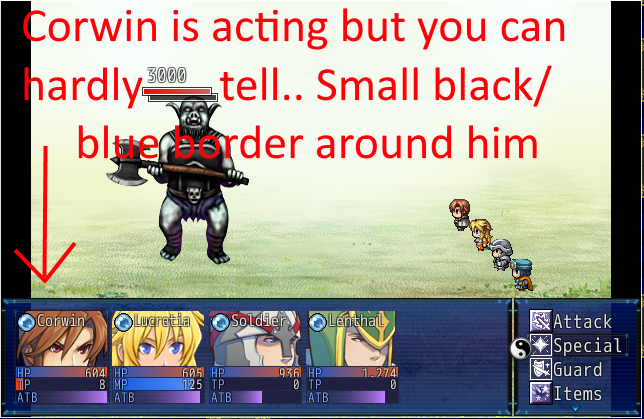
Hello, I'm using a bunch of Yanfly scripts but it is very difficult to see which actor is currently selected in battle. (see example below) As far as I can tell the only place to edit this is in Yanfly's Battle Engine here: #=-=-=-=-=-=-=-=-=-=-=-=-=-=-=-=-=-=-=-=-=-=-=-=-=-=-=-=-=-=-=-=-=-=-=-=-=-
Archived First Post
Hello,
I'm using a bunch of Yanfly scripts but it is very difficult to see which actor is currently selected in battle. (see example below)
As far as I can tell the only place to edit this is in Yanfly's Battle Engine here:
#=-=-=-=-=-=-=-=-=-=-=-=-=-=-=-=-=-=-=-=-=-=-=-=-=-=-=-=-=-=-=-=-=-=-=-=-=-
# - Battle Status Window -
#=-=-=-=-=-=-=-=-=-=-=-=-=-=-=-=-=-=-=-=-=-=-=-=-=-=-=-=-=-=-=-=-=-=-=-=-=-
# Here, you can adjust the settings for the battle status window. The
# battle status window, by default, will show the actor's face, HP, MP, TP
# (if viable), and any inflicted status effects.
#=-=-=-=-=-=-=-=-=-=-=-=-=-=-=-=-=-=-=-=-=-=-=-=-=-=-=-=-=-=-=-=-=-=-=-=-=-
BATTLESTATUS_NAME_FONT_SIZE = 20 # Font size used for name.
BATTLESTATUS_TEXT_FONT_SIZE = 16 # Font size used for HP, MP, TP.
BATTLESTATUS_NO_ACTION_ICON = 1166 # No action icon.
BATTLESTATUS_HPGAUGE_Y_PLUS = 11 # Y Location buffer used for HP gauge.
BATTLESTATUS_CENTER_FACES = false # Center faces for the Battle Status.
As far as I can tell these are the only variables to modify concerning the in battle screen display and as you can see none refer to the active character border.. I'd even settle for an "ACTION_ICON" so I could at least make that something different to let the player know which actor is currently in play.. Perhaps I can add ACTION_ICON in somewhere? I dunno.
I doubt it would be located in any of the built in scripts that come with Ace as this whole set up is custom made by Yanfly, unless I'm mistaken and somebody else has more information than I do.
I am absolutely clueless which direction to go with this one, any insight or directions would be greatly appreciated.
Thanks!
Protected download
I'm using a bunch of Yanfly scripts but it is very difficult to see which actor is currently selected in battle. (see example below)
As far as I can tell the only place to edit this is in Yanfly's Battle Engine here:
#=-=-=-=-=-=-=-=-=-=-=-=-=-=-=-=-=-=-=-=-=-=-=-=-=-=-=-=-=-=-=-=-=-=-=-=-=-
# - Battle Status Window -
#=-=-=-=-=-=-=-=-=-=-=-=-=-=-=-=-=-=-=-=-=-=-=-=-=-=-=-=-=-=-=-=-=-=-=-=-=-
# Here, you can adjust the settings for the battle status window. The
# battle status window, by default, will show the actor's face, HP, MP, TP
# (if viable), and any inflicted status effects.
#=-=-=-=-=-=-=-=-=-=-=-=-=-=-=-=-=-=-=-=-=-=-=-=-=-=-=-=-=-=-=-=-=-=-=-=-=-
BATTLESTATUS_NAME_FONT_SIZE = 20 # Font size used for name.
BATTLESTATUS_TEXT_FONT_SIZE = 16 # Font size used for HP, MP, TP.
BATTLESTATUS_NO_ACTION_ICON = 1166 # No action icon.
BATTLESTATUS_HPGAUGE_Y_PLUS = 11 # Y Location buffer used for HP gauge.
BATTLESTATUS_CENTER_FACES = false # Center faces for the Battle Status.
As far as I can tell these are the only variables to modify concerning the in battle screen display and as you can see none refer to the active character border.. I'd even settle for an "ACTION_ICON" so I could at least make that something different to let the player know which actor is currently in play.. Perhaps I can add ACTION_ICON in somewhere? I dunno.
I doubt it would be located in any of the built in scripts that come with Ace as this whole set up is custom made by Yanfly, unless I'm mistaken and somebody else has more information than I do.
I am absolutely clueless which direction to go with this one, any insight or directions would be greatly appreciated.
Thanks!
Protected download
Downloads / Referenced Files
Log in to download
Log in, then follow the RPG Maker Developers Group to see these download links.
Log in to downloadReferenced Images / Attachments
Creator Claims / Removal
If you are the original creator and want this listing reassigned, edited, or removed, join BMMPlay and contact the moderators with proof that matches the original RPG Maker Web profile, linked GitHub, itch.io page, or another public creator identity.
Replies (0)
No replies yet.
0
replies
4
views
Topic Summary
Loading summary...

