





public

Rpg Maker Developers Group

Simple enough for a child, powerful enough for a developer

2 Followers

Y value position as variable

BMM Archive · July 15, 2026

Preserved forum archive. This topic stores the original first post and locally mirrored RPG Maker Web attachments when available. It is posted by the BMMPlay archive account, not by the original creator.

Original Source

  • Original title: Y value position as variable
  • Original author: NotFlamingo
  • Original date: April 30, 2016
  • Source thread: https://forums.rpgmakerweb.com/threads/y-value-position-as-variable.61190/
  • Source forum path: Game Development Engines > Ruby Game System (RGSS) Scripts > RGSSx Script Support

Summary

Hello, I’m trying to make hud that shows items count and icons. I’m using "CDR – Show variables" script. Everything works perfect except I don’t know how to set y value position in a specific way. I want item count with icon appear in hud only when player gets it. Let’s say player could have 3 different items (1, 2, 3). If I pre-define each item variables y value position (let’s say 30, 60 and 90), it will show nicely in the column (attached picture). But if player will get only...

Archived First Post

Hello,


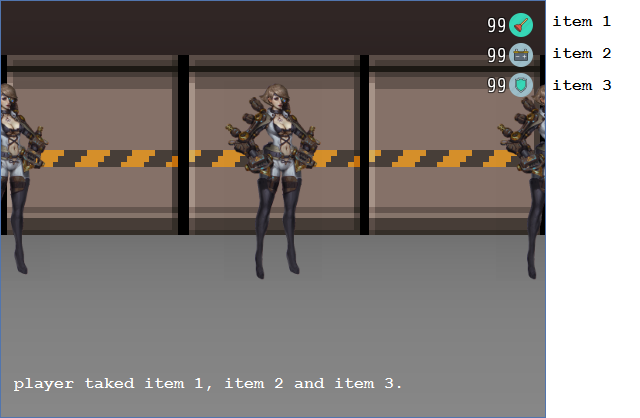
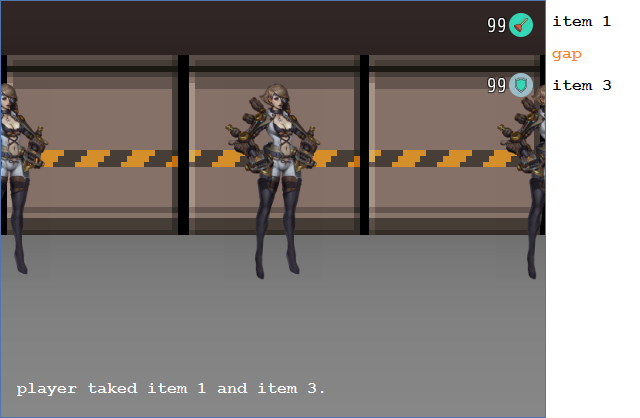
I’m trying to make hud that shows items count and icons. I’m using "CDR – Show variables" script. Everything works perfect except I don’t know how to set y value position in a specific way. I want item count with icon appear in hud only when player gets it. Let’s say player could have 3 different items (1, 2, 3). If I pre-define each item variables y value position (let’s say 30, 60 and 90), it will show nicely in the column (attached picture). But if player will get only first and last item, there will be a gap in hud.


How can I avoid that gap? Is it possible to set that y value position would be something else than stable value? Can I set it as a value of specific variable (then I can add +30 to that variable before each new item count appears to hud)? Btw, I don’t need item icon to disappear from hud, when item count reaches 0. The script call looks like that:


sv_options(n,x,y) #n is variable number


How to set y as variable, not pre-defined value? Or maybe there is another way to avoid the gap I mentioned (also please see it in attached picture)? Thank You for all your help!


Protected download

Protected download

Downloads / Referenced Files

Log in to download

Log in, then follow the RPG Maker Developers Group to see these download links.

Log in to download

Referenced Images / Attachments

items1.png
items1.png
items2.png
items2.png
Creator Claims / Removal

If you are the original creator and want this listing reassigned, edited, or removed, join BMMPlay and contact the moderators with proof that matches the original RPG Maker Web profile, linked GitHub, itch.io page, or another public creator identity.

#rpg-maker-archive#rgss-support

Replies (0)

No replies yet.

0 replies 1 view

Log in to reply.

User Avatar