Preserved forum archive. This topic stores the original first post and locally mirrored RPG Maker Web attachments when available. It is posted by the BMMPlay archive account, not by the original creator.
Original Source
Original title: I cant Get a Gameover text script working
Source forum path: Game Development Engines > Ruby Game System (RGSS) Scripts > RGSSx Script Support
Summary
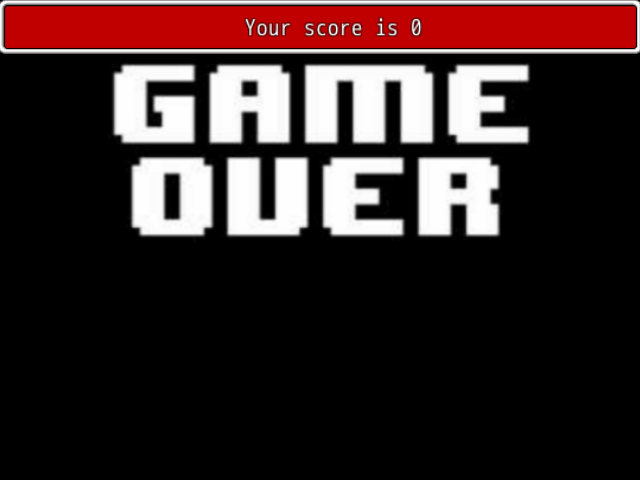
I need some assistance from good scripter(s) im trying to script a game over screen with text, i did find a script but i dont know where to put it, i tried putting it in the gameover script its self nothing, i tried putting it in the materials script list, and it works, but i want to make it so the text box is invisible and it appears at the bottom middle of the screen and make it transition to another text box, this is what the script is that i...
Archived First Post
I need some assistance from good scripter(s) im trying to script a game over screen with text, i did find a script but i dont know where to put it, i tried putting it in the gameover script its self nothing, i tried putting it in the materials script list, and it works, but i want to make it so the text box is invisible and it appears at the bottom middle of the screen and make it transition to another text box, this is what the script is that i found:
class Scene_Gameover < Scene_Base
alias galv_chigoo_gotext_start start
def start
galv_chigoo_gotext_start
create_txt_window
end
def create_txt_window
@txt_window = GoText_Window.new
end
end
class GoText_Window < Window_Base
def initialize
super(0, 0, Graphics.width, fitting_height(1))
draw_message
end
def draw_message
txt = "Your score is " + $game_variables[1].to_s
draw_text(0,0, Graphics.width, line_height, txt,1)
end
end
Protected download
I Just tried this:
class Scene_Gameover < Scene_Base
alias galv_chigoo_gotext_start start
def start
galv_chigoo_gotext_start
create_txt_window
end
def create_txt_window
@txt_window = GoText_Window.new
end
end
class GoText_Window < Window_Base
def initialize
super(0, 0, Graphics.width, fitting_height(1))
draw_message
end
def draw_message
txt = "Dont Give Up Just Yet" + "Michael Stay Determined" draw_text(0,0, Graphics.width, line_height, txt,1)
end
end
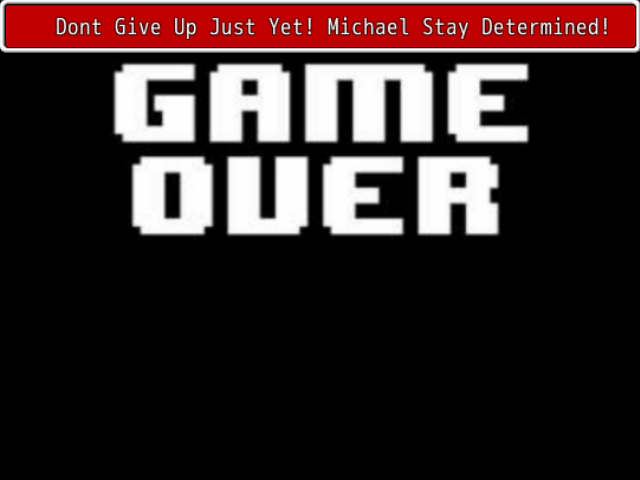
But its in one text box still on the top of the screen:
Protected download:
Please Send a Script to fix this, i cant find anywhere on the internet of how to fix this
P.S (Also Help Make The Menu's and The Battle Buttons look like they do in UNDERTALE, and possibly a bullet hell battle syst. Thanks )
Downloads / Referenced Files
Log in to download
Log in, then follow the RPG Maker Developers Group to see these download links.
If you are the original creator and want this listing reassigned, edited, or removed, join BMMPlay and contact the moderators with proof that matches the original RPG Maker Web profile, linked GitHub, itch.io page, or another public creator identity.




 Pulsar X2 Crazylight Wireless Gaming Mouse
Ultra-light wireless gaming mouse for quick aim, claw grip, and fingertip control.
View on Amazon
Pulsar X2 Crazylight Wireless Gaming Mouse
Ultra-light wireless gaming mouse for quick aim, claw grip, and fingertip control.
View on Amazon