

ButtonPicture Plugin - Wait until picture is selected?
BMM_Archive · July 15, 2026

Original Source
- Original title: ButtonPicture Plugin - Wait until picture is selected?
- Original author: ZombieKidzRule
- Original date: December 22, 2022
- Source thread: https://forums.rpgmakerweb.com/threads/buttonpicture-plugin-wait-until-picture-is-selected.153457/
- Source forum path: Game Development Engines > RPG Maker MZ Support
Summary
Hello, everyone. I have been working on this all day and although I have found several workarounds, I still haven't achieved the preferred result. I have been experimenting with the ButtonPicture plugin that is included with MZ. I want to make it so the player has to click on one of the pictures presented on the screen and they can't move until they do so. So imagine using Show Picture to place 5 images on the screen. Each one is set to be clickable using the ButtonPicture plugin. Everything works...
Archived First Post
I have been working on this all day and although I have found several workarounds, I still haven't achieved the preferred result.
I have been experimenting with the ButtonPicture plugin that is included with MZ. I want to make it so the player has to click on one of the pictures presented on the screen and they can't move until they do so.
So imagine using Show Picture to place 5 images on the screen. Each one is set to be clickable using the ButtonPicture plugin. Everything works fine except that the player can move around freely.
I tried a bunch of things using Set Movement Route/Wait in a loop, but then I couldn't click any of the pictures.
The first workaround I found was to surround the player sprite with blank events that keep them from moving. Once an image is selected, a script turns on Self Switches for all of those blank events to make it so they are now under the player and the player can move freely again. But that isn't ideal.
I thought I had a good solution using this:
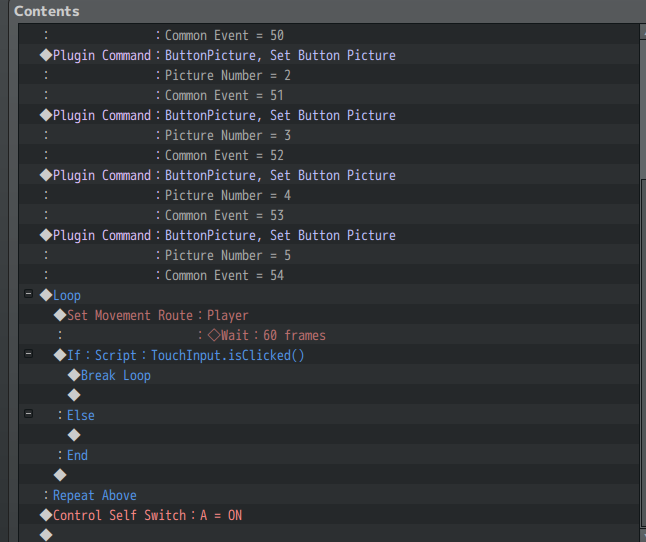
Using TouchInput.isClicked() worked great, until I realized the player could just click the mouse anywhere and that let them move again, even though an image wasn't selected.
So I am trying to find a way to keep the player from moving until they select one of the pictures.
Does anyone know of a way to do that?
I did discover that the default ButtonPicture plugin was updated a few years back (which I haven't downloaded) but that was to make it so you didn't need to use multiple common events when you have multiple pictures, which is a nice update.
Honestly, I tried to figure out how to do this without a plugin at all, but that wasn't successful. And I know I could use the Show Choices command along with the Show Picture and that would be another way. I was just hoping to allow them to click the picture.
Because originally I started experimenting with this for visible, onscreen dice rolls. So it would be nice if I could prompt the player to click the onscreen dice to trigger the roll but make it so they can't walk around until they do that.
I noticed that the ButtonPicture plugin command doesn't wait for input or a response. It just proceeds with the remainder of the event while still allowing the picture to be clicked on to trigger a Common Event, even though the original event that made the pictures appear has ended.
I also saw old threads about using a blank text event, but once the player presses Enter, they can move again.
Ultimately, I can work around what I am trying to do within the game itself. But I was just hoping that there would be a simple way (without another plugin) to make the player wait until they actually select one of the pictures. But I couldn't figure out how to link the picture that the player clicks on to anything that would let me break the wait loop.
I could be missing something obvious or maybe there really isn't a way to do it. I started posting for help here multiple times today, but each time I was able to make progress. Now I think I am stuck.
I hope my explanation of what I am trying to do is clear.
Thanks for any assistance you can provide!
Downloads / Referenced Files
RPG Maker Web attachments are mirrored locally when available. Other external links remain hosted by their original creator or third-party service.
- Local mirror: 227833-baa221f514e93bd2e3d946210d34cb7b.png
SHA-256:06ff1d709f76e4671867479e3d85a31520d727a49db2e79afcd7f3eb31fa787d
Original attachment URL: https://forums.rpgmakerweb.com/attachments/click-script-png.248753/
Referenced Images / Attachments
Creator Claims / Removal
If you are the original creator and want this listing reassigned, edited, or removed, join BMMPlay and contact the moderators with proof that matches the original RPG Maker Web profile, linked GitHub, itch.io page, or another public creator identity.
Replies (0)
No replies yet.
Topic Summary
Loading summary...