


Change MP and TP Module Vocab Terms?
BMM_Archive · July 15, 2026

Original Source
- Original title: Change MP and TP Module Vocab Terms?
- Original author: Imploded Tomato
- Original date: March 7, 2016
- Source thread: https://forums.rpgmakerweb.com/threads/change-mp-and-tp-module-vocab-terms.58217/
- Source forum path: Game Development Engines > Ruby Game System (RGSS) Scripts > RGSSx Script Support
Summary
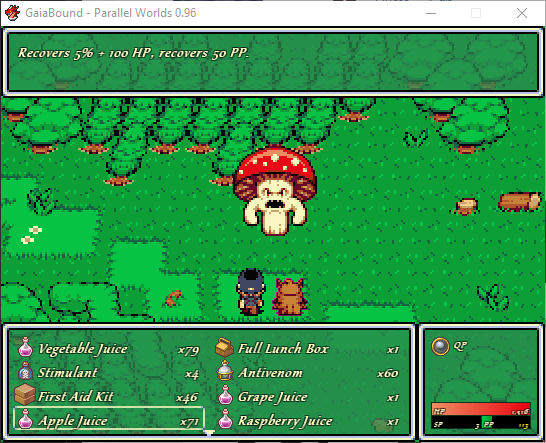
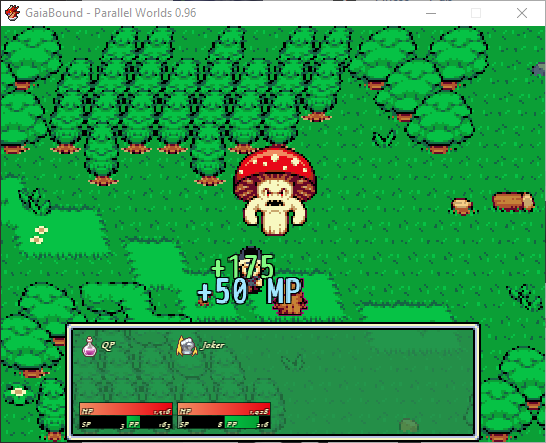
I have changed database terms in my project, MP is now PP and TP is now SP. While my characters are fighting monsters in battle and they use a recovery item that recovers PP or SP, it will still display as MP and TP after usage. I'm aware that the script settings Vocab control the settings on the terms I wish to change properly but I don't know how to do it. If anyone can show me how to convert these terms in battle, I'd be very thankful and would give a...
Archived First Post
Edit : I uploaded 2 screenshots to better explain my problem. When I use the item, the MP term pops up instead of the PP term that I intended. How do I change this to match?
Protected download
Protected download
Downloads / Referenced Files
Log in, then follow the RPG Maker Developers Group to see these download links.
Log in to downloadReferenced Images / Attachments
Creator Claims / Removal
If you are the original creator and want this listing reassigned, edited, or removed, join BMMPlay and contact the moderators with proof that matches the original RPG Maker Web profile, linked GitHub, itch.io page, or another public creator identity.
Replies (0)
No replies yet.
Topic Summary
Loading summary...

