





Original Source
- Original title: Help with "Hime's Custom Icon Sheets"
- Original author: Mogipo
- Original date: February 4, 2016
- Source thread: https://forums.rpgmakerweb.com/threads/help-with-himes-custom-icon-sheets.56263/
- Source forum path: Game Development Engines > Ruby Game System (RGSS) Scripts > RGSSx Script Support
Summary
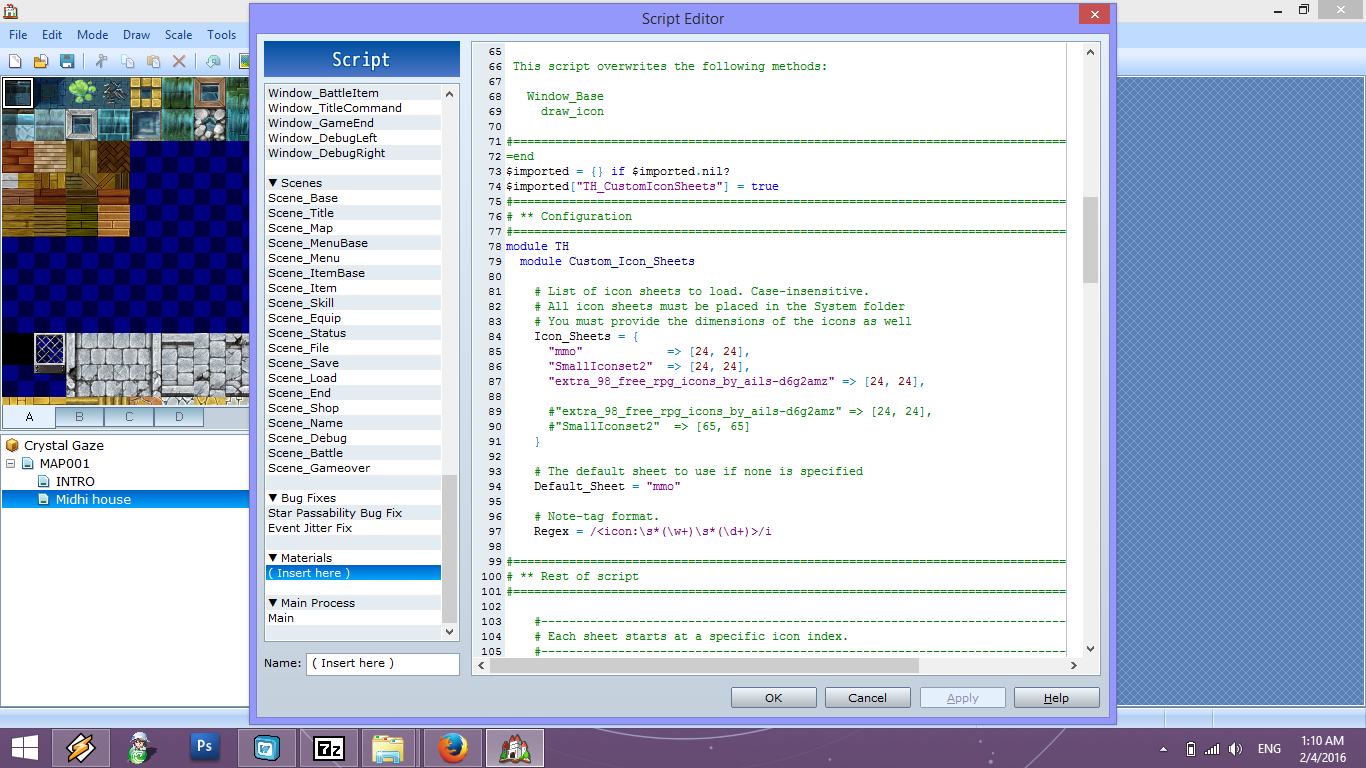
Hello, I'm new to RMVX Ace...and I have no idea how to make this script work. I'm clueless with scripts since this would be the first one I'm using. So let me explain fully... *I've installed the script in the right place and I placed my iconsets in my Graphics/system folder in my game folder. I've tried copying the names of the iconset file names into the script but I still have no option to select them when I'm in the database...I've even tried using the "Custom Icon Selector" Thing,...
Archived First Post
*I've installed the script in the right place and I placed my iconsets in my Graphics/system folder in my game folder. I've tried copying the names of the iconset file names into the script but I still have no option to select them when I'm in the database...I've even tried using the "Custom Icon Selector" Thing, but still no luck. It'd really appreciate it if someone can help...and for reference this is how I enter the filenames...not sure if its the right place but it's under configuration.
Protected download
Here is the link to the script-
http://himeworks.com/2013/03/custom-icon-sheets/
Downloads / Referenced Files
Log in, then follow the RPG Maker Developers Group to see these download links.
Log in to downloadReferenced Images / Attachments
Creator Claims / Removal
If you are the original creator and want this listing reassigned, edited, or removed, join BMMPlay and contact the moderators with proof that matches the original RPG Maker Web profile, linked GitHub, itch.io page, or another public creator identity.
Replies (0)
No replies yet.
Topic Summary
Loading summary...
