public

Rpg Maker Developers Group

Simple enough for a child, powerful enough for a developer

2 Followers

Yanfly's Ace Equip Engine & Yami's Equipment Learning Compatiblity Help

BMM Archive · July 15, 2026

Preserved forum archive. This topic stores the original first post and locally mirrored RPG Maker Web attachments when available. It is posted by the BMMPlay archive account, not by the original creator.

Original Source

  • Original title: Yanfly's Ace Equip Engine & Yami's Equipment Learning Compatiblity Help
  • Original author: BleachBummer
  • Original date: October 27, 2015
  • Source thread: https://forums.rpgmakerweb.com/threads/yanflys-ace-equip-engine-yamis-equipment-learning-compatiblity-help.47853/
  • Source forum path: Game Development Engines > Ruby Game System (RGSS) Scripts > RGSSx Script Support

Summary

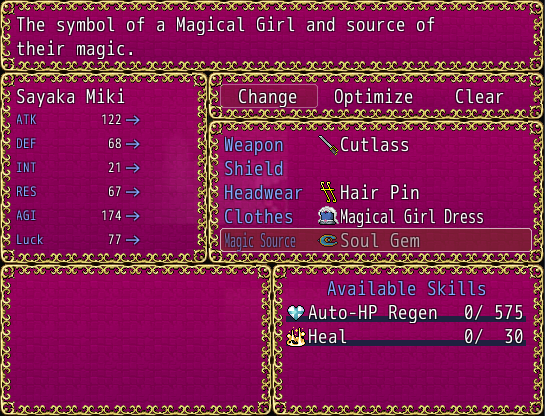
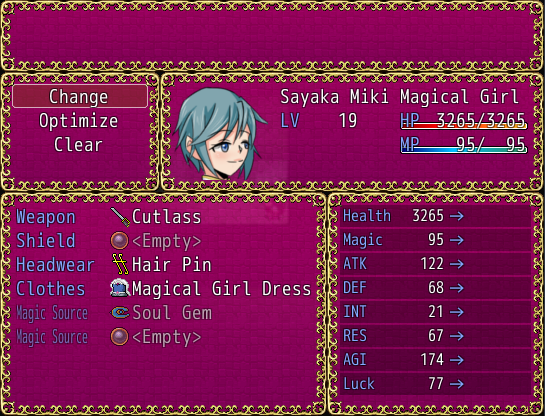
I don't know if someone asked this, but how do I make the screen look like how it would look in the first picture with the same elements from the first? (Meaning have the 5th equipment slot I made in the equipment menu and show the available skills along with how close you are to mastering them. Only thing to lack is the party member face/LV/HP/MP window) I would like to use these scripts in combination and it looks compatible according to Yami's script, but I just am not sure...

Archived First Post

I don't know if someone asked this, but how do I make the screen look like how it would look in the first picture with the same elements from the first? (Meaning have the 5th equipment slot I made in the equipment menu and show the available skills along with how close you are to mastering them. Only thing to lack is the party member face/LV/HP/MP window)

I would like to use these scripts in combination and it looks compatible according to Yami's script, but I just am not sure as to how to do it, if it is either edits to the script or something else.

Here is the first screenshot, using just Yami's script:

Protected download

Here is the second screenshot, using both. Yanfly's seems to take over and I'd still like to see the skills available for learning and progress on learning:

Protected download

Again, what I'd like is for it to look like the first screenshot with the exception of the fifth equipment slot. Either that or a way to toggle between stats and learned skills.

Edit: Forgot to add the scripts, sorry about that.

Yami's

Yanfly's


Downloads / Referenced Files

Log in to download

Log in, then follow the RPG Maker Developers Group to see these download links.

Log in to download

Referenced Images / Attachments

AndySnap_018.png
AndySnap_018.png
AndySnap_019.png
AndySnap_019.png
Creator Claims / Removal

If you are the original creator and want this listing reassigned, edited, or removed, join BMMPlay and contact the moderators with proof that matches the original RPG Maker Web profile, linked GitHub, itch.io page, or another public creator identity.

#039#rpg-maker-archive#rgss-support

Replies (0)

No replies yet.

0 replies 1 view

Log in to reply.

User Avatar