


Survival System by Apellonyx Problem
BMM_Archive · July 15, 2026

Original Source
- Original title: Survival System by Apellonyx Problem
- Original author: kaarnij
- Original date: October 19, 2015
- Source thread: https://forums.rpgmakerweb.com/threads/survival-system-by-apellonyx-problem.46133/
- Source forum path: Game Development Engines > Ruby Game System (RGSS) Scripts > RGSSx Script Support
Summary
Hi, I'm trying to make a basic kid game for my first project, I'm new with all of this but sure i followed the right steps, my problem is I've tried to setup the Survival System by Apellonyx and completed all these steps below but i get this error I only want to use rest, hunger and thirst and I've disable the others and if 1 of the bars goes down it simply transfers the player to a different location like a hospital instead of the game over which i havent...


Archived First Post
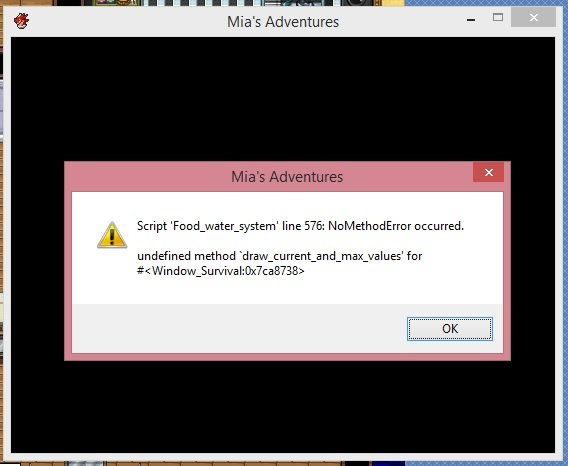
I've tried to setup the Survival System by Apellonyx and completed all these steps below but i get this error
I only want to use rest, hunger and thirst and I've disable the others and if 1 of the bars goes down it simply transfers the player to a different location like a hospital instead of the game over which i havent figured out yet because im stuck with this error
Error on line 576
Protected download
Here's the instructions i follow=
1. In "Database", create a "Common Events" called "Apple effect" (or something else you want).
2. In the "content" of this event, open up the "Event Commands" (double clicking a line) and go to the 3rd tab.
3. Under "Advanced", click on "Script".
4. Copy and paste "$survival_v[2] += n" (eg: n = 20) into the textbox. This means that whenever this function is called, it will add 20 to the value of the food bar.
5. Now go to "Items" and create an "Apple" item (change maximum to add a new item).
6. Set the price, description etc to your liking.
7. In the right side of the menu, under "Effects", double click on a space.
8. Under "Other" tab, click on "Common Event" and select the "Apple effect" you just created in the previous steps.
9. Read the script's "SURVIVALSWITCH = 1 # Game switch ID for enabling and disabling the system"; it is a direct copy of the script. You can change this number but make sure you change it for step 12.
10. In an empty square of the map, "Activate" the system.
11. In the 1st tab under "Game Progression", click on "Control Switches".
12. Choose the "0001" switch, that corresponds with step 9. I named mine "Survival System". The whole line is "Control Switches: [0001: Survival System] = ON
13. In the main event page at the bottom, under "Trigger", set it to "Parallel Process".
Heres the script
<snip>
View attachment 24302
View attachment 24301
View attachment 24300
Link to the Survival system
http://www.rpgmakervxace.net/topic/14084-survival-system/
Any help would be much appreciated thx
View attachment 24300
View attachment 24301
View attachment 24302
Protected download
Downloads / Referenced Files
Log in, then follow the RPG Maker Developers Group to see these download links.
Log in to downloadReferenced Images / Attachments
Creator Claims / Removal
If you are the original creator and want this listing reassigned, edited, or removed, join BMMPlay and contact the moderators with proof that matches the original RPG Maker Web profile, linked GitHub, itch.io page, or another public creator identity.
Replies (0)
No replies yet.
Topic Summary
Loading summary...
