Preserved forum archive. This topic stores the original first post and locally mirrored RPG Maker Web attachments when available. It is posted by the BMMPlay archive account, not by the original creator.
Source forum path: Game Development Engines > Ruby Game System (RGSS) Scripts > RGSSx Script Support
Summary
Hey Guys I just finished making a game using rpg maker xp but i have a few question.. Before i ask a few questions,i would like to introduce my game, The game is called animalrescue which the player needs to rescue the animals by answering a few quiz.. When each quiz is answered coorrect, the player may move to the second question and each correct quiz ansered, the player receive scoring points and the score windows is shown at the map... The game was able to dispose the window after...
Archived First Post
Hey Guys I just finished making a game using rpg maker xp but i have a few question..
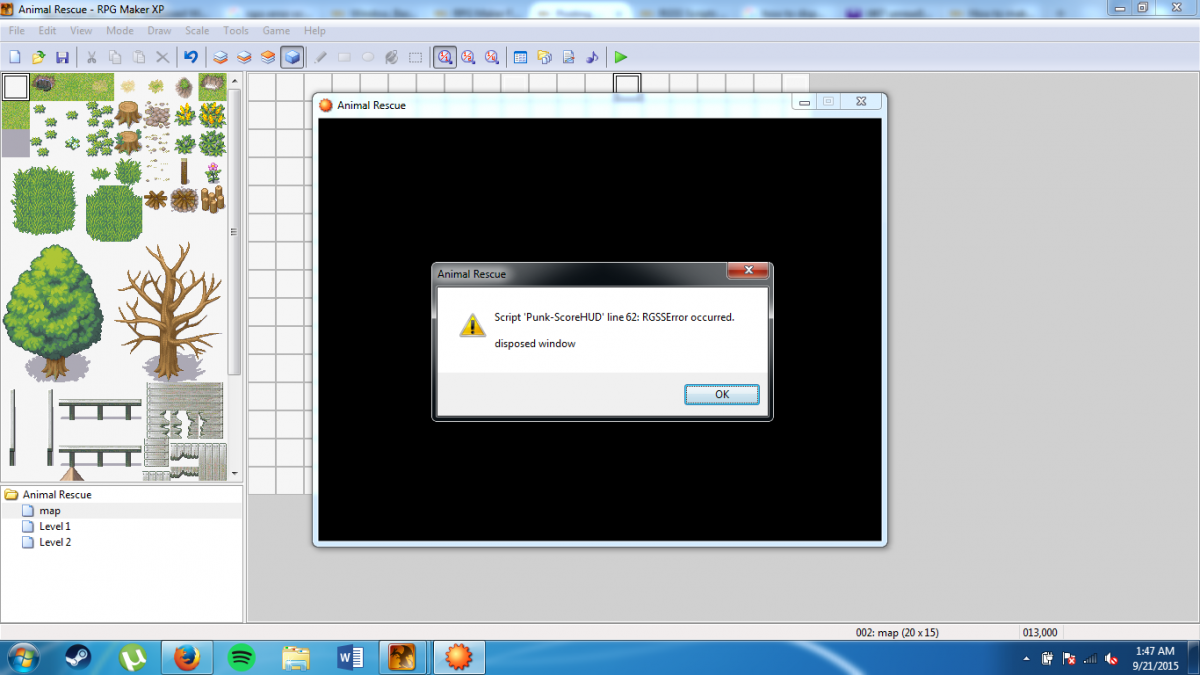
Before i ask a few questions,i would like to introduce my game, The game is called animalrescue which the player needs to rescue the animals by answering a few quiz.. When each quiz is answered coorrect, the player may move to the second question and each correct quiz ansered, the player receive scoring points and the score windows is shown at the map... The game was able to dispose the window after the game finished and not shown in the scene title. But i have a problem which is that after completing the game it will return to the title screen but after i start a new game as soon as i finish the 1st game, an error
occured
Protected download this is the pprobblem that i countered
Code script for scoring:
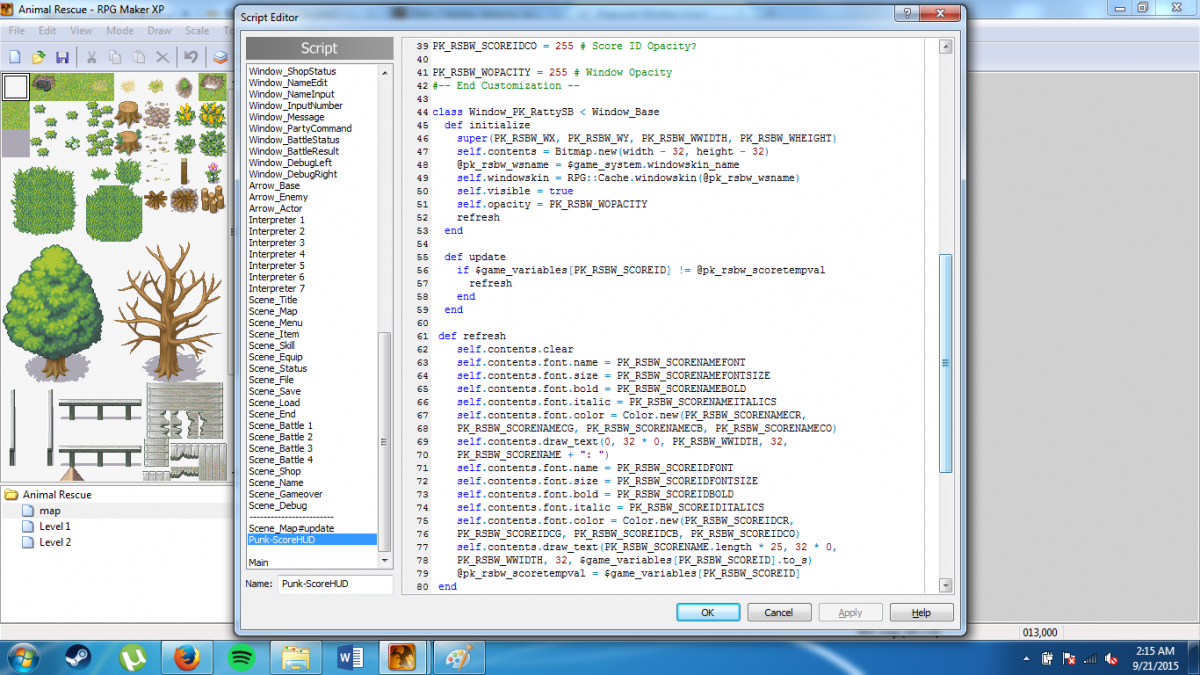
=begin╔══════════════════════════════════════════════════════════════════════════════╗║ Ratty's scoreboard v.2 ║║ By Punk ║║ 10/05/08 ║╟──────────────────────────────────────────────────────────────────────────────╢║ - To display the window, type $pk_rsbw = Window_PK_RattySB.new in a script ║║ call. ║║ - To dispose the window, type $pk_rsbw.dispose in a new script call. ║║ - You're not going to use the default menu system right? Meep! ║╚══════════════════════════════════════════════════════════════════════════════╝=end#-- Start Customization --PK_RSBW_WX = 390 # X PositionPK_RSBW_WY = 0 # Y PositionPK_RSBW_WWIDTH = 250 # WidthPK_RSBW_WHEIGHT = 60 # HeightPK_RSBW_SCORENAME = "SCORE" # Score NamePK_RSBW_SCOREID = 3 # Score Game Variable IDPK_RSBW_SCORENAMEFONT = ["Arial", "Tahoma"] # Score Name FontsPK_RSBW_SCORENAMEFONTSIZE = 22 # Score Name Font SizePK_RSBW_SCORENAMEBOLD = true # Score Name Bold Flag?PK_RSBW_SCORENAMEITALICS = false # Score Name Italics Flag?PK_RSBW_SCORENAMECR = 255 # Score Name Color Amount of Red?PK_RSBW_SCORENAMECG = 255 # Score Name Color Amount of Green?PK_RSBW_SCORENAMECB = 150 # Score Name Color Amount of Blue?PK_RSBW_SCORENAMECO = 255 # Score Name Opacity?PK_RSBW_SCOREIDFONT = ["Arial", "Tahoma"] # Score ID FontsPK_RSBW_SCOREIDFONTSIZE = 22 # Score ID Font SizePK_RSBW_SCOREIDBOLD = true # Score ID Bold Flag?PK_RSBW_SCOREIDITALICS = false # Score Name Italics Flag?PK_RSBW_SCOREIDCR = 255 # Score ID Color Amount of Red?PK_RSBW_SCOREIDCG = 255 # Score ID Color Amount of Green?PK_RSBW_SCOREIDCB = 255 # Score ID Color Amount of Blue?PK_RSBW_SCOREIDCO = 255 # Score ID Opacity?PK_RSBW_WOPACITY = 255 # Window Opacity#-- End Customization --class Window_PK_RattySB < Window_Base def initialize super(PK_RSBW_WX, PK_RSBW_WY, PK_RSBW_WWIDTH, PK_RSBW_WHEIGHT) self.contents = Bitmap.new(width - 32, height - 32) @pk_rsbw_wsname = $game_system.windowskin_name self.windowskin = RPG::Cache.windowskin(@pk_rsbw_wsname) self.visible = true self.opacity = PK_RSBW_WOPACITY refresh end def update if $game_variables[PK_RSBW_SCOREID] != @pk_rsbw_scoretempval refresh end end def refresh self.contents.clear self.contents.font.name = PK_RSBW_SCORENAMEFONT self.contents.font.size = PK_RSBW_SCORENAMEFONTSIZE self.contents.font.bold = PK_RSBW_SCORENAMEBOLD self.contents.font.italic = PK_RSBW_SCORENAMEITALICS self.contents.font.color = Color.new(PK_RSBW_SCORENAMECR, PK_RSBW_SCORENAMECG, PK_RSBW_SCORENAMECB, PK_RSBW_SCORENAMECO) self.contents.draw_text(0, 32 * 0, PK_RSBW_WWIDTH, 32, PK_RSBW_SCORENAME + ": ") self.contents.font.name = PK_RSBW_SCOREIDFONT self.contents.font.size = PK_RSBW_SCOREIDFONTSIZE self.contents.font.bold = PK_RSBW_SCOREIDBOLD self.contents.font.italic = PK_RSBW_SCOREIDITALICS self.contents.font.color = Color.new(PK_RSBW_SCOREIDCR, PK_RSBW_SCOREIDCG, PK_RSBW_SCOREIDCB, PK_RSBW_SCOREIDCO) self.contents.draw_text(PK_RSBW_SCORENAME.length * 25, 32 * 0, PK_RSBW_WWIDTH, 32, $game_variables[PK_RSBW_SCOREID].to_s) @pk_rsbw_scoretempval = $game_variables[PK_RSBW_SCOREID] end def dispose if self.contents != nil self.contents.dispose end super endendclass Scene_Map alias pk_rsbw_update :update def update pk_rsbw_update if $pk_rsbw == nil else $pk_rsbw.update end end endabove is the code for displaying score window in the game and on the line 62 where the error occured which is self.contents.clear
line 62
Protected download
(By the way my friend gave the script to mee for the scoring section so i dont know about the script either.. it is not mine..)
Can anyone help me??
Downloads / Referenced Files
Log in to download
Log in, then follow the RPG Maker Developers Group to see these download links.
If you are the original creator and want this listing reassigned, edited, or removed, join BMMPlay and contact the moderators with proof that matches the original RPG Maker Web profile, linked GitHub, itch.io page, or another public creator identity.






 Shure MV7 USB Podcast Microphone
USB/XLR dynamic microphone for podcasting, streaming, voiceover, and creator audio.
View on Amazon
Shure MV7 USB Podcast Microphone
USB/XLR dynamic microphone for podcasting, streaming, voiceover, and creator audio.
View on Amazon