


MVDeveloper Link Plugin
BMM_Archive · July 15, 2026

Original Source
- Original title: Developer Link Plugin
- Original author: OpheliaEnigma
- Original date: November 11, 2020
- Source thread: https://forums.rpgmakerweb.com/threads/developer-link-plugin.129776/
- Source forum path: Game Development Engines > RPG Maker Javascript Plugins > JS Plugin Releases (RMMV)
Summary
Developer Link Plugin+1.0.0 OpheliaEnigma Introduction Allows the user to link to a specific URL or email at the title screen or during the game. It can be used to link to the developer's site, contact email or the game's page.
Archived First Post
OpheliaEnigma
Introduction
Allows the user to link to a specific URL or email at the title screen or during the game. It can be used to link to the developer's site, contact email or the game's page.
Features
This plugin allows the developer to set a link on the title screen and/or an event in-game to redirect the user on a button click or event interaction.
How to Use
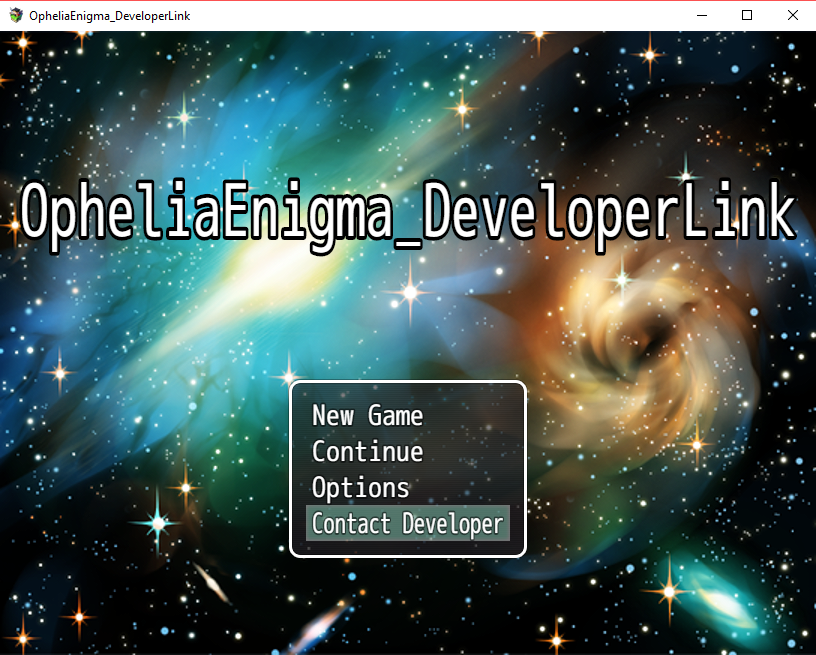
This plugin is quite simple. The parameters of the plugin can be set to add a new command option to the title screen below the Options command. On the parameters you can set the text for the command (first parameter) and the link to send the player when he selects the new command (third parameter). Note the second parameter can be set to true or false if you wish to add the command to the title screen or not.
The link to send the player can be normal url such as:
- https://opheliaenigma.itch.io/
Either you set the command option on the title screen or not, you can use a script call to link to any link you wish during any moment of the game. The script call is as follows:
- OpheliaEnigma.DeveloperLink.linkTo("https://opheliaenigma.itch.io/");
Please donwload the plugin here
Credits
- OpheliaEnigma
Terms
This plugin is free to be used for non-commercial projects, however, for usage on commercial projects please donate the amount specified for this plugin at the plugin's itch.io page. Any doubts don't hesitate to contact me, OpheliaEnigma, either through here or my email address: OpheliaEnigmaUltimateCoder@gmail.com
Features Mentioned
- This plugin allows the developer to set a link on the title screen and/or an event in-game to redirect the user on a button click or event interaction.
Downloads / Referenced Files
Log in, then follow the RPG Maker Developers Group to see these download links.
Log in to downloadLicense / Terms Note
Credits - OpheliaEnigma Terms This plugin is free to be used for non-commercial projects, however, for usage on commercial projects please donate the amount specified for this plugin at the plugin's itch.io page. Any doubts don't hesitate to contact me, OpheliaEnigma, either through here or my email address: OpheliaEnigmaUltimateCoder@gmail.com


Referenced Images / Attachments
Creator Claims / Removal
If you are the original creator and want this listing reassigned, edited, or removed, join BMMPlay and contact the moderators with proof that matches the original RPG Maker Web profile, linked GitHub, itch.io page, or another public creator identity.
Replies (0)
No replies yet.
Topic Summary
Loading summary...
