


Moving X position of text in Window_Base
BMM_Archive · July 15, 2026

Original Source
- Original title: Moving X position of text in Window_Base
- Original author: Juggy
- Original date: July 23, 2015
- Source thread: https://forums.rpgmakerweb.com/threads/moving-x-position-of-text-in-window_base.42758/
- Source forum path: Game Development Engines > Ruby Game System (RGSS) Scripts > RGSSx Script Support
Summary
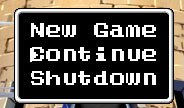
I've got another problem. I sucessfully made a picture to show instead of having to deal with the square box selection we have in menus. So now I have an arrow to show which command is being selected in all my menus. My issue is that I need to move the commands slightly on X position to the right. I don't want to center them, or aligh them to the right. I tried fiddling with the "standard_padding", but that obviously increases both the X and Y distance in the Window....
Archived First Post
What I need is a way to only move the X position so that the text is not ontop of my arrow selection.
Protected download
Downloads / Referenced Files
Log in, then follow the RPG Maker Developers Group to see these download links.
Log in to downloadReferenced Images / Attachments
Creator Claims / Removal
If you are the original creator and want this listing reassigned, edited, or removed, join BMMPlay and contact the moderators with proof that matches the original RPG Maker Web profile, linked GitHub, itch.io page, or another public creator identity.


Replies (0)
No replies yet.
Topic Summary
Loading summary...
