Hi everyone,
To avoid confusion, I'm going to fill in a few notable details before going on to my problem.
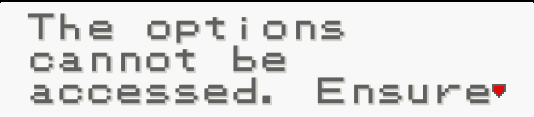
A friend of mine has started up a RPG Horror Game based off on a Pokemon scary story, but it was quickly shut down due to the loss of motivation. Recently, he let me in on completing the project myself, so he sent me all of the game files for the project. Things were going quite well... until I realized the amount of scripting I had to deal with. Particularly, when I was dealing with the font for the game, I had enough scripting knowledge to replace an old font with a new one, but the new font that I had chosen came up rather... brighter than what I anticipated the font to be (see attachments: "in_game_pokemon_font").
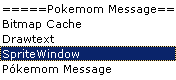
The main script section is called Pokemom Message, and it basically aligns and orients a selected font to fit with a Pokemon text box. You can see another attached file that shows the "sub-scripts" that are involved with making the Pokemon-styled text box.
I'm not sure where this script came from, but it seems to work with RPG Maker VX, so if anyone could clear that up for me, that would be great. Each of these scripts are in a text file (see attachments).
I'm not going to consider myself to be avid with RGSS, but I was tampering with the "SpriteWindow" script, looking for various variables dealing with the brightness of the font that is displayed in-game, and came across the variable "opacity". Specifically, the one that deals with the opacity of the font is "contents_opacity". This originally was at a value of 255, so when I changed the value to 100, and the font in my game was more brighter.
I then changed the variable to 500, to make the font darker, but the font went back to the 255 standard look.
@cursoropacity=500I looked through more of the "SpriteWindow" script to find that there was a conditional statement that said:
def contents_opacity=(value) @contents_opacity=value @contents_opacity=0 if @contents_opacity<0 @contents_opacity=255 if @contents_opacity>255 privRefresh if @visibleSo I changed the conditional statement to say that if the @contents_opacity>500, the @contents_opacity=255.
I was thinking that this would solve the problem, but it didn't. I tried to change all the contents_opacity variables in the "SpriteWindow" to 500, but it still didn't help. I was sure that the contents_opacity variable is the font brightness variable, because I changed all other opacity variables to 100 and worked my way into changing all the variables back to 255, eventually isolating the problem to the @contents_opacity variable.
Eventually, I set all the of the script back to its default values and gave up. I know that there are some expert RGSS scripters in this forum, so I decided to come to you guys. This isn't supposed to be a Script Request, since I already have some script, but I just want to make sense of all the script that I'm looking at and solve my problem.
Basically,
I want the font that I see in-game ("in_game_pokemon_font"; attached)
to look just like the font I had chosen ("actual_pokemon_font"; attached). Essentially, I wanted to make the font darker by changing the "contents_opacity" variable, but that didn't help. So any help would be appreciated. Thanks!
Protected download
Protected download
Protected download
BitmapCache.txt
Drawtext.txt
SpriteWindow.txt
PokemomMessage.txt






 7-in-2 USB-C Multiport Adapter for MacBook Pro and Air
Slim USB-C hub for HDMI, USB, card access, and everyday laptop expansion.
View on Amazon
7-in-2 USB-C Multiport Adapter for MacBook Pro and Air
Slim USB-C hub for HDMI, USB, card access, and everyday laptop expansion.
View on Amazon