
Original Source
- Original title: Resize the Battle Commands Window
- Original author: Zero0018
- Original date: January 1, 2015
- Source thread: https://forums.rpgmakerweb.com/threads/resize-the-battle-commands-window.35442/
- Source forum path: Game Development Engines > Ruby Game System (RGSS) Scripts > RGSSx Script Support
Summary
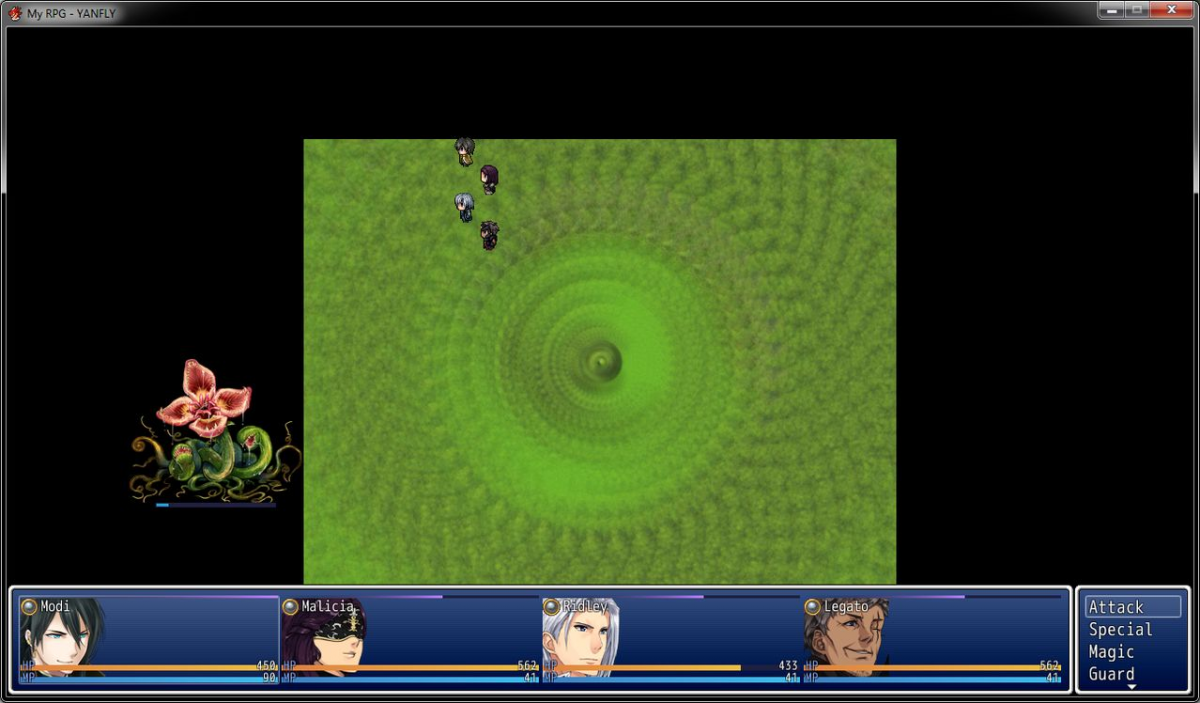
I am using the custom .dll that makes it so you can increase your games resolution. I am using 1280x720. I am using HIME's auto position script which fixes the enemy positions in combat. The problem I am having is the party window is to big. With the new size each party member's box is stretched out horizontally. Can someone please tell me what to edit to make it so the size is a constant and not scale with the width of the screen? I went through the whole script...
Archived First Post
Can someone please tell me what to edit to make it so the size is a constant and not scale with the width of the screen? I went through the whole script and tried changes values I thought would affect it, but I couldn't figure it out.
Also is there a way to adjust the action window at the top as well? Where it shows you the actions you performed.
Protected download
Downloads / Referenced Files
Log in, then follow the RPG Maker Developers Group to see these download links.
Log in to downloadReferenced Images / Attachments
Creator Claims / Removal
If you are the original creator and want this listing reassigned, edited, or removed, join BMMPlay and contact the moderators with proof that matches the original RPG Maker Web profile, linked GitHub, itch.io page, or another public creator identity.
Replies (0)
No replies yet.
Topic Summary
Loading summary...