public

Rpg Maker Developers Group

Simple enough for a child, powerful enough for a developer

2 Followers

Help please to mod Yanfly Save Engine

BMM Archive · July 15, 2026

Preserved forum archive. This topic stores the original first post and locally mirrored RPG Maker Web attachments when available. It is posted by the BMMPlay archive account, not by the original creator.

Original Source

  • Original title: Help please to mod Yanfly Save Engine
  • Original author: Kes
  • Original date: April 18, 2015
  • Source thread: https://forums.rpgmakerweb.com/threads/help-please-to-mod-yanfly-save-engine.38990/
  • Source forum path: Game Development Engines > Ruby Game System (RGSS) Scripts > RGSSx Script Support

Summary

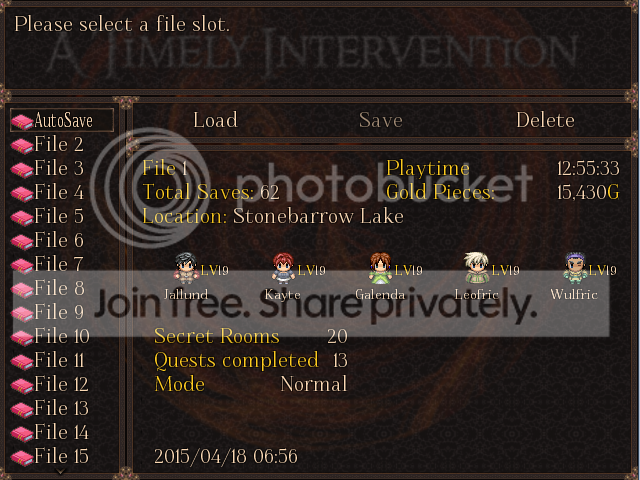
Yanfly's Save Engine, found here, allows information from up to 6 variables to be shown in 2 columns on the Save/Load screen.  These columns display the name of the variable and the data in it.  I, however, am only using 3 variables, and so am only using Column 1.  At the moment the screen looks like this. { "lightbox_close": "Close", "lightbox_next": "Next",

Archived First Post

Yanfly's Save Engine, found here, allows information from up to 6 variables to be shown in 2 columns on the Save/Load screen.  These columns display the name of the variable and the data in it.  I, however, am only using 3 variables, and so am only using Column 1.  At the moment the screen looks like this.

Save%20screen_zpskdcsaexi.png


My problem is that I would like the first variable to be Secret Rooms Found, but there isn't enough space in the column.  If I put in that much, it runs into the number, all squashed up.

What I would like is to have the text part of column 1 wider so that I can put in the full name.  This could be either by changing the width of both columns, or even eliminating column 2 altogether as I am not using it.

I had a tentative look at the script, and saw that the columns are drawn from lines #410 and following.  However, the coding isn't in just x, y, etc., but dx, dy etc.  I don't even know what that means, let alone know how to change it.

Could anyone tell me how to mod this so that I can have that wider column?

Thank you.

Downloads / Referenced Files

Log in to download

Log in, then follow the RPG Maker Developers Group to see these download links.

Log in to download

Referenced Images / Attachments

Save%20screen_zpskdcsaexi.png
Creator Claims / Removal

If you are the original creator and want this listing reassigned, edited, or removed, join BMMPlay and contact the moderators with proof that matches the original RPG Maker Web profile, linked GitHub, itch.io page, or another public creator identity.

#039#410#rpg-maker-archive#rgss-support

Replies (0)

No replies yet.

0 replies 1 view

Log in to reply.

User Avatar