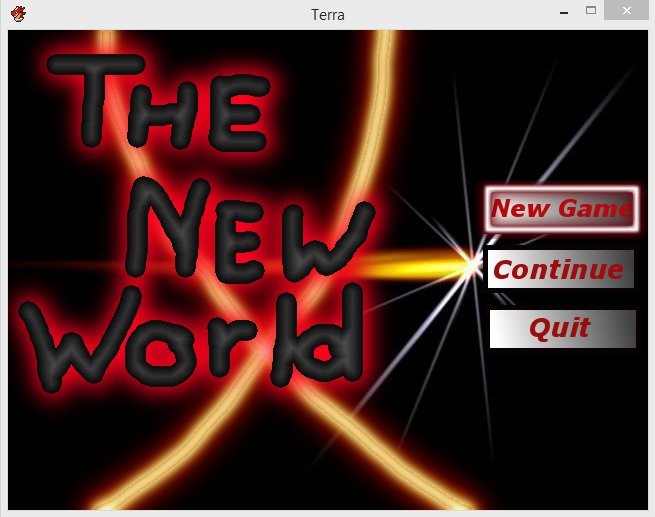
need help... RPG MAKER XV ACE can someone tell me how to change my Scene_Load #-------------------------------------------------------------------------- # * [Continue] Command
need help... RPG MAKER XV ACE
can someone tell me how to change my Scene_Load
#--------------------------------------------------------------------------
# * [Continue] Command
#--------------------------------------------------------------------------
def command_continue
if @continue_enabled
close_command_window
SceneManager.call(Scene_Load)
instead off calling Scene_Load i want it to load my 1st (and only) save file
i dont want my game to have a load menu but i can still load my 1st save file
already did so iff i dont have a save file i cant use main menu continue button
Protected download
full code i used for menu screen:
#==============================================================================## -- NerdiGaming - Title Menu# -- Last Updated: November 9, 2012##==============================================================================# - Introduction# =-=-=-=-=-=-=-=-=-=-=-=-=-=-=-=-=-=-=-=-=-=-=-=-=-=-=-=-=-=-=-=-=-=-=-=-=-=-=# This is a very simple script that allows you to use images for your title# menu.##==============================================================================# - Instructions# =-=-=-=-=-=-=-=-=-=-=-=-=-=-=-=-=-=-=-=-=-=-=-=-=-=-=-=-=-=-=-=-=-=-=-=-=-=-=# To install this script, open up your script editor and copy/paste this script# to an open slot below Materials but above Main. Remember to save.##==============================================================================# - Terms of Use# =-=-=-=-=-=-=-=-=-=-=-=-=-=-=-=-=-=-=-=-=-=-=-=-=-=-=-=-=-=-=-=-=-=-=-=-=-=-=# - You MUST credit me: NerdiGaming# - You MAY NOT re-distribute this script or any attached material to any# location without my permission.# - You MAY use this script or any attached material for non-commercial# projects.# - You MUST contact me before using this script or any attached material for# commercial projects.##==============================================================================# - Updates# =-=-=-=-=-=-=-=-=-=-=-=-=-=-=-=-=-=-=-=-=-=-=-=-=-=-=-=-=-=-=-=-=-=-=-=-=-=-=# Version 1.2 - Fixed a Bug: If players held down an input button the menu# would not update.# - Removed unecessary overwrites; improving compatability# slightly.# - Removed some unecessary code.# Version 1.1 - Fixed a Bug: If a save file was present, New Game would be# selected instead of Continue.# Version 1 - Script Completed.#============================================================================== module TitleMenu #=-=-=-=-=-=-=-=-=-=-=-=-=-=-=-=-=-=-=-=-=-=-=-=-=-=-=-=-=-=-=-=-=-=-=-=-=- # - Padding - #=-=-=-=-=-=-=-=-=-=-=-=-=-=-=-=-=-=-=-=-=-=-=-=-=-=-=-=-=-=-=-=-=-=-=-=-=- # Padding increases the distance between the New Game and Exit Game images # from the Continue Game image. # # New Game # -> <- This Space # Continue Game # -> <- This Space # Exit Game #=-=-=-=-=-=-=-=-=-=-=-=-=-=-=-=-=-=-=-=-=-=-=-=-=-=-=-=-=-=-=-=-=-=-=-=-=- PADDING = -1 # Default: 5 #=-=-=-=-=-=-=-=-=-=-=-=-=-=-=-=-=-=-=-=-=-=-=-=-=-=-=-=-=-=-=-=-=-=-=-=-=- # - Offset - #=-=-=-=-=-=-=-=-=-=-=-=-=-=-=-=-=-=-=-=-=-=-=-=-=-=-=-=-=-=-=-=-=-=-=-=-=- # Offset moves the menu images in different directions. # # Positive Y = Moves the Menu Up Example: 50 # Negative Y = Moves the Menu Down Example: -50 # # Positive X = Moves the Menu Left Example: 50 # Negative X = Moves the Menu Right Example: -50 #=-=-=-=-=-=-=-=-=-=-=-=-=-=-=-=-=-=-=-=-=-=-=-=-=-=-=-=-=-=-=-=-=-=-=-=-=- Y_OFFSET = 0 # Default: 0 X_OFFSET = 0 # Default: 0 #=-=-=-=-=-=-=-=-=-=-=-=-=-=-=-=-=-=-=-=-=-=-=-=-=-=-=-=-=-=-=-=-=-=-=-=-=- # - Image Names - #=-=-=-=-=-=-=-=-=-=-=-=-=-=-=-=-=-=-=-=-=-=-=-=-=-=-=-=-=-=-=-=-=-=-=-=-=- # This is where you specify what you want your images to be called. # # The images need to be placed in your Project\Graphics\System\ Folder. #=-=-=-=-=-=-=-=-=-=-=-=-=-=-=-=-=-=-=-=-=-=-=-=-=-=-=-=-=-=-=-=-=-=-=-=-=- NEW_IMAGE = "NewGame" NEW_SELECTED_IMAGE = "NewGameSelected" CONTINUE_IMAGE = "ContinueGame" CONTINUE_SELECTED_IMAGE = "ContinueGameSelected" EXIT_IMAGE = "ExitGame" EXIT_SELECTED_IMAGE = "ExitGameSelected" #=-=-=-=-=-=-=-=-=-=-=-=-=-=-=-=-=-=-=-=-=-=-=-=-=-=-=-=-=-=-=-=-=-=-=-=-=- # - Continue Opacity - #=-=-=-=-=-=-=-=-=-=-=-=-=-=-=-=-=-=-=-=-=-=-=-=-=-=-=-=-=-=-=-=-=-=-=-=-=- # Continue Opacity is how transparent the continue image will be when there # are no save files present or if the continue option is disabled for some # reason. #=-=-=-=-=-=-=-=-=-=-=-=-=-=-=-=-=-=-=-=-=-=-=-=-=-=-=-=-=-=-=-=-=-=-=-=-=- CONTINUE_DISABLED_OPACITY = 100 # Default: 100 end # TitleMenu class Scene_Title < Scene_Base #-------------------------------------------------------------------------- # * Start processing #-------------------------------------------------------------------------- def start super SceneManager.clear Graphics.freeze check_continue create_background create_command_window play_title_music end #-------------------------------------------------------------------------- # * Termination Processing #-------------------------------------------------------------------------- def terminate super SceneManager.snapshot_for_background dispose_background end #-------------------------------------------------------------------------- # * Check User Input #-------------------------------------------------------------------------- def check_input case @command_window.index when 0 # New Game Is Selected @spriteNewGameSelected.z = 15 @spriteNewGame.z = -2 @spriteContinueGameSelected.z = -2 @spriteContinueGame.z = 10 @spriteExitGameSelected.z = -2 @spriteExitGame.z = 10 when 1 # Continue Game Is Selected @spriteNewGameSelected.z = -2 @spriteNewGame.z = 10 @spriteContinueGameSelected.z = 15 @spriteContinueGame.z = -2 @spriteExitGameSelected.z = -2 @spriteExitGame.z = 10 when 2 # Exit Game Is Selected @spriteNewGameSelected.z = -2 @spriteNewGame.z = 10 @spriteContinueGameSelected.z = -2 @spriteContinueGame.z = 10 @spriteExitGameSelected.z = 15 @spriteExitGame.z = -2 end end #-------------------------------------------------------------------------- # * Frame Update #-------------------------------------------------------------------------- def update super if Input.trigger?DOWN) check_input end if Input.repeat?DOWN) check_input end if Input.trigger?UP) check_input end if Input.repeat?UP) check_input end end #-------------------------------------------------------------------------- # * Determine if Continue is Enabled #-------------------------------------------------------------------------- def check_continue @continue_enabled = (Dir.glob('Save*.rvdata2').size > 0) end #-------------------------------------------------------------------------- # * Create Background #-------------------------------------------------------------------------- def create_background @sprite1 = Sprite.new @sprite1.bitmap = Cache.title1( $data_system.title1_name ) @sprite2 = Sprite.new @sprite2.bitmap = Cache.title2( $data_system.title2_name ) center_sprite( @sprite1 ) center_sprite( @sprite2 ) # Creates The Continue Game Image @spriteContinueGame = Sprite.new @spriteContinueGame.bitmap = Cache.system( TitleMenu::CONTINUE_IMAGE ) @spriteContinueGame.x = ( ( Graphics.width / 2 ) - (@spriteContinueGame.bitmap.width / 2 ) ) @spriteContinueGame.y = ( ( Graphics.height / 2 ) - (@spriteContinueGame.bitmap.height / 2 ) ) @spriteContinueGame.z = 10 # Creates The Continue Game Selected Image @spriteContinueGameSelected = Sprite.new @spriteContinueGameSelected.bitmap = Cache.system( TitleMenu::CONTINUE_SELECTED_IMAGE ) @spriteContinueGameSelected.x = ( ( Graphics.width / 2 ) - ( @spriteContinueGameSelected.bitmap.width / 2 ) ) @spriteContinueGameSelected.y = ( ( Graphics.height / 2 ) - ( @spriteContinueGameSelected.bitmap.height / 2 ) ) @spriteContinueGameSelected.z = -2 # Applies The Opacity If Continue Is Disabled if !@continue_enabled @spriteContinueGame.opacity = TitleMenu::CONTINUE_DISABLED_OPACITY @spriteContinueGameSelected.opacity = TitleMenu::CONTINUE_DISABLED_OPACITY end # Creates The New Game Image @spriteNewGame = Sprite.new @spriteNewGame.bitmap = Cache.system( TitleMenu::NEW_IMAGE ) @spriteNewGame.x = ( ( Graphics.width / 2 ) - ( @spriteNewGame.bitmap.width / 2 ) ) @spriteNewGame.y = ( ( Graphics.height / 2 ) - ( @spriteNewGame.bitmap.height / 2 ) ) - ( @spriteContinueGame.bitmap.height + TitleMenu:ADDING ) @spriteNewGame.z = -2 # Creates The New Game Selected Image @spriteNewGameSelected = Sprite.new @spriteNewGameSelected.bitmap = Cache.system( TitleMenu::NEW_SELECTED_IMAGE ) @spriteNewGameSelected.x = ( ( Graphics.width / 2 ) - ( @spriteNewGameSelected.bitmap.width / 2 ) ) @spriteNewGameSelected.y = ( ( Graphics.height / 2 ) - ( @spriteNewGameSelected.bitmap.height / 2 ) ) - ( @spriteContinueGame.bitmap.height + TitleMenu:ADDING ) @spriteNewGameSelected.z = -2 # Creates The Exit Game Image @spriteExitGame = Sprite.new @spriteExitGame.bitmap = Cache.system( TitleMenu::EXIT_IMAGE ) @spriteExitGame.x = ( ( Graphics.width / 2 ) - ( @spriteExitGame.bitmap.width / 2 ) ) @spriteExitGame.y = ( ( Graphics.height / 2 ) - ( @spriteExitGame.bitmap.height / 2 ) ) + ( @spriteContinueGame.bitmap.height + TitleMenu:ADDING ) @spriteExitGame.z = 10 # Creates The Exit Game Selected Image @spriteExitGameSelected = Sprite.new @spriteExitGameSelected.bitmap = Cache.system( TitleMenu::EXIT_SELECTED_IMAGE ) @spriteExitGameSelected.x = ( ( Graphics.width / 2 ) - ( @spriteExitGameSelected.bitmap.width / 2 ) ) @spriteExitGameSelected.y = ( ( Graphics.height / 2 ) - ( @spriteExitGameSelected.bitmap.height / 2 ) ) + ( @spriteContinueGame.bitmap.height + TitleMenu:ADDING ) @spriteExitGameSelected.z = -2 # Applies The Offset To The Continue Game Images @spriteContinueGame.x -= TitleMenu::X_OFFSET @spriteContinueGame.y -= TitleMenu::Y_OFFSET @spriteContinueGameSelected.x -= TitleMenu::X_OFFSET @spriteContinueGameSelected.y -= TitleMenu::Y_OFFSET # Applies The Offset To The New Game Images @spriteNewGame.x -= TitleMenu::X_OFFSET @spriteNewGame.y -= TitleMenu::Y_OFFSET @spriteNewGameSelected.x -= TitleMenu::X_OFFSET @spriteNewGameSelected.y -= TitleMenu::Y_OFFSET # Applies The Offset To The Exit Game Images @spriteExitGame.x -= TitleMenu::X_OFFSET @spriteExitGame.y -= TitleMenu::Y_OFFSET @spriteExitGameSelected.x -= TitleMenu::X_OFFSET @spriteExitGameSelected.y -= TitleMenu::Y_OFFSET end #-------------------------------------------------------------------------- # * Dispose Background #-------------------------------------------------------------------------- def dispose_background @sprite1.bitmap.dispose @sprite1.dispose @sprite2.bitmap.dispose @sprite2.dispose @spriteNewGame.bitmap.dispose @spriteNewGame.dispose @spriteNewGameSelected.bitmap.dispose @spriteNewGameSelected.dispose @spriteContinueGame.bitmap.dispose @spriteContinueGame.dispose @spriteContinueGameSelected.bitmap.dispose @spriteContinueGameSelected.dispose @spriteExitGame.bitmap.dispose @spriteExitGame.dispose @spriteExitGameSelected.bitmap.dispose @spriteExitGameSelected.dispose end #-------------------------------------------------------------------------- # * Create Command Window #-------------------------------------------------------------------------- def create_command_window @command_window = Window_TitleCommand.new @command_window.set_handlernew_game, methodcommand_new_game)) @command_window.set_handlercontinue, methodcommand_continue)) @command_window.set_handlershutdown, methodcommand_shutdown)) @command_window.z = -2 case @command_window.index when 0 # New Game Is Selected @spriteNewGameSelected.z = 15 @spriteNewGame.z = -2 @spriteContinueGameSelected.z = -2 @spriteContinueGame.z = 10 @spriteExitGameSelected.z = -2 @spriteExitGame.z = 10 when 1 # Continue Game Is Selected @spriteNewGameSelected.z = -2 @spriteNewGame.z = 10 @spriteContinueGameSelected.z = 15 @spriteContinueGame.z = -2 @spriteExitGameSelected.z = -2 @spriteExitGame.z = 10 when 2 # Exit Game Is Selected @spriteNewGameSelected.z = -2 @spriteNewGame.z = 10 @spriteContinueGameSelected.z = -2 @spriteContinueGame.z = 10 @spriteExitGameSelected.z = 15 @spriteExitGame.z = -2 end end #-------------------------------------------------------------------------- # * [Continue] Command #-------------------------------------------------------------------------- def command_continue if @continue_enabled close_command_window SceneManager.call(Scene_Load) end end
Protected download#==============================================================================## -- NerdiGaming - Title Menu# -- Last Updated: November 9, 2012##==============================================================================# - Introduction# =-=-=-=-=-=-=-=-=-=-=-=-=-=-=-=-=-=-=-=-=-=-=-=-=-=-=-=-=-=-=-=-=-=-=-=-=-=-=# This is a very simple script that allows you to use images for your title# menu.##==============================================================================# - Instructions# =-=-=-=-=-=-=-=-=-=-=-=-=-=-=-=-=-=-=-=-=-=-=-=-=-=-=-=-=-=-=-=-=-=-=-=-=-=-=# To install this script, open up your script editor and copy/paste this script# to an open slot below Materials but above Main. Remember to save.##==============================================================================# - Terms of Use# =-=-=-=-=-=-=-=-=-=-=-=-=-=-=-=-=-=-=-=-=-=-=-=-=-=-=-=-=-=-=-=-=-=-=-=-=-=-=# - You MUST credit me: NerdiGaming# - You MAY NOT re-distribute this script or any attached...




 Antlion Audio ModMic USB Attachable Microphone
Attachable USB microphone that turns favorite headphones into a stream or chat headset.
View on Amazon
Antlion Audio ModMic USB Attachable Microphone
Attachable USB microphone that turns favorite headphones into a stream or chat headset.
View on Amazon