Hey everybody, Keaton here.
I'm working on a OMORI fan game based off of the demo hosted at GR2's Game Night and the J-POP Summit in 2014. But the thing is that there isn't a script for having a command list (Attack/Special/Escape/Item) that show commands horizontally, or I just don't know where to find the right script to modify.
I am using Moghunter's Battle HUD to replicate the demo's battle HUD but that doesn't have it either.
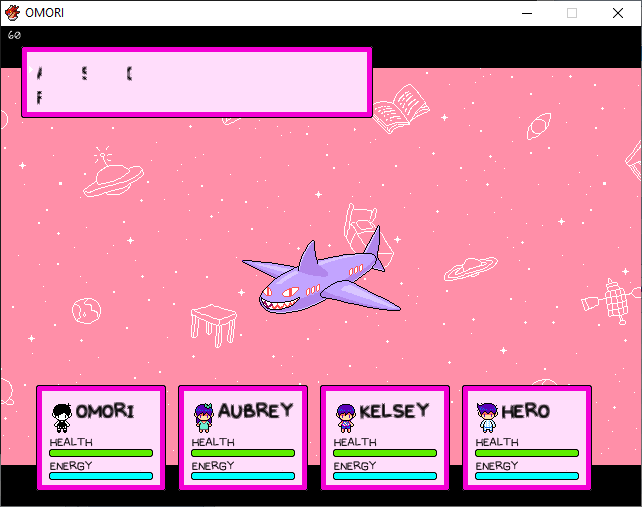
Right now, the HUD looks like this:
And what I'm going for looks like this:
This was the best picture I could get of the demo's battle HUD. For all I know is that I could be using the wrong script and the scripts used are private.
Another thing that I need help with is the scrolling parallaxes, and getting rid of the default actor window when I select Special or Items, which is shown in
this image. Every script I find seems to be way too complicated or just doesn't work. '\_(0_0)_/'
So far, I've figured out where to position things and kind of got the jist of setting the coordinates for layouts.
EDIT 7.14.2024 10:07PM (PST-7:00)
So I figured out how to show Battle commands horizontally, only problem now is that the action commands look like dogwater!
Protected download
EDIT 7.15.2024 13:03PM (PST-7:00)
So apparently I just found out that the OMORI 2014 Demo uses Luna Engine. Guess I gotta wait until Luna Engine goes on sale.






 UGREEN Nexode 200W GaN USB-C Wall Charger
High-output four-port USB-C charger for laptops, tablets, phones, and travel kits.
View on Amazon
UGREEN Nexode 200W GaN USB-C Wall Charger
High-output four-port USB-C charger for laptops, tablets, phones, and travel kits.
View on Amazon