


Display item quantity in battle scene
BMM_Archive · July 15, 2026

Original Source
- Original title: Display item quantity in battle scene
- Original author: NotFlamingo
- Original date: January 27, 2016
- Source thread: https://forums.rpgmakerweb.com/threads/display-item-quantity-in-battle-scene.55822/
- Source forum path: Game Development Engines > Ruby Game System (RGSS) Scripts > RGSS3 Scripts (RMVX Ace) > RGSS3 Script Requests
Summary
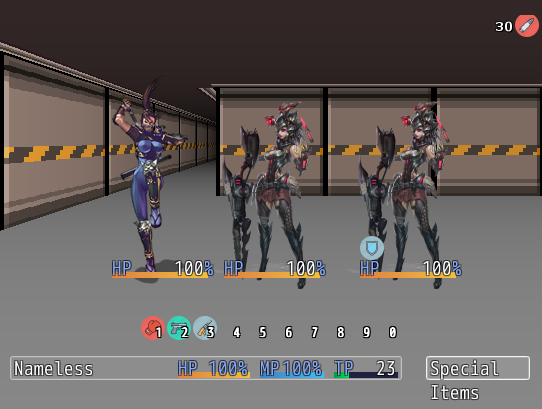
Hello! I'm trying to show one item (ammo) quantity in the battle scene. I only succeeded to understand that It's impossible for me to do, because i can't code at all... I would be glad if someone could help! Layout is number which is the quantity of the item (id=100) and then 24x24 icon from IconSet.png (30). In upper right window place. You can see it in the picture added. It should be visible during all the battle or better only when player party hud is showing (basically when player can choose what...


Archived First Post
Layout is number which is the quantity of the item (id=100) and then 24x24 icon from IconSet.png (30). In upper right window place. You can see it in the picture added. It should be visible during all the battle or better only when player party hud is showing (basically when player can choose what to do). I use hotkey system to choose battle skills without surfing through battle commands. All of the skills have requirement of the same ammo. Every time when player uses skill, it reduces quantity of that item (I use Yanfly Engine Ace - Skill Cost Manager v1.03). That is why I want to show ammo quantity on battle screen that will refresh every time player uses skill. Because in that case player can see how many ammo is left and decide which skill (some of skills needs more ammo, some less) to use without going through the battle command to the item list every turn to check the ammo quantity.
Thank You for your patience of my super engrish
Protected download
Downloads / Referenced Files
Log in, then follow the RPG Maker Developers Group to see these download links.
Log in to downloadReferenced Images / Attachments
Creator Claims / Removal
If you are the original creator and want this listing reassigned, edited, or removed, join BMMPlay and contact the moderators with proof that matches the original RPG Maker Web profile, linked GitHub, itch.io page, or another public creator identity.
Replies (0)
No replies yet.
Topic Summary
Loading summary...
