


[Ace] Check my Script, change item and message generate.
BMM_Archive · July 15, 2026

Original Source
- Original title: [Ace] Check my Script, change item and message generate.
- Original author: CrawlinUK
- Original date: June 21, 2014
- Source thread: https://forums.rpgmakerweb.com/threads/ace-check-my-script-change-item-and-message-generate.28797/
- Source forum path: Game Development Engines > Ruby Game System (RGSS) Scripts > RGSSx Script Support
Summary
Hi I should mention first that I don't really know RGSS, but I understand programming structure enough to know what it going on. The Script I used was, with bits of help from here and there, but mainly here http://hikimoki.sakura.ne.jp/html/rgss_memo_0.html. I couldn't find anywhere that had exactly what I was looking for, unless it meant adding blocks and blocks of script. I added:
Archived First Post
I should mention first that I don't really know RGSS, but I understand programming structure enough to know what it going on.
The Script I used was, with bits of help from here and there, but mainly here http://hikimoki.sakura.ne.jp/html/rgss_memo_0.html. I couldn't find anywhere that had exactly what I was looking for, unless it meant adding blocks and blocks of script.
I added:
i = $game_variables[5]
item = $data_items
$game_party.gain_item(item,1)
$game_variables[6] = item.name
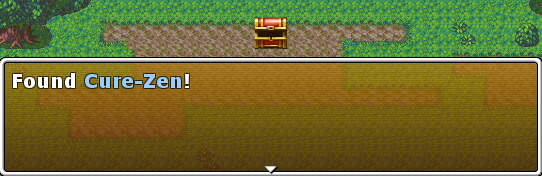
-to a common event with a sound effect, a Self switch A and the Text: Found \C[4]\V[6]\C[0]!
Then create an Event with Control Variable no. 5 and assign it the item number (as listed in the items database), and a call to the above common event.
It works fine...
Protected download
...but is it the best way to do this?
I was trying to free up variable 6 by using:
$game_message.add("Found #{item.name}")but I could not figure out how to make the item highlighted a different colour like above. The \ control characters don't work the same here, hence why I used variable 6.
If this could have been done better or easier, please tell me.
Thanks
Downloads / Referenced Files
Log in, then follow the RPG Maker Developers Group to see these download links.
Log in to downloadReferenced Images / Attachments
Creator Claims / Removal
If you are the original creator and want this listing reassigned, edited, or removed, join BMMPlay and contact the moderators with proof that matches the original RPG Maker Web profile, linked GitHub, itch.io page, or another public creator identity.
Replies (0)
No replies yet.
Topic Summary
Loading summary...

