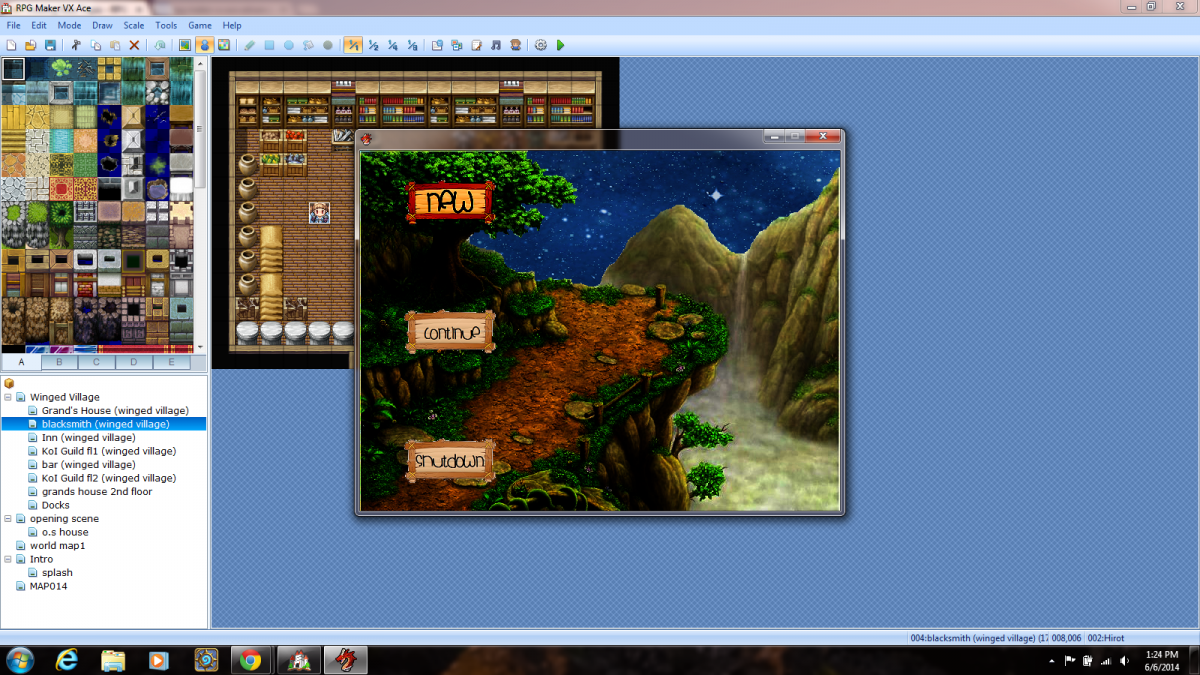
I have this script here Spoiler #==============================================================================## -- NerdiGaming - Title Menu# -- Last Updated: November 9, 2012##==============================================================================# - Introduction# =-=-=-=-=-=-=-=-=-=-=-=-=-=-=-=-=-=-=-=-=-=-=-=-=-=-=-=-=-=-=-=-=-=-=-=-=-=-=# This is a very simple script that allows you to use images for your title# menu.##==============================================================================# - Instructions# =-=-=-=-=-=-=-=-=-=-=-=-=-=-=-=-=-=-=-=-=-=-=-=-=-=-=-=-=-=-=-=-=-=-=-=-=-=-=# To install this script, open up your script editor and copy/paste this script# to an open slot below Materials but above Main. Remember to save.##==============================================================================# - Terms of Use# =-=-=-=-=-=-=-=-=-=-=-=-=-=-=-=-=-=-=-=-=-=-=-=-=-=-=-=-=-=-=-=-=-=-=-=-=-=-=# - You MUST credit me: NerdiGaming# - You MAY NOT re-distribute this script or any attached material to any# location...
I have this script here
#==============================================================================## -- NerdiGaming - Title Menu# -- Last Updated: November 9, 2012##==============================================================================# - Introduction# =-=-=-=-=-=-=-=-=-=-=-=-=-=-=-=-=-=-=-=-=-=-=-=-=-=-=-=-=-=-=-=-=-=-=-=-=-=-=# This is a very simple script that allows you to use images for your title# menu.##==============================================================================# - Instructions# =-=-=-=-=-=-=-=-=-=-=-=-=-=-=-=-=-=-=-=-=-=-=-=-=-=-=-=-=-=-=-=-=-=-=-=-=-=-=# To install this script, open up your script editor and copy/paste this script# to an open slot below Materials but above Main. Remember to save.##==============================================================================# - Terms of Use# =-=-=-=-=-=-=-=-=-=-=-=-=-=-=-=-=-=-=-=-=-=-=-=-=-=-=-=-=-=-=-=-=-=-=-=-=-=-=# - You MUST credit me: NerdiGaming# - You MAY NOT re-distribute this script or any attached material to any# location without my permission.# - You MAY use this script or any attached material for non-commercial# projects.# - You MUST contact me before using this script or any attached material for# commercial projects.##==============================================================================# - Updates# =-=-=-=-=-=-=-=-=-=-=-=-=-=-=-=-=-=-=-=-=-=-=-=-=-=-=-=-=-=-=-=-=-=-=-=-=-=-=# Version 1.2 - Fixed a Bug: If players held down an input button the menu# would not update.# - Removed unecessary overwrites; improving compatability# slightly.# - Removed some unecessary code.# Version 1.1 - Fixed a Bug: If a save file was present, New Game would be# selected instead of Continue.# Version 1 - Script Completed.#==============================================================================module TitleMenu #=-=-=-=-=-=-=-=-=-=-=-=-=-=-=-=-=-=-=-=-=-=-=-=-=-=-=-=-=-=-=-=-=-=-=-=-=- # - Padding - #=-=-=-=-=-=-=-=-=-=-=-=-=-=-=-=-=-=-=-=-=-=-=-=-=-=-=-=-=-=-=-=-=-=-=-=-=- # Padding increases the distance between the New Game and Exit Game images # from the Continue Game image. # # New Game # -> <- This Space # Continue Game # -> <- This Space # Exit Game #=-=-=-=-=-=-=-=-=-=-=-=-=-=-=-=-=-=-=-=-=-=-=-=-=-=-=-=-=-=-=-=-=-=-=-=-=- PADDING = 5 # Default: 5 #=-=-=-=-=-=-=-=-=-=-=-=-=-=-=-=-=-=-=-=-=-=-=-=-=-=-=-=-=-=-=-=-=-=-=-=-=- # - Offset - #=-=-=-=-=-=-=-=-=-=-=-=-=-=-=-=-=-=-=-=-=-=-=-=-=-=-=-=-=-=-=-=-=-=-=-=-=- # Offset moves the menu images in different directions. # # Positive Y = Moves the Menu Up Example: 50 # Negative Y = Moves the Menu Down Example: -50 # # Positive X = Moves the Menu Left Example: 50 # Negative X = Moves the Menu Right Example: -50 #=-=-=-=-=-=-=-=-=-=-=-=-=-=-=-=-=-=-=-=-=-=-=-=-=-=-=-=-=-=-=-=-=-=-=-=-=- Y_OFFSET = 0 # Default: 0 X_OFFSET = 0 # Default: 0 #=-=-=-=-=-=-=-=-=-=-=-=-=-=-=-=-=-=-=-=-=-=-=-=-=-=-=-=-=-=-=-=-=-=-=-=-=- # - Image Names - #=-=-=-=-=-=-=-=-=-=-=-=-=-=-=-=-=-=-=-=-=-=-=-=-=-=-=-=-=-=-=-=-=-=-=-=-=- # This is where you specify what you want your images to be called. # # The images need to be placed in your Project\Graphics\System\ Folder. #=-=-=-=-=-=-=-=-=-=-=-=-=-=-=-=-=-=-=-=-=-=-=-=-=-=-=-=-=-=-=-=-=-=-=-=-=- NEW_IMAGE = "NewGame" NEW_SELECTED_IMAGE = "NewGameSelected" CONTINUE_IMAGE = "ContinueGame" CONTINUE_SELECTED_IMAGE = "ContinueGameSelected" EXIT_IMAGE = "ExitGame" EXIT_SELECTED_IMAGE = "ExitGameSelected" #=-=-=-=-=-=-=-=-=-=-=-=-=-=-=-=-=-=-=-=-=-=-=-=-=-=-=-=-=-=-=-=-=-=-=-=-=- # - Continue Opacity - #=-=-=-=-=-=-=-=-=-=-=-=-=-=-=-=-=-=-=-=-=-=-=-=-=-=-=-=-=-=-=-=-=-=-=-=-=- # Continue Opacity is how transparent the continue image will be when there # are no save files present or if the continue option is disabled for some # reason. #=-=-=-=-=-=-=-=-=-=-=-=-=-=-=-=-=-=-=-=-=-=-=-=-=-=-=-=-=-=-=-=-=-=-=-=-=- CONTINUE_DISABLED_OPACITY = 100 # Default: 100 end # TitleMenuclass Scene_Title < Scene_Base #-------------------------------------------------------------------------- # * Start processing #-------------------------------------------------------------------------- def start super SceneManager.clear Graphics.freeze check_continue create_background create_command_window play_title_music end #-------------------------------------------------------------------------- # * Termination Processing #-------------------------------------------------------------------------- def terminate super SceneManager.snapshot_for_background dispose_background end #-------------------------------------------------------------------------- # * Check User Input #-------------------------------------------------------------------------- def check_input case @command_window.index when 0 # New Game Is Selected @spriteNewGameSelected.z = 15 @spriteNewGame.z = -2 @spriteContinueGameSelected.z = -2 @spriteContinueGame.z = 10 @spriteExitGameSelected.z = -2 @spriteExitGame.z = 10 when 1 # Continue Game Is Selected @spriteNewGameSelected.z = -2 @spriteNewGame.z = 10 @spriteContinueGameSelected.z = 15 @spriteContinueGame.z = -2 @spriteExitGameSelected.z = -2 @spriteExitGame.z = 10 when 2 # Exit Game Is Selected @spriteNewGameSelected.z = -2 @spriteNewGame.z = 10 @spriteContinueGameSelected.z = -2 @spriteContinueGame.z = 10 @spriteExitGameSelected.z = 15 @spriteExitGame.z = -2 end end #-------------------------------------------------------------------------- # * Frame Update #-------------------------------------------------------------------------- def update super if Input.trigger?DOWN) check_input end if Input.repeat?DOWN) check_input end if Input.trigger?UP) check_input end if Input.repeat?UP) check_input end end #-------------------------------------------------------------------------- # * Determine if Continue is Enabled #-------------------------------------------------------------------------- def check_continue @continue_enabled = (Dir.glob('Save*.rvdata2').size > 0) end #-------------------------------------------------------------------------- # * Create Background #-------------------------------------------------------------------------- def create_background @sprite1 = Sprite.new @sprite1.bitmap = Cache.title1( $data_system.title1_name ) @sprite2 = Sprite.new @sprite2.bitmap = Cache.title2( $data_system.title2_name ) center_sprite( @sprite1 ) center_sprite( @sprite2 ) # Creates The Continue Game Image @spriteContinueGame = Sprite.new @spriteContinueGame.bitmap = Cache.system( TitleMenu::CONTINUE_IMAGE ) @spriteContinueGame.x = ( ( Graphics.width / 2 ) - (@spriteContinueGame.bitmap.width / 2 ) ) @spriteContinueGame.y = ( ( Graphics.height / 2 ) - (@spriteContinueGame.bitmap.height / 2 ) ) @spriteContinueGame.z = 10 # Creates The Continue Game Selected Image @spriteContinueGameSelected = Sprite.new @spriteContinueGameSelected.bitmap = Cache.system( TitleMenu::CONTINUE_SELECTED_IMAGE ) @spriteContinueGameSelected.x = ( ( Graphics.width / 2 ) - ( @spriteContinueGameSelected.bitmap.width / 2 ) ) @spriteContinueGameSelected.y = ( ( Graphics.height / 2 ) - ( @spriteContinueGameSelected.bitmap.height / 2 ) ) @spriteContinueGameSelected.z = -2 # Applies The Opacity If Continue Is Disabled if !@continue_enabled @spriteContinueGame.opacity = TitleMenu::CONTINUE_DISABLED_OPACITY @spriteContinueGameSelected.opacity = TitleMenu::CONTINUE_DISABLED_OPACITY end # Creates The New Game Image @spriteNewGame = Sprite.new @spriteNewGame.bitmap = Cache.system( TitleMenu::NEW_IMAGE ) @spriteNewGame.x = ( ( Graphics.width / 2 ) - ( @spriteNewGame.bitmap.width / 2 ) ) @spriteNewGame.y = ( ( Graphics.height / 2 ) - ( @spriteNewGame.bitmap.height / 2 ) ) - ( @spriteContinueGame.bitmap.height + TitleMenu:ADDING ) @spriteNewGame.z = -2 # Creates The New Game Selected Image @spriteNewGameSelected = Sprite.new @spriteNewGameSelected.bitmap = Cache.system( TitleMenu::NEW_SELECTED_IMAGE ) @spriteNewGameSelected.x = ( ( Graphics.width / 2 ) - ( @spriteNewGameSelected.bitmap.width / 2 ) ) @spriteNewGameSelected.y = ( ( Graphics.height / 2 ) - ( @spriteNewGameSelected.bitmap.height / 2 ) ) - ( @spriteContinueGame.bitmap.height + TitleMenu:ADDING ) @spriteNewGameSelected.z = -2 # Creates The Exit Game Image @spriteExitGame = Sprite.new @spriteExitGame.bitmap = Cache.system( TitleMenu::EXIT_IMAGE ) @spriteExitGame.x = ( ( Graphics.width / 2 ) - ( @spriteExitGame.bitmap.width / 2 ) ) @spriteExitGame.y = ( ( Graphics.height / 2 ) - ( @spriteExitGame.bitmap.height / 2 ) ) + ( @spriteContinueGame.bitmap.height + TitleMenu:ADDING ) @spriteExitGame.z = 10 # Creates The Exit Game Selected Image @spriteExitGameSelected = Sprite.new @spriteExitGameSelected.bitmap = Cache.system( TitleMenu::EXIT_SELECTED_IMAGE ) @spriteExitGameSelected.x = ( ( Graphics.width / 2 ) - ( @spriteExitGameSelected.bitmap.width / 2 ) ) @spriteExitGameSelected.y = ( ( Graphics.height / 2 ) - ( @spriteExitGameSelected.bitmap.height / 2 ) ) + ( @spriteContinueGame.bitmap.height + TitleMenu:ADDING ) @spriteExitGameSelected.z = -2 # Applies The Offset To The Continue Game Images @spriteContinueGame.x -= TitleMenu::X_OFFSET @spriteContinueGame.y -= TitleMenu::Y_OFFSET @spriteContinueGameSelected.x -= TitleMenu::X_OFFSET @spriteContinueGameSelected.y -= TitleMenu::Y_OFFSET # Applies The Offset To The New Game Images @spriteNewGame.x -= TitleMenu::X_OFFSET @spriteNewGame.y -= TitleMenu::Y_OFFSET @spriteNewGameSelected.x -= TitleMenu::X_OFFSET @spriteNewGameSelected.y -= TitleMenu::Y_OFFSET # Applies The Offset To The Exit Game Images @spriteExitGame.x -= TitleMenu::X_OFFSET @spriteExitGame.y -= TitleMenu::Y_OFFSET @spriteExitGameSelected.x -= TitleMenu::X_OFFSET @spriteExitGameSelected.y -= TitleMenu::Y_OFFSET end #-------------------------------------------------------------------------- # * Dispose Background #-------------------------------------------------------------------------- def dispose_background @sprite1.bitmap.dispose @sprite1.dispose @sprite2.bitmap.dispose @sprite2.dispose @spriteNewGame.bitmap.dispose @spriteNewGame.dispose @spriteNewGameSelected.bitmap.dispose @spriteNewGameSelected.dispose @spriteContinueGame.bitmap.dispose @spriteContinueGame.dispose @spriteContinueGameSelected.bitmap.dispose @spriteContinueGameSelected.dispose @spriteExitGame.bitmap.dispose @spriteExitGame.dispose @spriteExitGameSelected.bitmap.dispose @spriteExitGameSelected.dispose end #-------------------------------------------------------------------------- # * Create Command Window #-------------------------------------------------------------------------- def create_command_window @command_window = Window_TitleCommand.new @command_window.set_handlernew_game, methodcommand_new_game)) @command_window.set_handlercontinue, methodcommand_continue)) @command_window.set_handlershutdown, methodcommand_shutdown)) @command_window.z = -2 case @command_window.index when 0 # New Game Is Selected @spriteNewGameSelected.z = 15 @spriteNewGame.z = -2 @spriteContinueGameSelected.z = -2 @spriteContinueGame.z = 10 @spriteExitGameSelected.z = -2 @spriteExitGame.z = 10 when 1 # Continue Game Is Selected @spriteNewGameSelected.z = -2 @spriteNewGame.z = 10 @spriteContinueGameSelected.z = 15 @spriteContinueGame.z = -2 @spriteExitGameSelected.z = -2 @spriteExitGame.z = 10 when 2 # Exit Game Is Selected @spriteNewGameSelected.z = -2 @spriteNewGame.z = 10 @spriteContinueGameSelected.z = -2 @spriteContinueGame.z = 10 @spriteExitGameSelected.z = 15 @spriteExitGame.z = -2 end end #-------------------------------------------------------------------------- # * [Continue] Command #-------------------------------------------------------------------------- def command_continue if @continue_enabled close_command_window SceneManager.call(Scene_Load) end endend # Scene_Title
With this I have created this
Protected download
I have actually made the menu with custom buttons and such.. is there anyway i can make the sky behind the background move?
I had tried to put
def update super @sprite1.ox-=1end but then it locks up my menu from being able to jump from icon to icon... i hear the noise of the menu moving and if i move it down and hit enter it will go to my load saved game page.. so with the above code to move the back ground it is stopping the animations... any ideas?!?!
#==============================================================================## -- NerdiGaming - Title Menu# -- Last Updated: November 9, 2012##==============================================================================# - Introduction# =-=-=-=-=-=-=-=-=-=-=-=-=-=-=-=-=-=-=-=-=-=-=-=-=-=-=-=-=-=-=-=-=-=-=-=-=-=-=# This is a very simple script that allows you to use images for your title# menu.##==============================================================================# - Instructions# =-=-=-=-=-=-=-=-=-=-=-=-=-=-=-=-=-=-=-=-=-=-=-=-=-=-=-=-=-=-=-=-=-=-=-=-=-=-=# To install this script, open up your script editor and copy/paste this script# to an open slot below Materials but above Main. Remember to save.##==============================================================================# - Terms of Use# =-=-=-=-=-=-=-=-=-=-=-=-=-=-=-=-=-=-=-=-=-=-=-=-=-=-=-=-=-=-=-=-=-=-=-=-=-=-=# - You MUST credit me: NerdiGaming# - You MAY NOT re-distribute this script or any attached...




 PlayStation DualSense Wireless Controller - Midnight Black
Extra PS5 controller in Midnight Black for multiplayer, remote play, and backup charging rotation.
View on Amazon
PlayStation DualSense Wireless Controller - Midnight Black
Extra PS5 controller in Midnight Black for multiplayer, remote play, and backup charging rotation.
View on Amazon