Preserved forum archive. This topic stores the original first post and locally mirrored RPG Maker Web attachments when available. It is posted by the BMMPlay archive account, not by the original creator.
Original Source
- Original title: How to change resurces Mid game
- Original author: Xecy
- Original date: June 8, 2014
- Source thread: https://forums.rpgmakerweb.com/threads/how-to-change-resurces-mid-game.28117/
- Source forum path: Game Development Engines > Ruby Game System (RGSS) Scripts > RGSSx Script Support
Summary
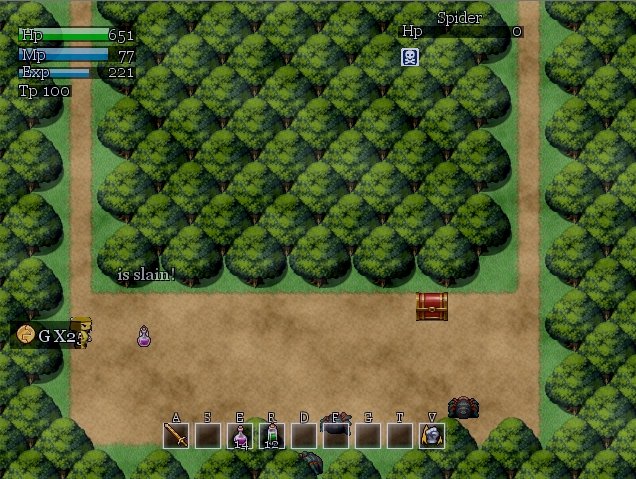
Hello, My question stems from a problem with using Liquid Vx Ace. l am trying to create a cut scene where the player wakes up in a bed from a black screen. However all is fine and dandy until you notice immediately that there is this giant skill bar at the bottom of the screen and the HP, MP bars used in this particular script.
Archived First Post
Hello,
My question stems from a problem with using Liquid Vx Ace.
l am trying to create a cut scene where the player wakes up in a bed from a black screen. However all is fine and dandy until you
notice immediately that there is this giant skill bar at the bottom of the screen and the HP, MP bars used in this particular script.
Everything l seem to try ends in failure to try and temporarily remove or hide those bars. l was thinking maybe there would be a
way to replace the resources mid game.
As an example:
Have the picture resource replaced as transparent. Through and event or script in an event just for the duration of the scene.
Then have the resources replaced back to their orginal state after the scene.
Script:
http://falcaorgss.wordpress.com/2012/12/02/falcao-pearl-abs-liquid-v1/
Protected download


My question stems from a problem with using Liquid Vx Ace.
l am trying to create a cut scene where the player wakes up in a bed from a black screen. However all is fine and dandy until you
notice immediately that there is this giant skill bar at the bottom of the screen and the HP, MP bars used in this particular script.
Everything l seem to try ends in failure to try and temporarily remove or hide those bars. l was thinking maybe there would be a
way to replace the resources mid game.
As an example:
Have the picture resource replaced as transparent. Through and event or script in an event just for the duration of the scene.
Then have the resources replaced back to their orginal state after the scene.
Script:
http://falcaorgss.wordpress.com/2012/12/02/falcao-pearl-abs-liquid-v1/
Protected download

Downloads / Referenced Files
Log in to download
Log in, then follow the RPG Maker Developers Group to see these download links.
Log in to downloadReferenced Images / Attachments
Creator Claims / Removal
If you are the original creator and want this listing reassigned, edited, or removed, join BMMPlay and contact the moderators with proof that matches the original RPG Maker Web profile, linked GitHub, itch.io page, or another public creator identity.
Replies (0)
No replies yet.
0
replies
1
view
Topic Summary
Loading summary...