




public

Rpg Maker Developers Group

Simple enough for a child, powerful enough for a developer

2 Followers

[Ace] Animated battle/ Map turn battler cut off?

BMM Archive · July 15, 2026

Preserved forum archive. This topic stores the original first post and locally mirrored RPG Maker Web attachments when available. It is posted by the BMMPlay archive account, not by the original creator.

Original Source

  • Original title: [Ace] Animated battle/ Map turn battler cut off?
  • Original author: Traveling Bard
  • Original date: January 20, 2014
  • Source thread: https://forums.rpgmakerweb.com/threads/ace-animated-battle-map-turn-battler-cut-off.22655/
  • Source forum path: Game Development Engines > Ruby Game System (RGSS) Scripts > RGSSx Script Support

Summary

Hello forum,          I am having a bit of a problem and I am pretty sure it's user error but I can't seem to figure out where I'm messing up haha. So I have the following scripts in the following order: Victor Engine - Basic Module Victor Engine - Animated Battles

Archived First Post

Hello forum,

         I am having a bit of a problem and I am pretty sure it's user error but I can't seem to figure out where I'm messing up haha. So I have the following scripts in the following order:

Victor Engine - Basic Module

Victor Engine - Animated Battles

Victor Engine - Actors Battlers

Victor Engine - Map Turn Battle

Galv's Move Route Extras

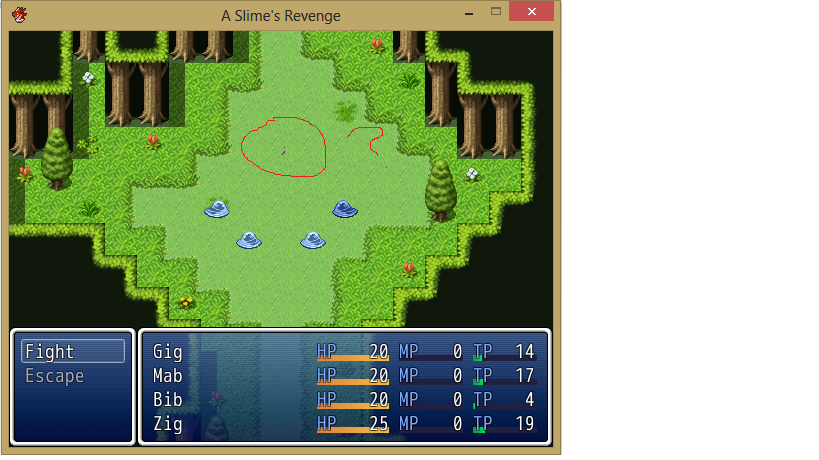
I did the setup in Animated Battles for my player characters and for one of my enemies just to try the scripts out. I put the <battler name: Zig>, etc in the notes section of the actors and they appear fine after the standard comment call for the map turn battle. My issue is with the enemy.

What I have done:

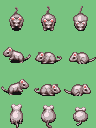
I put <battler name: Rat> in the notes section of the enemy in the enemy tab, which is the filename in the characters folder(the graphic I am using is attached). I have it so that when you run into the rat on the field, he will jump to a specific x,y coordinate using Galv's Move Route Extras, I'll call the Map Turn Battle and the player characters get into position....and then the attached screenshot occurs.

I am sure something is overlapping but I can't seem to figure out what's wrong... Any insight?

Protected download

Protected download

Downloads / Referenced Files

Log in to download

Log in, then follow the RPG Maker Developers Group to see these download links.

Log in to download

Referenced Images / Attachments

Animated Battler cut off.png
Rat.png
Rat.png
Creator Claims / Removal

If you are the original creator and want this listing reassigned, edited, or removed, join BMMPlay and contact the moderators with proof that matches the original RPG Maker Web profile, linked GitHub, itch.io page, or another public creator identity.

#039#rpg-maker-archive#rgss-support

Replies (0)

No replies yet.

0 replies 1 view

Log in to reply.

User Avatar
