


Transparent Target Name Window
BMM_Archive · July 15, 2026

Preserved forum archive. This topic stores the original first post and locally mirrored RPG Maker Web attachments when available. It is posted by the BMMPlay archive account, not by the original creator.
Original Source
- Original title: Transparent Target Name Window
- Original author: Kevin Eontrainer
- Original date: September 28, 2016
- Source thread: https://forums.rpgmakerweb.com/threads/transparent-target-name-window.68965/
- Source forum path: Game Development Engines > Ruby Game System (RGSS) Scripts > RGSS3 Scripts (RMVX Ace) > RGSS3 Script Requests
Summary
Hello everyone! I don't know if this requires a script but I think it does... So basically, I'd like to change the target name window to transparent, it does not disappear/removed and the enemy name is still there but the background window disappeared (just like when we chose "Transparent" from the Show Text command)
Archived First Post
Hello everyone!
I don't know if this requires a script but I think it does...
So basically, I'd like to change the target name window to transparent, it does not disappear/removed and the enemy name is still there but the background window disappeared
(just like when we chose "Transparent" from the Show Text command)
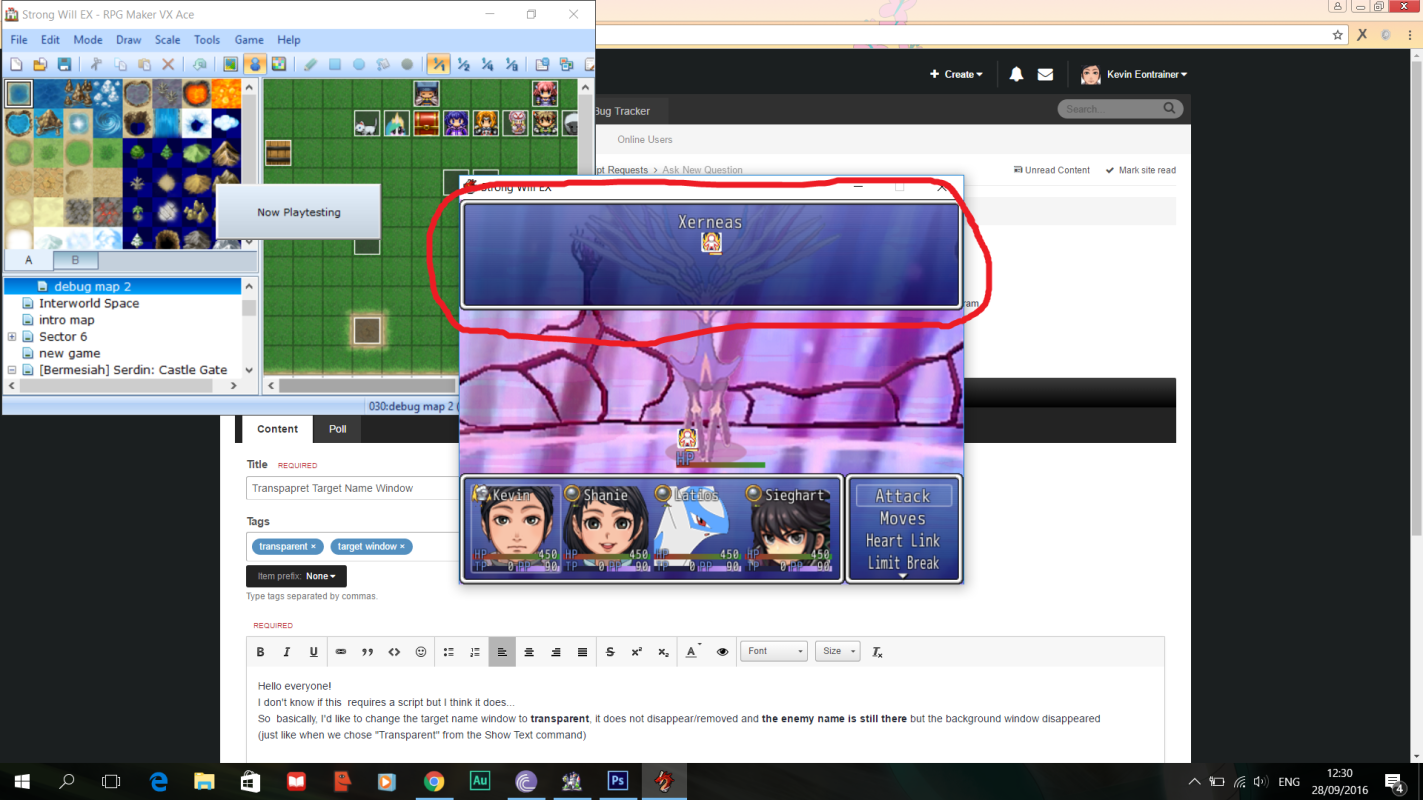
As you can see in the image below, I'd like to make the blue colored window transparent, but the name "Xerneas" and the state icon stays there.
It would've been better if the window opactiy is adjustable so it is possible to just decrease the window opacity (blue color) instead of removing the window completely.
Protected download
Thanks in advance!
I don't know if this requires a script but I think it does...
So basically, I'd like to change the target name window to transparent, it does not disappear/removed and the enemy name is still there but the background window disappeared
(just like when we chose "Transparent" from the Show Text command)
As you can see in the image below, I'd like to make the blue colored window transparent, but the name "Xerneas" and the state icon stays there.
It would've been better if the window opactiy is adjustable so it is possible to just decrease the window opacity (blue color) instead of removing the window completely.
Protected download
Thanks in advance!
Downloads / Referenced Files
Log in to download
Log in, then follow the RPG Maker Developers Group to see these download links.
Log in to downloadReferenced Images / Attachments
Creator Claims / Removal
If you are the original creator and want this listing reassigned, edited, or removed, join BMMPlay and contact the moderators with proof that matches the original RPG Maker Web profile, linked GitHub, itch.io page, or another public creator identity.
Replies (0)
No replies yet.
0
replies
9
views
Topic Summary
Loading summary...

