


More Blend Mode ?
BMM_Archive · July 15, 2026

Preserved forum archive. This topic stores the original first post and locally mirrored RPG Maker Web attachments when available. It is posted by the BMMPlay archive account, not by the original creator.
Original Source
- Original title: More Blend Mode ?
- Original author: Puffer
- Original date: July 26, 2016
- Source thread: https://forums.rpgmakerweb.com/threads/more-blend-mode.65876/
- Source forum path: Game Development Engines > Ruby Game System (RGSS) Scripts > RGSS3 Scripts (RMVX Ace) > RGSS3 Script Requests
Summary
I'm using parallax mapping to draw my map(I use photoshop cs6 for it) when i draw the lighting in soft light blend mode and it look really good when i export it. { "lightbox_close": "Close",


Archived First Post
I'm using parallax mapping to draw my map(I use photoshop cs6 for it) when i draw the lighting in soft light blend mode and it look really good when i export it.

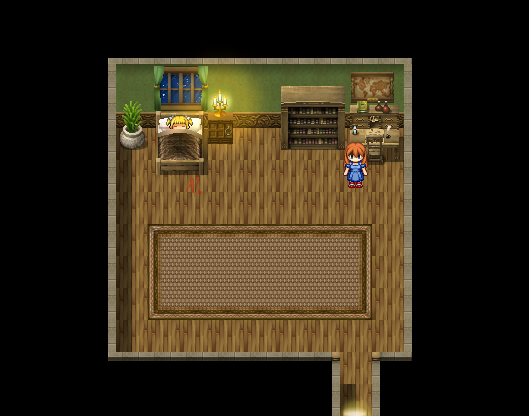
But when i export the lighting and insert it in(i let opacity still 100 and blend mode turn in to normal) when i insert it to rpg maker vx ace, it doesn't look great
Protected download
I try tons of way, change to other blend mode(add) change opacity,tone,using fog script,multiple layer but still so bad
So is there any script for RPG Maker VX Ace that add more blend mode? like soft light, overlay, multiply,... ?
I searching around and it seem like only RPG Maker MV had it
P/s: sorry for my bad English,it isn't my mother language tho.
But when i export the lighting and insert it in(i let opacity still 100 and blend mode turn in to normal) when i insert it to rpg maker vx ace, it doesn't look great
Protected download
I try tons of way, change to other blend mode(add) change opacity,tone,using fog script,multiple layer but still so bad
So is there any script for RPG Maker VX Ace that add more blend mode? like soft light, overlay, multiply,... ?
I searching around and it seem like only RPG Maker MV had it
P/s: sorry for my bad English,it isn't my mother language tho.
Downloads / Referenced Files
Log in to download
Log in, then follow the RPG Maker Developers Group to see these download links.
Log in to downloadReferenced Images / Attachments
Creator Claims / Removal
If you are the original creator and want this listing reassigned, edited, or removed, join BMMPlay and contact the moderators with proof that matches the original RPG Maker Web profile, linked GitHub, itch.io page, or another public creator identity.
Replies (0)
No replies yet.
0
replies
12
views
Topic Summary
Loading summary...
