Preserved forum archive. This topic stores the original first post and locally mirrored RPG Maker Web attachments when available. It is posted by the BMMPlay archive account, not by the original creator.
Original Source
Original title: Simple Yet Elegant Inventory, Battle, and Shop Menu
Source forum path: Game Development Engines > Ruby Game System (RGSS) Scripts > RGSS3 Scripts (RMVX Ace) > RGSS3 Script Requests
Summary
I don't like clunky menus. I'm a fan of "clean" menus like Final Fantasy X, rather than "complex" menus like Xenoblade Chronciles. These menus I want aren't like either one, though, they're just what I want for my time travel game. If a script (or scripts) already exists for this kind of thing, please link me to it (or them) - the master list of scripts is very long! Battle Menu: { "lightbox_close": "Close",
Archived First Post
I don't like clunky menus. I'm a fan of "clean" menus like Final Fantasy X, rather than "complex" menus like Xenoblade Chronciles. These menus I want aren't like either one, though, they're just what I want for my time travel game. If a script (or scripts) already exists for this kind of thing, please link me to it (or them) - the master list of scripts is very long!
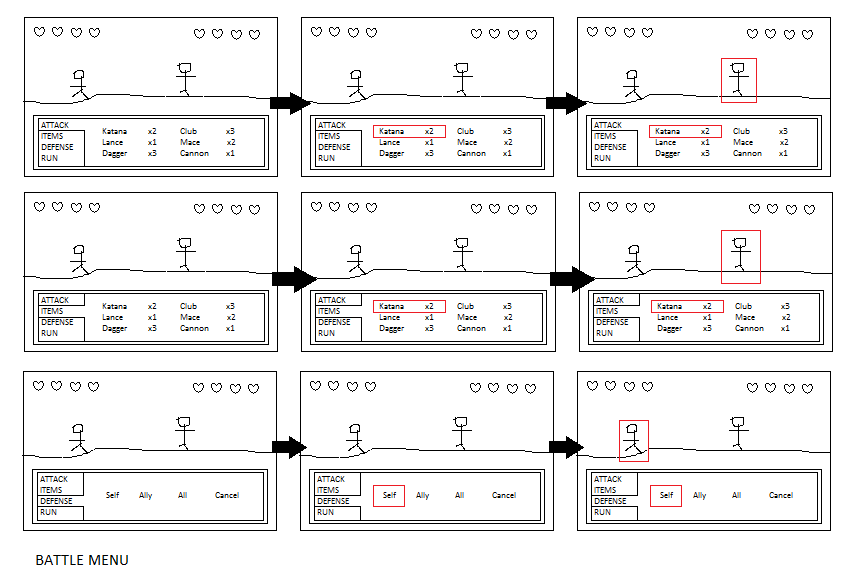
Battle Menu:
Protected download
On the player's turn, you start at the Attack menu, which shows the weapons and their amount. Confirm to attack to scroll through the weapons. It automatically highlights the weapon at the top-left. Pick a weapon, then an enemy to attack. The weapons submenu should allow for an unlimited amount of weapons, rather than limit the player's choice. Cancel attack to scroll the other menus: Items (items), Defense (defend), and Run (escape). Defense allows you to either defend yourself, an ally, or the whole party, or cancel. Cancel to navigate the menus. Lastly, the battle screen includes the player and enemies' health represented by hearts, but that's not part of the menu.
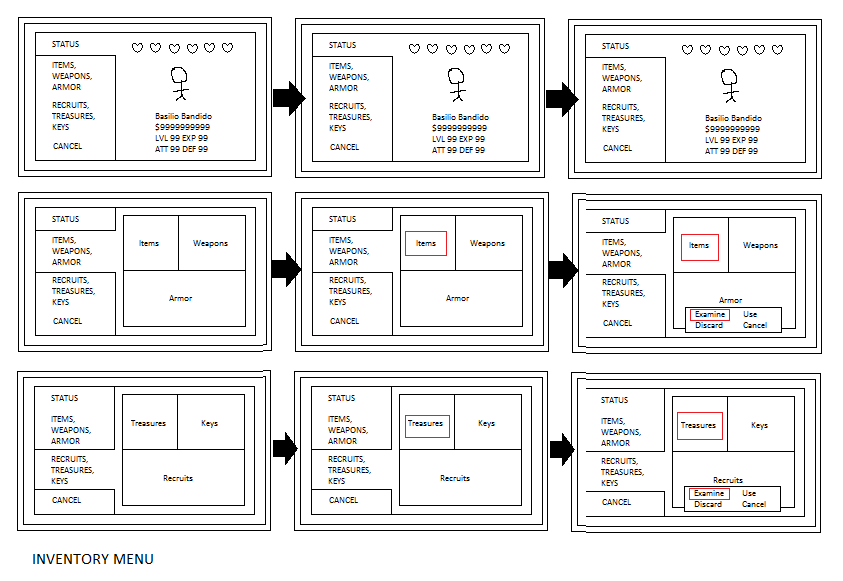
Inventory Menu:
Protected download
When the inventory is opened, you start at the Stats menu, which shows the player's current health (represented by hearts), the player, and the player's gold, level, EXP, attack points, and defense points. There are two other menus: Items, Weapons, Armor and Recruits, Treasures, Keys. When you scroll to these menus, they show their contents in three submenus. Confirm to enter a menu to select an item, a piece of armor, a weapon, a treasure, a key, or a recruit from the submenus. It automatically highlights the top selection. The submenus should allow for an unlimited amount of content. Once selected, you can either examine, use (if possible), or discard something, or cancel. Cancel to navigate the submenus, cancel again to navigate the menus, and cancel a third time to close the inventory.
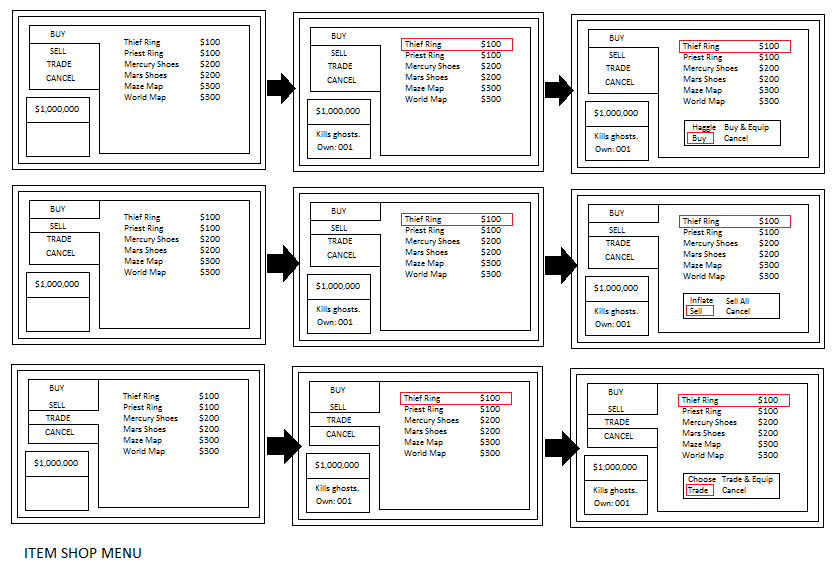
Shop Menu:
Protected download
The shop menu begins at the Buy menu, which shows purchasable items and their prices (same goes for the Sell and Trade menus, only they show you what the items are worth). At the bottom left is your total gold. Confirm to buy to scroll through the items. It automatically highlights the top item on the list. Cancel to scroll the other menus: Sell and Trade. Once you select something to buy, sell, or trade, it shows you the item's description and how much of it you already own, plus you can either: (for buy) haggle to lower the price of an item, buy and automatically equip it, or just buy it, or cancel; (for sell) inflate to raise the price of an item, sell everything in your inventory, or just sell an item, or cancel; and (for trade) choose which of your items to exchange for the item you've already selected in the shop, trade and automatically equip the item you've traded for, or just trade, or cancel. Cancel to navigate the menus, cancel again to exit the shop menu.
Finally, the highlights (weapons, enemy to attack, items, and selections) are signified by red outlines. I'm not sure what colors the menus, submenus, and highlights should be, so I'd like the menu colors to be customizeable by the developer. If you have any questions about my request, please feel to ask them and I'll do my best to answer me as soon as I can.
Downloads / Referenced Files
Log in to download
Log in, then follow the RPG Maker Developers Group to see these download links.
If you are the original creator and want this listing reassigned, edited, or removed, join BMMPlay and contact the moderators with proof that matches the original RPG Maker Web profile, linked GitHub, itch.io page, or another public creator identity.






 PlayStation 5 Portal Remote Player
Remote-play handheld for PS5 players who want more ways to play around the house.
View on Amazon
PlayStation 5 Portal Remote Player
Remote-play handheld for PS5 players who want more ways to play around the house.
View on Amazon