Preserved forum archive. This topic stores the original first post and locally mirrored RPG Maker Web attachments when available. It is posted by the BMMPlay archive account, not by the original creator.
Original Source
Original title: Falcao Pearl ABS Quick Tool Selection Menu
Source forum path: Game Development Engines > Ruby Game System (RGSS) Scripts > RGSS3 Scripts (RMVX Ace) > RGSS3 Script Requests
Summary
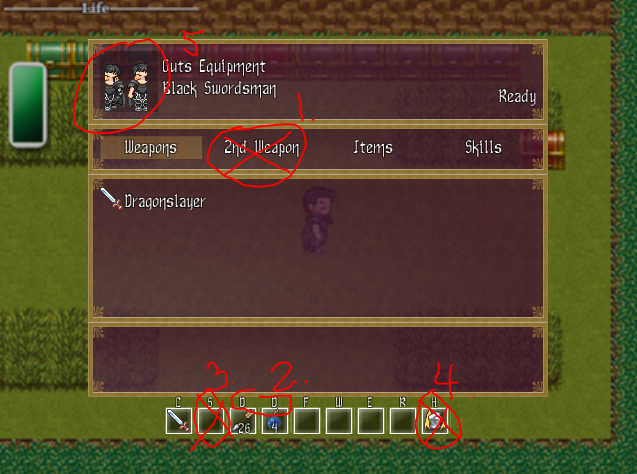
Hello guys! I have 5 questions regarding customization of the Quick Tool Menu in Falcao Pearl ABS system. If you could answer even 1 of these, I'll be extremely thankful. I have a picture attached to this post to help with explaining myself (please look at it, as all of the things I want changed are circled and/or crossed out) 1. So my first question is, would it be possible to completely remove the "Left Hand" option from the menu? (Which in my pic is called "2nd Weapon") There really...
Archived First Post
Hello guys! I have 5 questions regarding customization of the Quick Tool Menu in Falcao Pearl ABS system. If you could answer even 1 of these, I'll be extremely thankful.
I have a picture attached to this post to help with explaining myself (please look at it, as all of the things I want changed are circled and/or crossed out)
1. So my first question is, would it be possible to completely remove the "Left Hand" option from the menu? (Which in my pic is called "2nd Weapon") There really is no use for it in my game.
UPDATE: I fixed question 2 on my own, so I only need questions 1, 3, 4, and 5 answered. 2. This is probably just a really dumb mistake on my part for messing with the script and there is most likely nothing you can do, but just in case: why are there 2 "D" hotkeys? The segment in the Battler Settings script looks like this and I don't see anything wrong with it:
3. Is there also anyway to remove this 'S' hotkey? Since I'd like to remove the Left Hand or "2nd Weapon" from the game to begin with, there is no use for this command. I know that I will have to edit the graphic, but that doesn't remove the function from the script.
4. Same as with question 3, how do I remove the "Party Attack" command? (The 'H' hotkey) My game doesn't have any party members. I enabled the "Single Player Mode" so the Party Menu has been disabled, but this hotkey still exists.
5. This is honestly not as important, but is it possible to put the Face Graphic for the player character in the top left of the menu, replacing the messed up 4-frame sprite?
This is asking a lot; perhaps even too much, I know. But if someone could give even the slightest bit of help, you will have my gratitude. If you would wish to be credited in my game, I will happily do that, as well.
Thank you so much~
Protected download
Downloads / Referenced Files
Log in to download
Log in, then follow the RPG Maker Developers Group to see these download links.
This is asking a lot; perhaps even too much, I know. But if someone could give even the slightest bit of help, you will have my gratitude. If you would wish to be credited in my game, I will happily do that, as well. Thank you so much~ { "lightbox_close": "Close",
Referenced Images / Attachments
capture1.PNG
Creator Claims / Removal
If you are the original creator and want this listing reassigned, edited, or removed, join BMMPlay and contact the moderators with proof that matches the original RPG Maker Web profile, linked GitHub, itch.io page, or another public creator identity.




 SteelSeries Rival 3 Wireless Gen 2 Gaming Mouse
Dual wireless gaming mouse with fast response and long battery life for PC players.
View on Amazon
SteelSeries Rival 3 Wireless Gen 2 Gaming Mouse
Dual wireless gaming mouse with fast response and long battery life for PC players.
View on Amazon

