

Resizing/Changing Skill or Item windows
BMM_Archive · July 15, 2026

BMM_Archive
Preserved forum archive. This topic stores the original first post and locally mirrored RPG Maker Web attachments when available. It is posted by the BMMPlay archive account, not by the original creator.
Original Source
- Original title: Resizing/Changing Skill or Item windows
- Original author: blackraisondetre
- Original date: August 19, 2013
- Source thread: https://forums.rpgmakerweb.com/threads/resizing-changing-skill-or-item-windows.17108/
- Source forum path: Game Development Engines > Ruby Game System (RGSS) Scripts > RGSSx Script Support
Summary
Okay. So. I don't really find the default skill and item windows (in the battle window) to be aesthetically pleasing. Also, probably due to some compatibility issues, the skill window and item window don't even fit the 640*416 screen.
Archived First Post
Okay. So.
I don't really find the default skill and item windows (in the battle window) to be aesthetically pleasing.
Also, probably due to some compatibility issues, the skill window and item window don't even fit
the 640*416 screen.
I was trying to find a way to adjust this in the Window_BattleSkill or Window_BattleItem, but I have no knowledge in ruby so I
did not understand anything.
Getting to the point, is there a way to resize the skill and item window or better yet, is there a way to use imported images
as the skill window? (with a script or...?[couldn't find a script that did that])
Screenshot below
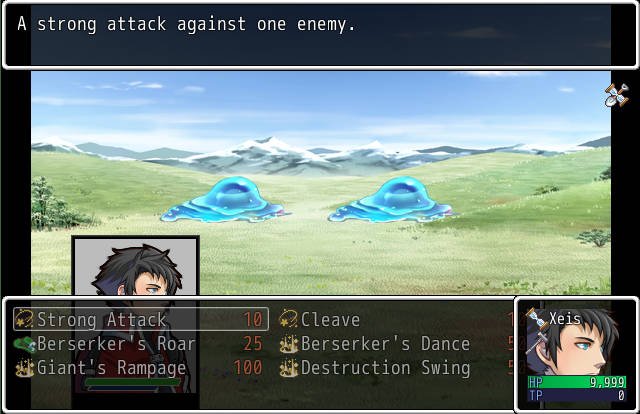
As you can see the skill window and the face image overlap and I don't think it goes with the other part of the HUD very well.
Thanks in Advance!
P.S I'm using Yanfly Core Engine, http://yanflychannel.wordpress.com/rmvxa/core-scripts/ace-core-engine/
Yanfly Battle Engine, http://yanflychannel.wordpress.com/rmvxa/battle-scripts/ace-battle-engine/
Yanfly FTB,http://yanflychannel.wordpress.com/rmvxa/battle-scripts/ace-battle-engine/battle-system-free-turn-battle/
Ziifee's Command Wheel, http://neomemo.web.fc2.com/rgss3.html
Moghunter's Advance Battle Hud. http://www.atelier-rgss.com/RGSS/Battle/ACE_BAT03.html
Just in case you wanted to know.
UPDATE: Solution found to this issue. This thread can be closed.
I don't really find the default skill and item windows (in the battle window) to be aesthetically pleasing.
Also, probably due to some compatibility issues, the skill window and item window don't even fit
the 640*416 screen.
I was trying to find a way to adjust this in the Window_BattleSkill or Window_BattleItem, but I have no knowledge in ruby so I
did not understand anything.
Getting to the point, is there a way to resize the skill and item window or better yet, is there a way to use imported images
as the skill window? (with a script or...?[couldn't find a script that did that])
Screenshot below
As you can see the skill window and the face image overlap
and I don't think it goes with the other part of the HUD very well.Thanks in Advance!
P.S I'm using Yanfly Core Engine, http://yanflychannel.wordpress.com/rmvxa/core-scripts/ace-core-engine/
Yanfly Battle Engine, http://yanflychannel.wordpress.com/rmvxa/battle-scripts/ace-battle-engine/
Yanfly FTB,http://yanflychannel.wordpress.com/rmvxa/battle-scripts/ace-battle-engine/battle-system-free-turn-battle/
Ziifee's Command Wheel, http://neomemo.web.fc2.com/rgss3.html
Moghunter's Advance Battle Hud. http://www.atelier-rgss.com/RGSS/Battle/ACE_BAT03.html
Just in case you wanted to know.
UPDATE: Solution found to this issue. This thread can be closed.
Downloads / Referenced Files
RPG Maker Web attachments are mirrored locally when available. Other external links remain hosted by their original creator or third-party service.
- Local mirror: 1880-03438ef37c6b69ac4a46d8b451aa9fbd.jpg
SHA-256:f163ece4801b0cc157753f4fe6d467cf96d799bde2c4cee40241ed19785e455e
Original attachment URL: https://forums.rpgmakerweb.com/attachments/messedupskillwindow-jpg.7739/
Referenced Images / Attachments
Creator Claims / Removal
If you are the original creator and want this listing reassigned, edited, or removed, join BMMPlay and contact the moderators with proof that matches the original RPG Maker Web profile, linked GitHub, itch.io page, or another public creator identity.
Replies (0)
No replies yet.
0
replies
21
views
Topic Summary
Loading summary...