


I need a new Inventory script for my game
BMM_Archive · July 15, 2026

Preserved forum archive. This topic stores the original first post and locally mirrored RPG Maker Web attachments when available. It is posted by the BMMPlay archive account, not by the original creator.
Original Source
- Original title: I need a new Inventory script for my game
- Original author: Ebonfix
- Original date: September 28, 2015
- Source thread: https://forums.rpgmakerweb.com/threads/i-need-a-new-inventory-script-for-my-game.45211/
- Source forum path: Game Development Engines > Ruby Game System (RGSS) Scripts > RGSS3 Scripts (RMVX Ace) > RGSS3 Script Requests
Summary
Hi so I am trying to make a game ,but no one has the exact script that I want... I want the inventory to look like this { "lightbox_close": "Close", "lightbox_next": "Next",
Archived First Post
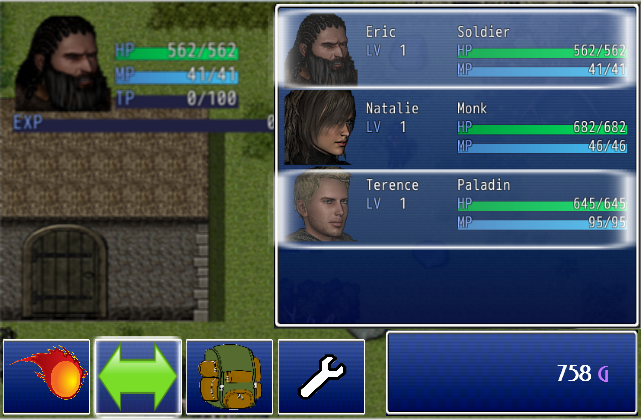
Hi so I am trying to make a game ,but no one has the exact script that I want... I want the inventory to look like this
Protected download this is the formation screen of course. so it's just like the normal formation script ,but in this menu
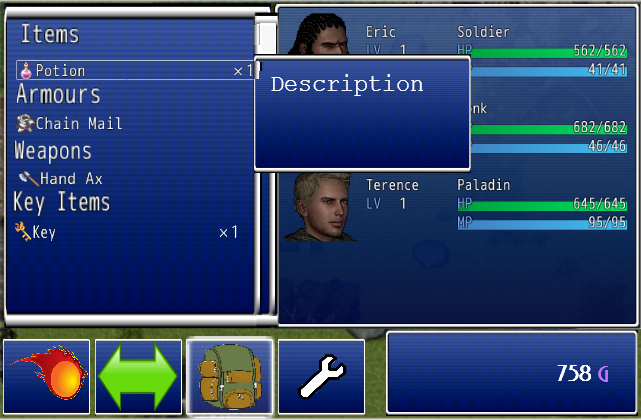
Protected download this is the inventory. If you have the item equipped, the item will show in gray. If you hover over a item it will show the description, and the stats change. If you have to many items, A scroll bar will appear to show you where in your inventory you are. If you do want to equip the weapon, it would select the weapon,and then you choose which actor you want to have that weapon. If it can't be used by that person it'd play that buzzer sound. Same for the Armour.
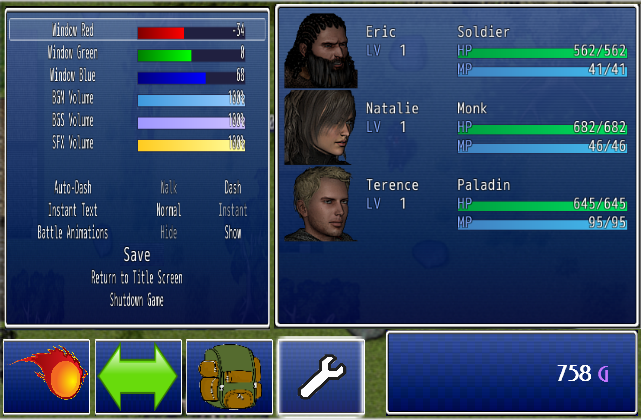
Protected download the options/save menu would just look like the yannfly channel options menu except with save in it and on the left side. IF SOME HOW you can manage to put the yanfly channel script right on the side I'd be happy ,or you could just remove the window color thing and instead add a option that says "audio" "save/load" and "shutdown/go to title screen"
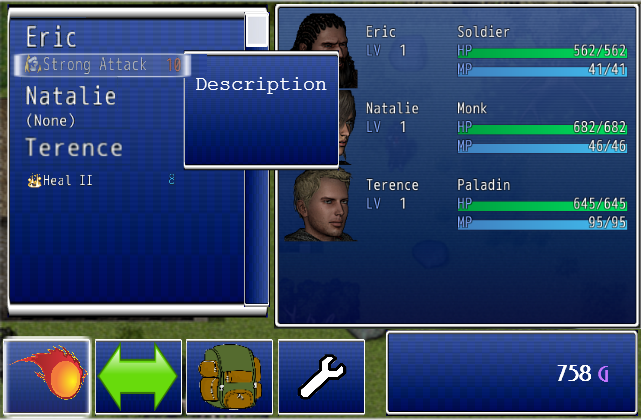
Protected download skills would be just like inventory except with skills and if you have no skills it'd just say "(None)" so instead of "items/weapons/armor/key items" it'd say the actors name like shown in the picture.
also if I need any pictures for the bottom 4 squares with the main functions of the inventory please tell me.
If there is no inventory scripts like this can someone be a dear for poor little old me and make it? Much appreciated for reading this long post. Please reply!
Protected download this is the inventory. If you have the item equipped, the item will show in gray. If you hover over a item it will show the description, and the stats change. If you have to many items, A scroll bar will appear to show you where in your inventory you are. If you do want to equip the weapon, it would select the weapon,and then you choose which actor you want to have that weapon. If it can't be used by that person it'd play that buzzer sound. Same for the Armour.
Protected download the options/save menu would just look like the yannfly channel options menu except with save in it and on the left side. IF SOME HOW you can manage to put the yanfly channel script right on the side I'd be happy ,or you could just remove the window color thing and instead add a option that says "audio" "save/load" and "shutdown/go to title screen"
Protected download skills would be just like inventory except with skills and if you have no skills it'd just say "(None)" so instead of "items/weapons/armor/key items" it'd say the actors name like shown in the picture.
also if I need any pictures for the bottom 4 squares with the main functions of the inventory please tell me.
If there is no inventory scripts like this can someone be a dear for poor little old me and make it? Much appreciated for reading this long post. Please reply!
Downloads / Referenced Files
Log in to download
Log in, then follow the RPG Maker Developers Group to see these download links.
Log in to downloadReferenced Images / Attachments
Creator Claims / Removal
If you are the original creator and want this listing reassigned, edited, or removed, join BMMPlay and contact the moderators with proof that matches the original RPG Maker Web profile, linked GitHub, itch.io page, or another public creator identity.


Replies (0)
No replies yet.
0
replies
9
views
Topic Summary
Loading summary...
