


How do i hide exp from menu when character is level 99?
BMM_Archive · July 15, 2026

Original Source
- Original title: How do i hide exp from menu when character is level 99?
- Original author: PussiCat
- Original date: September 25, 2015
- Source thread: https://forums.rpgmakerweb.com/threads/how-do-i-hide-exp-from-menu-when-character-is-level-99.45093/
- Source forum path: Game Development Engines > Ruby Game System (RGSS) Scripts > RGSS3 Scripts (RMVX Ace) > RGSS3 Script Requests
Summary
Hello everyone, I was wondering whether it was possible to remove the EXP bar from the menu when the character reaches level 99, which is the max level for my game. Currently it keeps showing the amount of experience gained after i hat max level. Please refer to image "Problem". I would like it that when the character reaches level 99 the exp bar disapears completely. Is this possible to even do? One other question. is it possible with this menu to make the location box taller by 100% and the...
Archived First Post
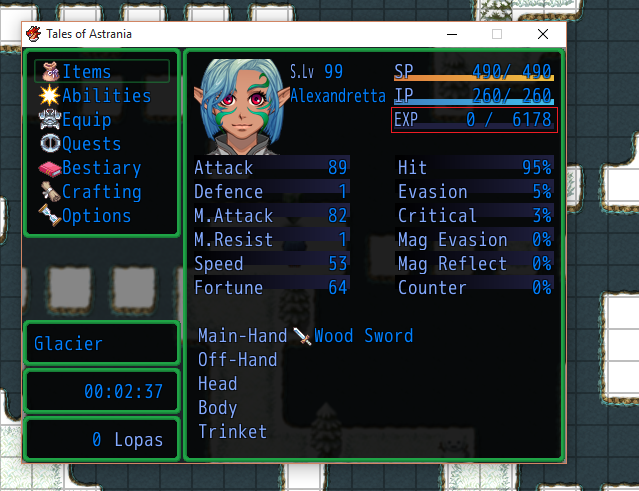
Currently it keeps showing the amount of experience gained after i hat max level. Please refer to image "Problem".
I would like it that when the character reaches level 99 the exp bar disapears completely. Is this possible to even do?
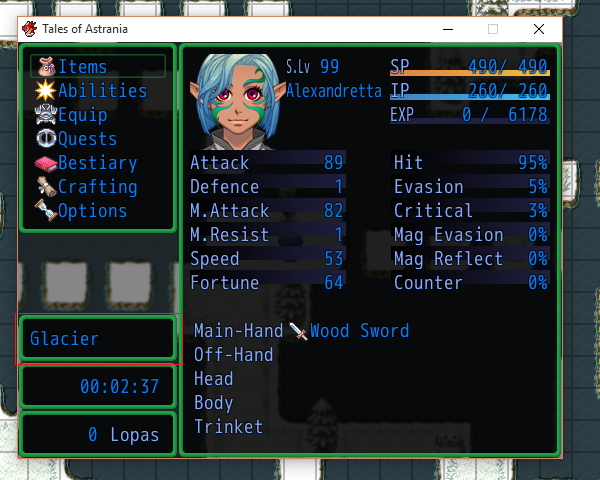
One other question. is it possible with this menu to make the location box taller by 100% and the location able to word wrap inside that box? Please refer to image "Problem_2".
I'm using - Mr Trivel's Expanded Actor Menu and nerdigaming's Menu Location scripts. I know little about scripting but I have fiddled around a littlee but with these to configure correctly for my menu.
Thankyou for your time.
Protected download
Protected download
Downloads / Referenced Files
Log in, then follow the RPG Maker Developers Group to see these download links.
Log in to downloadReferenced Images / Attachments
Creator Claims / Removal
If you are the original creator and want this listing reassigned, edited, or removed, join BMMPlay and contact the moderators with proof that matches the original RPG Maker Web profile, linked GitHub, itch.io page, or another public creator identity.


Replies (0)
No replies yet.
Topic Summary
Loading summary...
