


Add TP to windows outside of battle, also empty equipment slots
BMM_Archive · July 15, 2026

Original Source
- Original title: Add TP to windows outside of battle, also empty equipment slots
- Original author: MusicTF
- Original date: July 5, 2015
- Source thread: https://forums.rpgmakerweb.com/threads/add-tp-to-windows-outside-of-battle-also-empty-equipment-slots.41948/
- Source forum path: Game Development Engines > Ruby Game System (RGSS) Scripts > RGSS3 Scripts (RMVX Ace) > RGSS3 Script Requests
Summary
I'm looking for a script to: 1. Add TP to the main window of the menu, by moving the actor class to under the actor level, then moving HP and MP up, and finally adding TP where MP was. 2. Add TP to the status window by moving HP and MP up and then putting TP where MP was. 3. If a certain type of equipment is not equipped (no shield is equipped, or no helmet) then where it would show the equipment if it were equipped show the words:...
Archived First Post
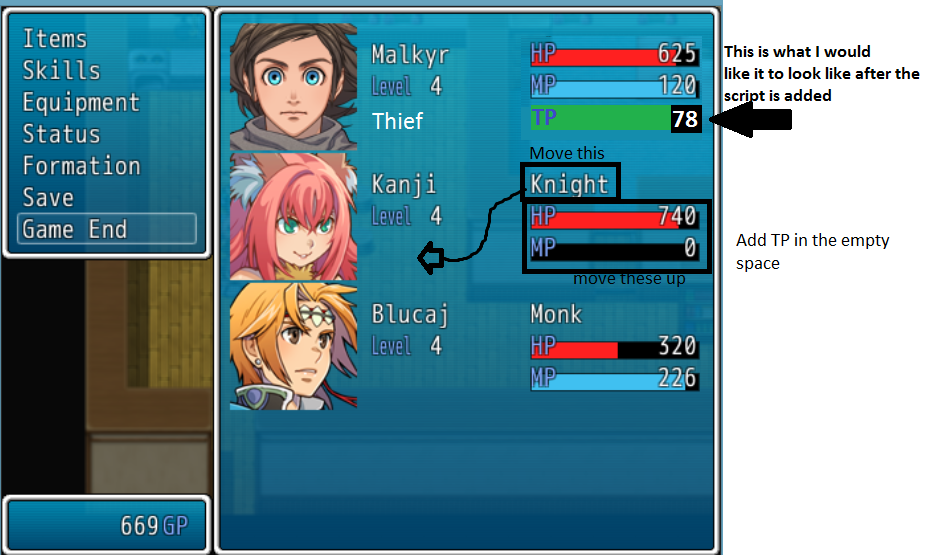
1. Add TP to the main window of the menu, by moving the actor class to under the actor level, then moving HP and MP up, and finally adding TP where MP was.
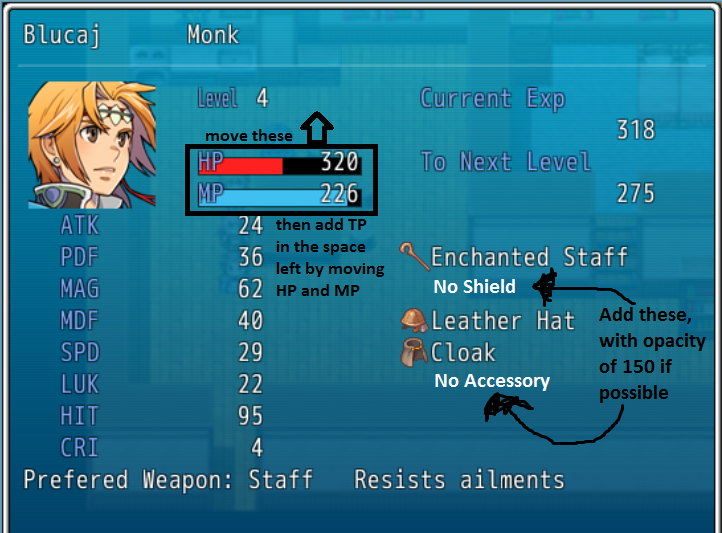
2. Add TP to the status window by moving HP and MP up and then putting TP where MP was.
3. If a certain type of equipment is not equipped (no shield is equipped, or no helmet) then where it would show the equipment if it were equipped show the words: "no [equipment type]" with opacity at 150.
all of the actors in my game have the Preserve TP special flag in their list of features.
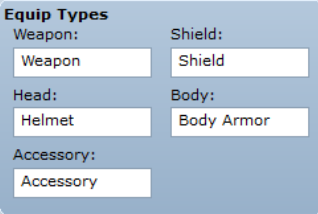
Attached are visual representations of what I mean, and the words I use for each equipment type
Protected download
Protected download
Protected download
Downloads / Referenced Files
Log in, then follow the RPG Maker Developers Group to see these download links.
Log in to downloadReferenced Images / Attachments
Creator Claims / Removal
If you are the original creator and want this listing reassigned, edited, or removed, join BMMPlay and contact the moderators with proof that matches the original RPG Maker Web profile, linked GitHub, itch.io page, or another public creator identity.
Replies (0)
No replies yet.
Topic Summary
Loading summary...

