Preserved forum archive. This topic stores the original first post and locally mirrored RPG Maker Web attachments when available. It is posted by the BMMPlay archive account, not by the original creator.
Original Source
Original title: Add Faces In the Battle Status Window
Source forum path: Game Development Engines > Ruby Game System (RGSS) Scripts > RGSS3 Scripts (RMVX Ace) > RGSS3 Script Requests
Summary
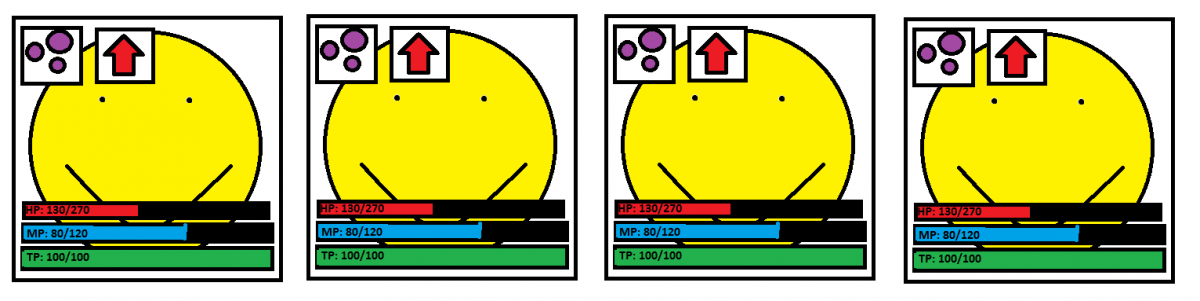
OK does anyone know a way to instead of having the actors name, followed by state(s), HP, MP, and TP, in four lines descending from the top (as is the default in RPG Maker VX Ace), to have four squares in a line from the left, containing the actors face graphic as the background, with state(s) at the top, and HP, MP and TP bars at the bottom? Attached is an image to give an idea of what I mean. On the topic of battle, is there a way to...
Archived First Post
OK does anyone know a way to instead of having the actors name, followed by state(s), HP, MP, and TP, in four lines descending from the top (as is the default in RPG Maker VX Ace), to have four squares in a line from the left, containing the actors face graphic as the background, with state(s) at the top, and HP, MP and TP bars at the bottom? Attached is an image to give an idea of what I mean.
On the topic of battle, is there a way to just slow down the flow of battle, like waiting more between each action, waiting more between the "Actor does this" message and the animation, etc.
Thanks
Protected download
Downloads / Referenced Files
Log in to download
Log in, then follow the RPG Maker Developers Group to see these download links.
If you are the original creator and want this listing reassigned, edited, or removed, join BMMPlay and contact the moderators with proof that matches the original RPG Maker Web profile, linked GitHub, itch.io page, or another public creator identity.




 Amazon Fire TV 50-Inch 4-Series 4K UHD Smart TV
4K smart TV with Fire TV built in for streaming, games, and living room viewing.
View on Amazon
Amazon Fire TV 50-Inch 4-Series 4K UHD Smart TV
4K smart TV with Fire TV built in for streaming, games, and living room viewing.
View on Amazon

