
Preserved forum archive. This topic stores the original first post and locally mirrored RPG Maker Web attachments when available. It is posted by the BMMPlay archive account, not by the original creator.
Original Source
- Original title: Arrows and animations in battle symphony
- Original author: blamethepoet
- Original date: January 16, 2015
- Source thread: https://forums.rpgmakerweb.com/threads/arrows-and-animations-in-battle-symphony.35976/
- Source forum path: Game Development Engines > Ruby Game System (RGSS) Scripts > RGSS3 Scripts (RMVX Ace) > RGSS3 Script Requests
Summary
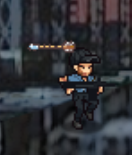
Hi everybody I'm having a problem with battle symphony script using Holder's battlers. Problem 1: Arrow goes far behind its target As you can see the arrow goes far behind its target, I enclose here the script I wrote for the weapon animation.
Archived First Post
Hi everybody
I'm having a problem with battle symphony script using Holder's battlers.
Problem 1: Arrow goes far behind its target
As you can see the arrow goes far behind its target, I enclose here the script I wrote for the weapon animation.
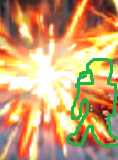
I tried to edit the dimensions of animations but still symphony seems to enlarge them on my characters. The green line represents a chara size (yeah I drew it weird). The animation is supposed to be the shots of a machine gun (instead it looks like a bomb!)
Can you help me with them?
Protected download
Protected download
I'm having a problem with battle symphony script using Holder's battlers.
Problem 1: Arrow goes far behind its target
As you can see the arrow goes far behind its target, I enclose here the script I wrote for the weapon animation.
Problem 2: big animations small characters<target action>
move user: forward, 6, wait
stance: user, item, wait
icon create: user, arrow, shield, 149, wait
ani wait: 5
stance: user, forward, wait
ani wait: 3
icon effect: user, arrow, rotate, 45, wait
stance: user, attack, wait
ani wait: 4
animation 113: user
icon throw user: target, arrow, 0, 30, wait
stance: target, dmg,
animation 13: target, wait
skill effect: dmg, calc
ani wait: 5
icon delete: user, weapon
move user: origin
stance: user, idle
I tried to edit the dimensions of animations but still symphony seems to enlarge them on my characters. The green line represents a chara size (yeah I drew it weird). The animation is supposed to be the shots of a machine gun (instead it looks like a bomb!)
Can you help me with them?
Protected download
Protected download
Downloads / Referenced Files
Log in to download
Log in, then follow the RPG Maker Developers Group to see these download links.
Log in to downloadReferenced Images / Attachments
Creator Claims / Removal
If you are the original creator and want this listing reassigned, edited, or removed, join BMMPlay and contact the moderators with proof that matches the original RPG Maker Web profile, linked GitHub, itch.io page, or another public creator identity.
Replies (0)
No replies yet.
0
replies
1
view
Topic Summary
Loading summary...