

Custom window that can show switches, variables and bar gauges
BMM_Archive · July 15, 2026

Original Source
- Original title: Custom window that can show switches, variables and bar gauges
- Original author: Meganli
- Original date: September 22, 2014
- Source thread: https://forums.rpgmakerweb.com/threads/custom-window-that-can-show-switches-variables-and-bar-gauges.32273/
- Source forum path: Game Development Engines > Ruby Game System (RGSS) Scripts > RGSS3 Scripts (RMVX Ace) > RGSS3 Script Requests
Summary
Hi everyone. I've searched everywhere for a script that could meet my needs, but couldn't find one anywhere, so I thought I'd ask here. Please let me know if there is actually a script out there that could work with my idea. So, I'm making a game which is not an RPG but which is more of a visual novel/stat-raising game. It's about a girl who makes various choices in her daily life, and these decisions can cause any of the parameters in the game to increase or decrease. The...
Archived First Post
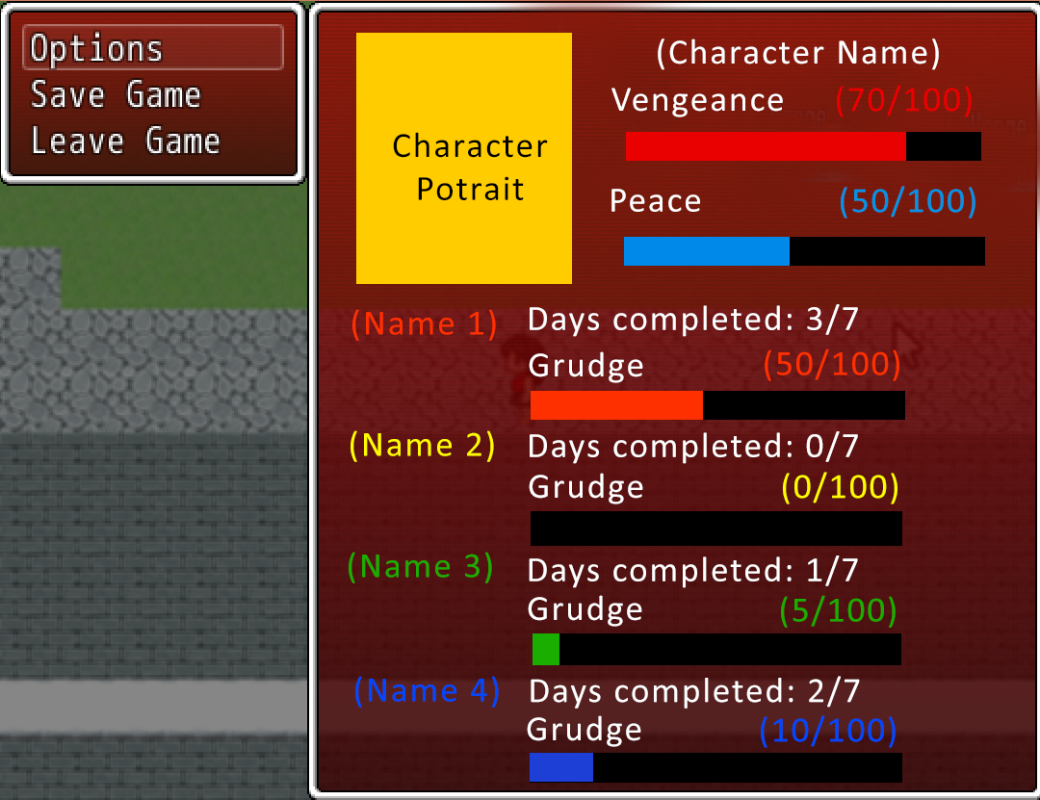
So, I'm making a game which is not an RPG but which is more of a visual novel/stat-raising game. It's about a girl who makes various choices in her daily life, and these decisions can cause any of the parameters in the game to increase or decrease. The parameters are 'Vengeance', 'Peace', and four different 'Grudge' stats.
The player can get different endings depending on the parameters. I used Variables to measure the parameters (I'm not sure if I should use the 'Parameters' fields under the Database instead of Variables. Please let me know if it is better for me to use that instead).
I want the player to be able to see all their parameters in the menu, on the right window (so it won't actually have to be an option in the menu - it'll just be displayed on the right). I have attached a mockup to explain how I want it to look like. The numbers shown are controlled by the variables, and I would like for there to be a coloured bar gauge beneath the numbers as a visual representation. How much the bar gauge is filled will be controlled by the variables.
The 'Days completed: #/7' text will be controlled by switches (I used switches in the game to keep track of the day the player is currently on, like Day1, Day2, etc.)
Finally, it'll be great if there is an ability to add a graphic to the window so that I can display a portrait of the character on the top left.
If it isn't possible to add stuff to the right window menu, I don't mind having a new and separate window appear instead, which can be opened by pressing a different button. I would just find a script or something to reduce the main menu to only a small window menu with 'Options', 'Save' and 'Quit' instead.
Edit: I'd just like to add that I might not be using the 4th Grudge parameter - that is, everything under (Name 4) can be removed. I guess that means the window can have more space for the other bars and information.
Downloads / Referenced Files
RPG Maker Web attachments are mirrored locally when available. Other external links remain hosted by their original creator or third-party service.
- Local mirror: 8149-2345f31f9e3a4eadcd193a309311f74d.png
SHA-256:ed5b1dd99fe31b6f8714d0070fab934085a81f1bfe6e60823239661d808efcd2
Original attachment URL: https://forums.rpgmakerweb.com/attachments/screenshot-menu-png.17044/
Referenced Images / Attachments
Creator Claims / Removal
If you are the original creator and want this listing reassigned, edited, or removed, join BMMPlay and contact the moderators with proof that matches the original RPG Maker Web profile, linked GitHub, itch.io page, or another public creator identity.
Replies (0)
No replies yet.
Topic Summary
Loading summary...