

Placing a horizontal rule in the Start Up window.
BMM_Archive · July 15, 2026

Original Source
- Original title: Placing a horizontal rule in the Start Up window.
- Original author: Anruth
- Original date: February 9, 2014
- Source thread: https://forums.rpgmakerweb.com/threads/placing-a-horizontal-rule-in-the-start-up-window.23544/
- Source forum path: Game Development Engines > Ruby Game System (RGSS) Scripts > RGSS3 Scripts (RMVX Ace) > RGSS3 Script Requests
Summary
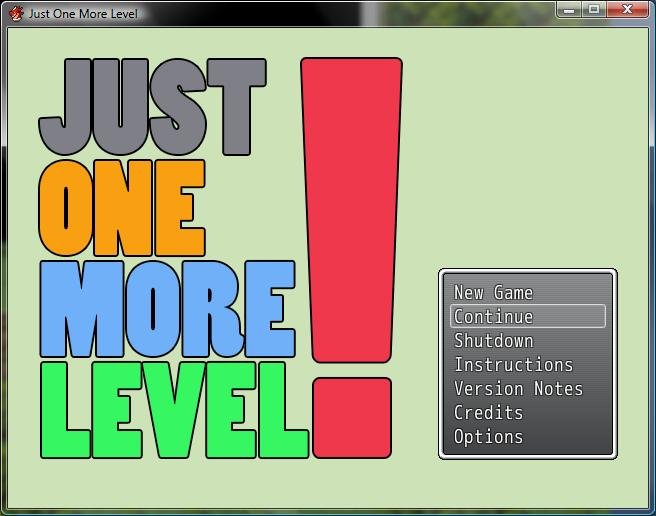
I have added several choices to the startup menu (Instructions,Version Notes, Credits). I'd like to put a horizontal rule between shut down and instructions. Just to make it look alittle better. I have no idea how to do this. I'm also unable to draw just plain text to this menu. I'm having a few other issues with getting my added selections to work, but I'd like to get this screen looking the way I want it before addressing the rest. One small step at a time. Thanks in advance for any...
Archived First Post
I have no idea how to do this. I'm also unable to draw just plain text to this menu.
I'm having a few other issues with getting my added selections to work, but I'd like to get this screen looking the
way I want it before addressing the rest. One small step at a time. Thanks in advance for any help.
Note: I tried to upload a screen shot to the gallery, but uploader kept giving me and error.
And how do I put images in the "Screen Shot" box?
Downloads / Referenced Files
RPG Maker Web attachments are mirrored locally when available. Other external links remain hosted by their original creator or third-party service.
- Local mirror: 4293-c7b03eeeaa8e811d9cd0a6e4a39c436d.jpg
SHA-256:abf1a68c7b0a38c923e8cdeb94c0b92db2a35a549cf0d9e303ee01c482f2cbae
Original attachment URL: https://forums.rpgmakerweb.com/attachments/jomlsm-jpg.11138/
License / Terms Note
I have added several choices to the startup menu (Instructions,Version Notes, Credits). I'd like to put a horizontal rule between shut down and instructions. Just to make it look alittle better. I have no idea how to do this. I'm also unable to draw just plain text to this menu. I'm having a few other issues with getting my added selections to work, but I'd like to get this screen looking the way I want it before addressing the rest. One...
Referenced Images / Attachments
Creator Claims / Removal
If you are the original creator and want this listing reassigned, edited, or removed, join BMMPlay and contact the moderators with proof that matches the original RPG Maker Web profile, linked GitHub, itch.io page, or another public creator identity.
Replies (0)
No replies yet.
Topic Summary
Loading summary...