


Moving Individual Actor Statuses in Menu
BMM_Archive · July 15, 2026

Original Source
- Original title: Moving Individual Actor Statuses in Menu
- Original author: CriticalGames
- Original date: November 1, 2016
- Source thread: https://forums.rpgmakerweb.com/threads/moving-individual-actor-statuses-in-menu.70427/
- Source forum path: Game Development Engines > RPG Maker Javascript Plugins > Learning Javascript
Summary
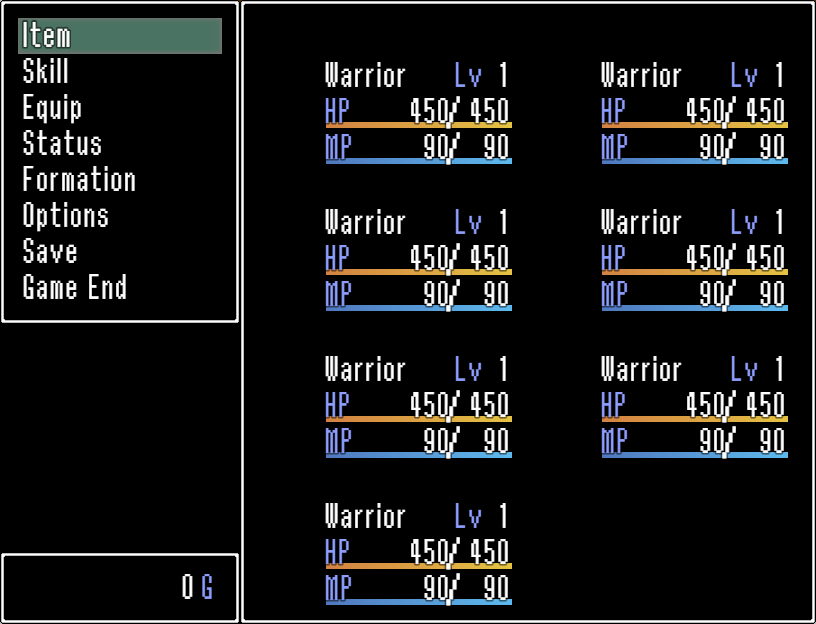
Hi everyone, I'm currently trying to develop my own Custom Menu Plugin, and while I've been going well (thanks in no small part of SumRndmDde's excellent tutorial series!), I've hit a snag that I just can't figure out and was wondering if anyone had any suggestions. I'm working on the Actor Status part of the Main Menu, where it displays all of your characters and their HP/MP/Level/etc. This is what I've currently got: {


Archived First Post
I'm currently trying to develop my own Custom Menu Plugin, and while I've been going well (thanks in no small part of SumRndmDde's excellent tutorial series!), I've hit a snag that I just can't figure out and was wondering if anyone had any suggestions.
I'm working on the Actor Status part of the Main Menu, where it displays all of your characters and their HP/MP/Level/etc. This is what I've currently got:
Protected download
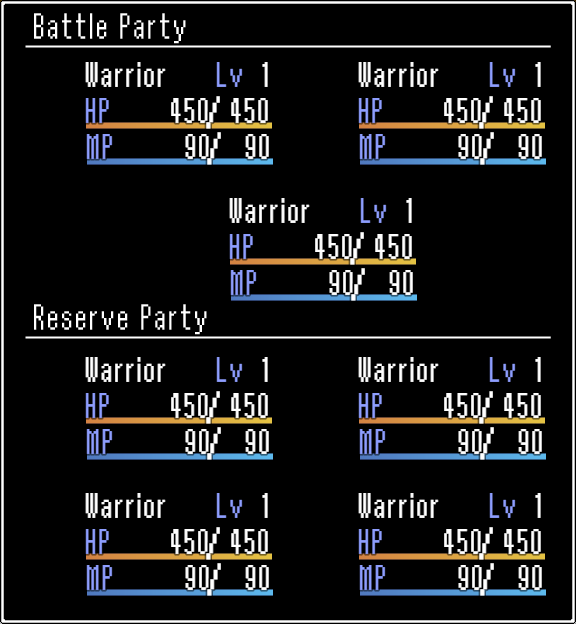
And this is what I'm trying to achieve:
Protected download
My game features a total of 7 playable characters, and a maximum of 3 characters in battle, so I thought this was a good way of approaching the layout. So basically I'm trying to make it so that the menu is presented as a row of 2 characters, then a row of 1 character (which is centralised), then a larger than normal gap followed by two rows of 2 characters. I believe I know how to sort out the background with the Battle Party/Reserve Party assets, however...
I cannot for the life of me figure out how to manipulate the x/y/width/height variables of an individual actor's status (e.g. keep the first two party members in their designated columns, but move the third to the centre of the menu). I've tried creating new prototypes (e.g. I made one called drawActor1HP and tried to point it towards the first actor in the party using $gameParty.members()[index] - obviously I got something very wrong there), and looking for the origins of commonly referenced terms like 'actor' and 'ActorSimpleStatus' to see how they're defined. But no luck, I'm afraid - I'm completely stumped! So my question is - is there a piece of syntax that allows me to manipulate a single actor's status graphics? My current script is below; I apologise for the mess (this isn't my forte)!
var _Scene_Menu_create = Scene_Menu.prototype.create;
Scene_Menu.prototype.create = function() {
_Scene_Menu_create.call(this);
};
Window_MenuStatus.prototype.windowWidth = function() {
return Graphics.boxWidth - 240;
};
Window_MenuStatus.prototype.windowHeight = function() {
return Graphics.boxHeight
};
Window_MenuStatus.prototype.numVisibleRows = function() {
return 4;
};
Window_MenuStatus.prototype.maxCols = function() {
return 2;
};
Window_MenuStatus.prototype.drawItemStatus = function(index) {
var actor = $gameParty.members()[index];
var rect = this.itemRect(index);
var x = rect.x + 68;
var y = rect.y + 40;
var width = rect.width - x - this.textPadding();
var lineHeight = this.lineHeight();
var width2 = 186; //Math.min(200, width - 180 - this.textPadding());
this.drawActorName(actor, x, y);
this.drawActorIcons(actor, x, y + lineHeight * 2);
this.drawActorHp(actor, x, y + lineHeight, width2);
this.drawActorMp(actor, x, y + lineHeight * 2, width2);
Window_MenuStatus.prototype.drawItemImage = function(index) {
var actor = $gameParty.members()[index];
var rect = this.itemRect(index);
this.drawActorFace(actor, rect.x - 52, rect.y + 22, Window_Base._faceWidth, Window_Base._faceHeight);
this.changePaintOpacity(true);
};
Window_Base.prototype.drawActorLevel = function(actor, x, y) {
this.changeTextColor(this.systemColor());
this.drawText(TextManager.levelA, x, y, 48);
this.resetTextColor();
this.drawText(actor.level, x + 36, y, 20, 'right');
};
this.drawActorLevel(actor, (x + 130), y);
};
Window_MenuCommand.prototype.windowWidth = function() {
return 240;
};
Window_MenuCommand.prototype.windowHeight = function() {
return this.fittingHeight(this.numVisibleRows());
};
Window_MenuCommand.prototype.numVisibleRows = function() {
return this.maxItems();
};
})();
Thank you very much for looking! =)
Downloads / Referenced Files
Log in, then follow the RPG Maker Developers Group to see these download links.
Log in to downloadReferenced Images / Attachments
Creator Claims / Removal
If you are the original creator and want this listing reassigned, edited, or removed, join BMMPlay and contact the moderators with proof that matches the original RPG Maker Web profile, linked GitHub, itch.io page, or another public creator identity.
Replies (0)
No replies yet.
Topic Summary
Loading summary...
