

How do I split up windows?
BMM_Archive · July 15, 2026

BMM_Archive
Preserved forum archive. This topic stores the original first post and locally mirrored RPG Maker Web attachments when available. It is posted by the BMMPlay archive account, not by the original creator.
Original Source
- Original title: How do I split up windows?
- Original author: Zane
- Original date: August 12, 2013
- Source thread: https://forums.rpgmakerweb.com/threads/how-do-i-split-up-windows.16849/
- Source forum path: Game Development Engines > Ruby Game System (RGSS) Scripts > RGSS3 Scripts (RMVX Ace) > RGSS3 Script Requests
Summary
note: Maybe this post goes in script support ? I have no idea I was just told by a global mod. to post my topic here. Issue You guys know how the default battle system looks all the commands are in one window and all the actors are
Archived First Post
note:
Maybe this post goes in script support ? I have no idea I was just told by a global mod. to post my topic here.
Issue
You guys know how the default battle system looks all the commands are in one window and all the actors are
in one window. My question to the forum is how can I split up these windows? I know it takes some coding and
im fine with that. I just need a little help on how to do it.
Visual Idea
the following images are for a general idea on what i mean by split up.
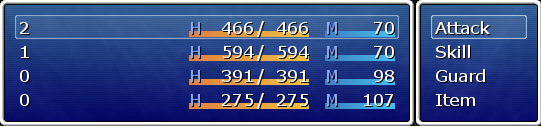
This photo represents what it looks like now
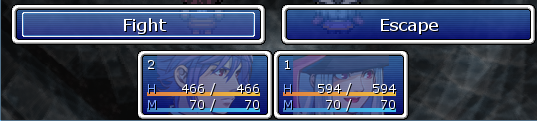
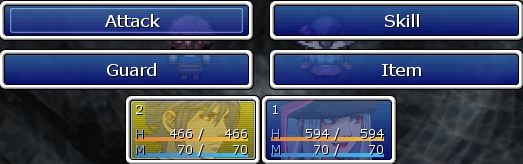
This photo represents what I mean by everything in its own window
The general statement is Im not looking for someone to write this cbs out.
<span style="color: #a52a2a"> I just what to know what do I edit?
<span style="color: #a52a2a">What needs to be replaced?
<span style="color: #a52a2a">How can I move the windows around after editing?
Thank you for reading this post and/or responding and helping me solve this!
<span style="color: #a52a2a">Note: If this section is in the wrong location please feel free to move it
Maybe this post goes in script support ? I have no idea I was just told by a global mod. to post my topic here.
Issue
You guys know how the default battle system looks all the commands are in one window and all the actors are
in one window. My question to the forum is how can I split up these windows? I know it takes some coding and
im fine with that. I just need a little help on how to do it.
Visual Idea
the following images are for a general idea on what i mean by split up.
This photo represents what it looks like now
This photo represents what I mean by everything in its own window
<span style="color: #a52a2a"> I just what to know what do I edit?
<span style="color: #a52a2a">What needs to be replaced?
<span style="color: #a52a2a">How can I move the windows around after editing?
Thank you for reading this post and/or responding and helping me solve this!
<span style="color: #a52a2a">Note: If this section is in the wrong location please feel free to move it
Downloads / Referenced Files
RPG Maker Web attachments are mirrored locally when available. Other external links remain hosted by their original creator or third-party service.
- Local mirror: 1794-484ecdba10ffbe12dc3e45cda70473b0.png
SHA-256:a6e04db9f6fa595f025abdb2ebe02311d07fe24126a44e0b29f35d653ab94218
Original attachment URL: https://forums.rpgmakerweb.com/attachments/edit-1-png.7610/ - Local mirror: 1795-ad386aa87a9d9364b463a290e4db1ac3.png
SHA-256:3ef371681eec6da9f4a2776cd577627f64e0393738460dbbb44ea8c1591be76d
Original attachment URL: https://forums.rpgmakerweb.com/attachments/edit-2-png.7611/ - Local mirror: 1796-d80516b480cbf79fe900441e811ccd34.png
SHA-256:eeb124b6a9e2fede882f53f4b225f0aeee15b994fd17f7e58d52a1c8493cb8ab
Original attachment URL: https://forums.rpgmakerweb.com/attachments/edit-3-png.7612/
Referenced Images / Attachments
Creator Claims / Removal
If you are the original creator and want this listing reassigned, edited, or removed, join BMMPlay and contact the moderators with proof that matches the original RPG Maker Web profile, linked GitHub, itch.io page, or another public creator identity.
Replies (0)
No replies yet.
0
replies
22
views
Topic Summary
Loading summary...