

My first plugin (Macros), feedback required
BMM_Archive · July 15, 2026

BMM_Archive
Preserved forum archive. This topic stores the original first post and locally mirrored RPG Maker Web attachments when available. It is posted by the BMMPlay archive account, not by the original creator.
Original Source
- Original title: My first plugin (Macros), feedback required
- Original author: Thyzer
- Original date: January 29, 2016
- Source thread: https://forums.rpgmakerweb.com/threads/my-first-plugin-macros-feedback-required.55927/
- Source forum path: Game Development Engines > RPG Maker Javascript Plugins > Learning Javascript
Summary
Hey, I am currently learning Javascript and especially with making plugins there are many things new to me. For example saving a function, overwriting it with my own code and then execute the saved code... After about 3-4 hours I tinkered a plugin I call "Macros".
Archived First Post
Hey,
I am currently learning Javascript and especially with making plugins there are many things new to me.
For example saving a function, overwriting it with my own code and then execute the saved code...
After about 3-4 hours I tinkered a plugin I call "Macros".
Macros will basically replace text from noteboxes with other text you define in a common event.
I want feedback from you about my coding style. I personally think some things in my code are "dirty" and want to make it different, but dont know how.
Maybe it's not that bad or not possible another way...
How to use:
My Questions:
- When I want a macro with more than one parameter, and both parameters should contain a longer text (and thus containing comma)... how do I distinguish between "comma for the text" and "comma to seperate parameters".
- Is there another plugin like this, which might be more stable/useful/... which I can take a look at? I havent found anything myself.
- Is there a way, that this plugin doesnt require to be the first in plugin-load-order?
- Do you find it useful?
- Did you find any bugs/mistakes/messy code?
- Do you know how to solve something better then I did?
Source Code:
View attachment THY_Macros.js
I am currently learning Javascript and especially with making plugins there are many things new to me.
For example saving a function, overwriting it with my own code and then execute the saved code...
After about 3-4 hours I tinkered a plugin I call "Macros".
Macros will basically replace text from noteboxes with other text you define in a common event.
I want feedback from you about my coding style. I personally think some things in my code are "dirty" and want to make it different, but dont know how.
Maybe it's not that bad or not possible another way...
How to use:
- Install this plugin before anything that reads noteblocks!!!
- Make a Common Event and add a "Comment". In this comment you can now define a macro.
-
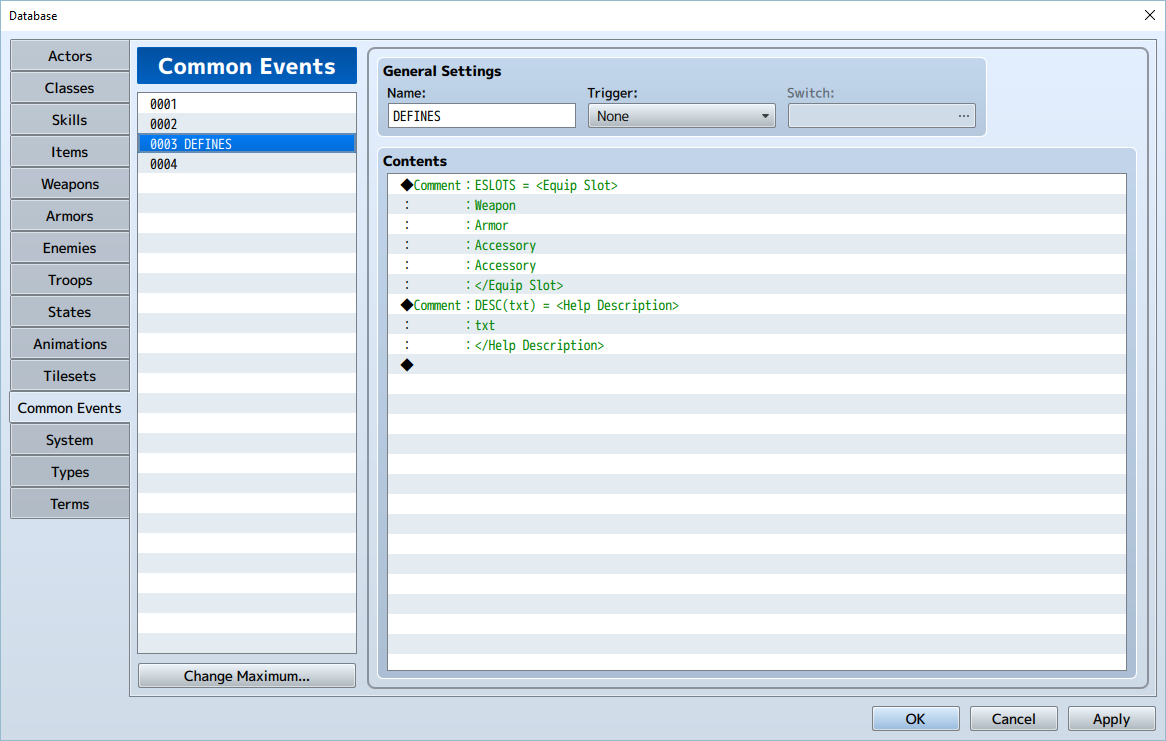
- Adjust the Common Event ID in the plugin parameter.
-
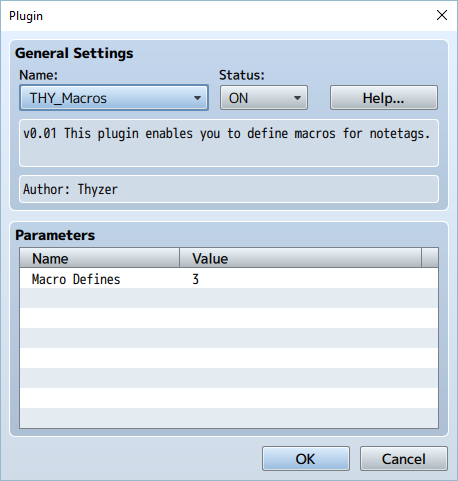
- Use the macro in any notebox
-
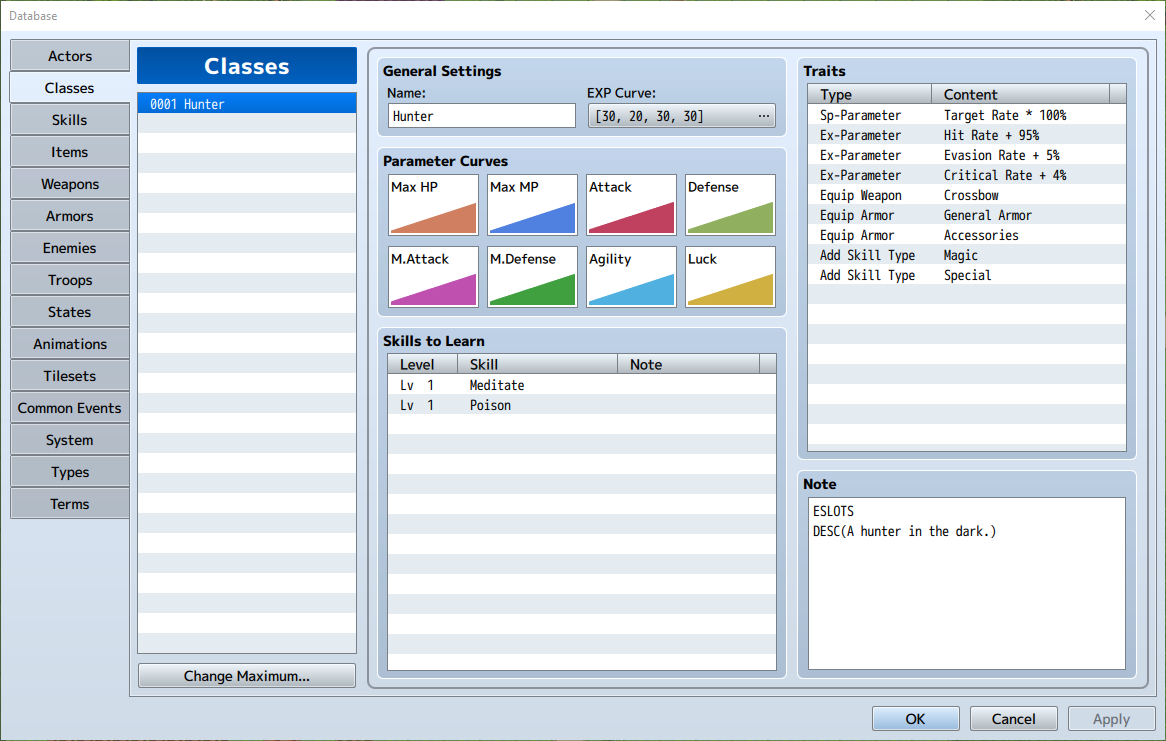
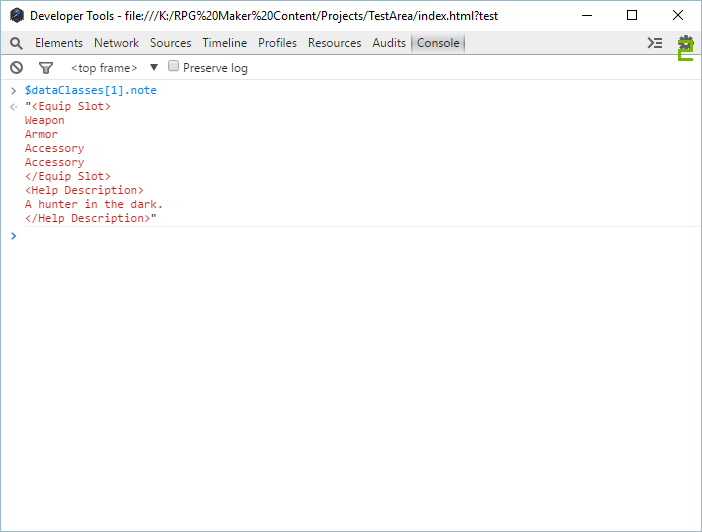
My Questions:
- When I want a macro with more than one parameter, and both parameters should contain a longer text (and thus containing comma)... how do I distinguish between "comma for the text" and "comma to seperate parameters".
- Is there another plugin like this, which might be more stable/useful/... which I can take a look at? I havent found anything myself.
- Is there a way, that this plugin doesnt require to be the first in plugin-load-order?
- Do you find it useful?
- Did you find any bugs/mistakes/messy code?
- Do you know how to solve something better then I did?
Source Code:
//=============================================================================
/*:
* @plugindesc v0.01 This plugin enables you to define macros for notetags.
* @author Thyzer
*
* @param Macro Defines
* @desc In which common event are your macros defined?
* @default 1
*
* @help
* ============================================================================
* Introduction
* ============================================================================
*
* Sometimes we want to use a lot of notetags in our notes. Often we need to
* copy and paste the same notes in other noteboxes. With this plugin you may
* define a macro, which will replace a word with your predefined notetags.
* This removes clutter in the notebox and makes it easier changing values when
* you want the same notetags in different places.
*
* ============================================================================
* Defining Macros
* ============================================================================
*
* Use one comment for each define. The define should look like this:
*
* <name>(<parameter1>, <parameter2>) = <anything> <parameter1> <anything> <parameter2> <anything>
*
* Name: The name can contain any letters a-z, A-Z and 0-9.
* - The name is case sensitive (intentional)
*
* Parameters: You can define as much parameters as you want, they are split with a ",".
*
* The result string, can consist of basically anything you want. If the name
* of a parameter occurs it will be replaced by the text you enter when using
* the macro.
*
* Examples:
*
* ESLOTS = <Equip Slot>
* Weapon
* Armor
* Accessory
* Accessory
* </Equip Slot>
*
* DESC(txt) = <Help Description>
* txt
* </Help Description>
*
* ============================================================================
* Using Macros
* ============================================================================
*
* Simply use the name of the macro in any notebox, it will be replaced
* and parameters will be inserted.
*
* Examples:
*
* ESLOTS
* ==>
* <Equip Slot>
* Weapon
* Armor
* Accessory
* Accessory
* </Equip Slot>
*
* DESC(A hunter in the dark.)
* ==>
* <Help Description>
* A hunter in the dark.
* </Help Description>
*
* ============================================================================
* Changelog
* ============================================================================
*
* Version 0.01:
* - Public release for feedback.
*/
//=============================================================================
var Thyzer = Thyzer || {};
Thyzer.Macros = Thyzer.Macros || {};
Thyzer.Macros.params = PluginManager.parameters("THY_Macros");
Thyzer.Macros.define_common_event = Number(Thyzer.Macros.params["Macro Defines"]);
Thyzer.Macros.regex = /([\w]+)(?:\((.+)\))?/g;
Thyzer.Macros.param_split_regex = /[\s]*\,[\s]*/
Thyzer.Macros.define_regex = /([\w]+)(?:\(((?:[\w]+[\,\s]*)*)\))?(?:[\s]+\=[\s]+)([\s\S]+)/;
Thyzer.Macros.defines = null;
Thyzer.Macros.processMacros = function(group) {
for (var n = 1; n < group.length; n++) {
var obj = group[n];
var notedata = obj.note;
for (var j = 0; j < this.defines.length; j++)
{
var macro = Thyzer.Macros.defines[j];
notedata = notedata.replace(this.regex, function replaceFunction(whole, title, params)
{
if (title === macro.title)
{
var repl_str = macro.replace_str;
if (params != null) {
var args = params.split(this.param_split_regex, macro.params.length);
for (var k = 0; k < macro.params.length; k++)
{
repl_str = repl_str.replace(macro.params[k], args[k]);
}
}
return repl_str;
}
return whole;
});
}
obj.note = notedata;
}
};
Thyzer.Macros.getMacros = function() {
var defines = [];
var ce = $dataCommonEvents[this.define_common_event];
for (var i = 0; i < ce.list.length; i++) {
var elem = ce.list;
if (elem.code === 108)
{
var str = elem.parameters[0];
while (ce.list[i+1].code === 408)
{
str = str.concat("\n" + ce.list[1+i++].parameters[0]);
}
var macr = this.getMacro(str);
if (macr != null) {
defines.push(macr);
}
}
}
return defines;
}
Thyzer.Macros.getMacro = function(comment) {
if (comment.match(this.define_regex)) {
var macr_prms = [];
var title = RegExp.$1;
var params = RegExp.$2;
var replace_str = RegExp.$3;
var prms = params.split(this.param_split_regex);
for (var i = 0; i < prms.length; i++) {
macr_prms.push(prms);
}
var macr = {title:title, params:macr_prms, replace_str:replace_str}
return macr;
}
return null;
}
Thyzer.Macros.DataManager_isDatabaseLoaded = DataManager.isDatabaseLoaded;
DataManager.isDatabaseLoaded = function() {
if (!Thyzer.Macros.DataManager_isDatabaseLoaded.call(this)) return false;
Thyzer.Macros.defines = Thyzer.Macros.getMacros();
Thyzer.Macros.processMacros($dataActors);
Thyzer.Macros.processMacros($dataClasses);
Thyzer.Macros.processMacros($dataSkills);
Thyzer.Macros.processMacros($dataItems);
Thyzer.Macros.processMacros($dataWeapons);
Thyzer.Macros.processMacros($dataArmors);
Thyzer.Macros.processMacros($dataEnemies);
Thyzer.Macros.processMacros($dataStates);
Thyzer.Macros.processMacros($dataTilesets);
return true;
};
/*:
* @plugindesc v0.01 This plugin enables you to define macros for notetags.
* @author Thyzer
*
* @param Macro Defines
* @desc In which common event are your macros defined?
* @default 1
*
* @help
* ============================================================================
* Introduction
* ============================================================================
*
* Sometimes we want to use a lot of notetags in our notes. Often we need to
* copy and paste the same notes in other noteboxes. With this plugin you may
* define a macro, which will replace a word with your predefined notetags.
* This removes clutter in the notebox and makes it easier changing values when
* you want the same notetags in different places.
*
* ============================================================================
* Defining Macros
* ============================================================================
*
* Use one comment for each define. The define should look like this:
*
* <name>(<parameter1>, <parameter2>) = <anything> <parameter1> <anything> <parameter2> <anything>
*
* Name: The name can contain any letters a-z, A-Z and 0-9.
* - The name is case sensitive (intentional)
*
* Parameters: You can define as much parameters as you want, they are split with a ",".
*
* The result string, can consist of basically anything you want. If the name
* of a parameter occurs it will be replaced by the text you enter when using
* the macro.
*
* Examples:
*
* ESLOTS = <Equip Slot>
* Weapon
* Armor
* Accessory
* Accessory
* </Equip Slot>
*
* DESC(txt) = <Help Description>
* txt
* </Help Description>
*
* ============================================================================
* Using Macros
* ============================================================================
*
* Simply use the name of the macro in any notebox, it will be replaced
* and parameters will be inserted.
*
* Examples:
*
* ESLOTS
* ==>
* <Equip Slot>
* Weapon
* Armor
* Accessory
* Accessory
* </Equip Slot>
*
* DESC(A hunter in the dark.)
* ==>
* <Help Description>
* A hunter in the dark.
* </Help Description>
*
* ============================================================================
* Changelog
* ============================================================================
*
* Version 0.01:
* - Public release for feedback.
*/
//=============================================================================
var Thyzer = Thyzer || {};
Thyzer.Macros = Thyzer.Macros || {};
Thyzer.Macros.params = PluginManager.parameters("THY_Macros");
Thyzer.Macros.define_common_event = Number(Thyzer.Macros.params["Macro Defines"]);
Thyzer.Macros.regex = /([\w]+)(?:\((.+)\))?/g;
Thyzer.Macros.param_split_regex = /[\s]*\,[\s]*/
Thyzer.Macros.define_regex = /([\w]+)(?:\(((?:[\w]+[\,\s]*)*)\))?(?:[\s]+\=[\s]+)([\s\S]+)/;
Thyzer.Macros.defines = null;
Thyzer.Macros.processMacros = function(group) {
for (var n = 1; n < group.length; n++) {
var obj = group[n];
var notedata = obj.note;
for (var j = 0; j < this.defines.length; j++)
{
var macro = Thyzer.Macros.defines[j];
notedata = notedata.replace(this.regex, function replaceFunction(whole, title, params)
{
if (title === macro.title)
{
var repl_str = macro.replace_str;
if (params != null) {
var args = params.split(this.param_split_regex, macro.params.length);
for (var k = 0; k < macro.params.length; k++)
{
repl_str = repl_str.replace(macro.params[k], args[k]);
}
}
return repl_str;
}
return whole;
});
}
obj.note = notedata;
}
};
Thyzer.Macros.getMacros = function() {
var defines = [];
var ce = $dataCommonEvents[this.define_common_event];
for (var i = 0; i < ce.list.length; i++) {
var elem = ce.list;
if (elem.code === 108)
{
var str = elem.parameters[0];
while (ce.list[i+1].code === 408)
{
str = str.concat("\n" + ce.list[1+i++].parameters[0]);
}
var macr = this.getMacro(str);
if (macr != null) {
defines.push(macr);
}
}
}
return defines;
}
Thyzer.Macros.getMacro = function(comment) {
if (comment.match(this.define_regex)) {
var macr_prms = [];
var title = RegExp.$1;
var params = RegExp.$2;
var replace_str = RegExp.$3;
var prms = params.split(this.param_split_regex);
for (var i = 0; i < prms.length; i++) {
macr_prms.push(prms);
}
var macr = {title:title, params:macr_prms, replace_str:replace_str}
return macr;
}
return null;
}
Thyzer.Macros.DataManager_isDatabaseLoaded = DataManager.isDatabaseLoaded;
DataManager.isDatabaseLoaded = function() {
if (!Thyzer.Macros.DataManager_isDatabaseLoaded.call(this)) return false;
Thyzer.Macros.defines = Thyzer.Macros.getMacros();
Thyzer.Macros.processMacros($dataActors);
Thyzer.Macros.processMacros($dataClasses);
Thyzer.Macros.processMacros($dataSkills);
Thyzer.Macros.processMacros($dataItems);
Thyzer.Macros.processMacros($dataWeapons);
Thyzer.Macros.processMacros($dataArmors);
Thyzer.Macros.processMacros($dataEnemies);
Thyzer.Macros.processMacros($dataStates);
Thyzer.Macros.processMacros($dataTilesets);
return true;
};
View attachment THY_Macros.js
Downloads / Referenced Files
RPG Maker Web attachments are mirrored locally when available. Other external links remain hosted by their original creator or third-party service.
- Local mirror: 17436-8e3fc36c9fc09d48690007ab3c5eb135.png
SHA-256:8d0acfd211fbaaa4fb9d12bf6257379667d48774ddf22d5abef4d6f0f8536683
Original attachment URL: https://forums.rpgmakerweb.com/attachments/scrn-29-01-16-40040530-png.30279/ - Local mirror: 17437-7d27d61c232cb87fc27184834c23deab.png
SHA-256:7957d7f257bec6a2f51b9e914ab516a16848d59800b4e91164719c1315a4f769
Original attachment URL: https://forums.rpgmakerweb.com/attachments/scrn-29-01-16-39040559-png.30280/ - Local mirror: 17435-a99d0092a789dde109cfce5fa14d2883.png
SHA-256:614e2b11d9abafd8612d723dad7174bd588949564a7c5b2aa8c79c9f3449072c
Original attachment URL: https://forums.rpgmakerweb.com/attachments/scrn-29-01-16-41040512-png.30278/ - Local mirror: 17434-382d1cf74928aaa6bec9a900b7cff604.png
SHA-256:8d5e6a4334d22d9b86ab7a4224035a14937b7c8c8419d105f630637a5707f9ee
Original attachment URL: https://forums.rpgmakerweb.com/attachments/scrn-29-01-16-41040549-png.30277/ - Local mirror: THY_Macros.js
SHA-256:cd1e8b729120cb92dd3f07d0df69569744bda1b616b292f9f586e380d7cf2f4b
Original attachment URL: https://forums.rpgmakerweb.com/attachments/thy_macros-js.30276/
Referenced Images / Attachments
Creator Claims / Removal
If you are the original creator and want this listing reassigned, edited, or removed, join BMMPlay and contact the moderators with proof that matches the original RPG Maker Web profile, linked GitHub, itch.io page, or another public creator identity.
Replies (0)
No replies yet.
0
replies
37
views
Topic Summary
Loading summary...