


public

Rpg Maker Developers Group

Simple enough for a child, powerful enough for a developer

2 Followers

VXACEResolution Selection Script

BMM Archive · July 15, 2026

Preserved forum archive. This topic stores the original first post and locally mirrored RPG Maker Web attachments when available. It is posted by the BMMPlay archive account, not by the original creator.

Original Source

  • Original title: Resolution Selection Script
  • Original author: Venka
  • Original date: November 9, 2014
  • Source thread: https://forums.rpgmakerweb.com/threads/resolution-selection-script.33783/
  • Source forum path: Game Development Engines > Ruby Game System (RGSS) Scripts > RGSS3 Scripts (RMVX Ace)

Summary

Resolution Selection​By Dekita and Venka​ ​Description: This script allows you to pick which resolution you'd like to play the game in. The first time you run a game it will ask you to select a resolution. It will save your selection in the Game.ini file so you never have to select it again. You can still change the resolution while on the Title Screen if you want to. This script was written for the High Res project. The link to the High Res project was close and removed and I haven't...

Archived First Post

Resolution Selection
By Dekita and Venka​
 ​
Description:

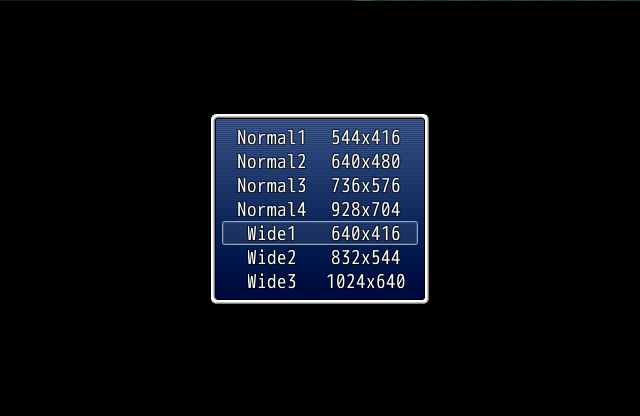
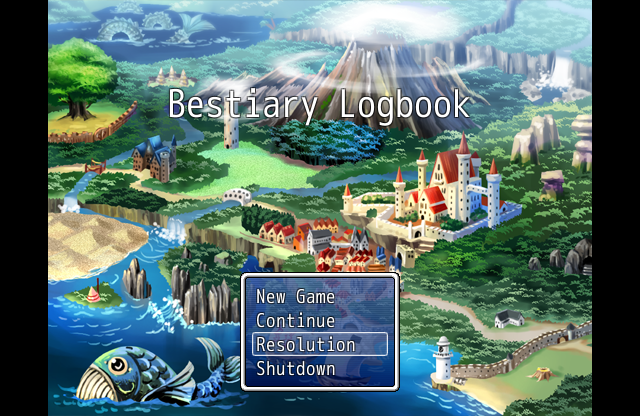
This script allows you to pick which resolution you'd like to play the game in. The first time you run a game it will ask you to select a resolution. It will save your selection in the Game.ini file so you never have to select it again. You can still change the resolution while on the Title Screen if you want to. This script was written for the High Res project. The link to the High Res project was close and removed and I haven't been able to find the new link to it. It will work even without the high res dll, however you will not be able to select any resolutions about 640x480. You can select the resolutions that the player can choose from and name them. This script will also work in play tests and battle play tests.

Update: You can now set graphics to display based on the resolution. So you could use the default file for the Title screen when in the default resolution, or display a different title screen for each resolution set up in the script. No more dealing with stretched images or black space around your images. The file's name will need to be the same for all resolutions, just the files location will change. See the screenshot for an example:

post-2313-0-19462500-1416968834.png
NOTE: You don't have to use the image portion of the script if you don't want to. If it doesn't file a file in the resolution sized folder, it was use the default file. There may be some compatibility issues if your image files aren't normally found in the "Graphics" folder. It won't break the script, it just isn't set up to handle images outside of the Graphics folder.

This script was submitted for the Community DLC that you can pick up for free from here or on Steam. I'm opening this thread for any support issues for this script.

Script:

https://www.dropbox.com/s/5idrcg67s2goklx/ResolutionSelection.txt?dl=0

This is a plug and play script and doesn't need a demo.

Screenshots:

Protected download

Protected download
Terms of Use:

This script can be use in both commercial and non-commercial games.
Credit must be given to Dekita and Venka.
 

Known Issues:

- There are some compatibly issues with Mouse scripts.

- It's possible you will get an "RGSS Player stoped working." if the user's graphics card doesn't support the desired resolution!! Keep this in mind when picking a default resolution for the first time the game starts.
 

Downloads / Referenced Files

Log in to download

Log in, then follow the RPG Maker Developers Group to see these download links.

Log in to download

License / Terms Note

Terms of Use: This script can be use in both commercial and non-commercial games. Credit must be given to Dekita and Venka.  
Referenced Images / Attachments

res1.png
res1.png
res2.png
res2.png
Creator Claims / Removal

If you are the original creator and want this listing reassigned, edited, or removed, join BMMPlay and contact the moderators with proof that matches the original RPG Maker Web profile, linked GitHub, itch.io page, or another public creator identity.

#039#rgss3#script-archive

Replies (0)

No replies yet.

0 replies 1 view

Log in to reply.

User Avatar



